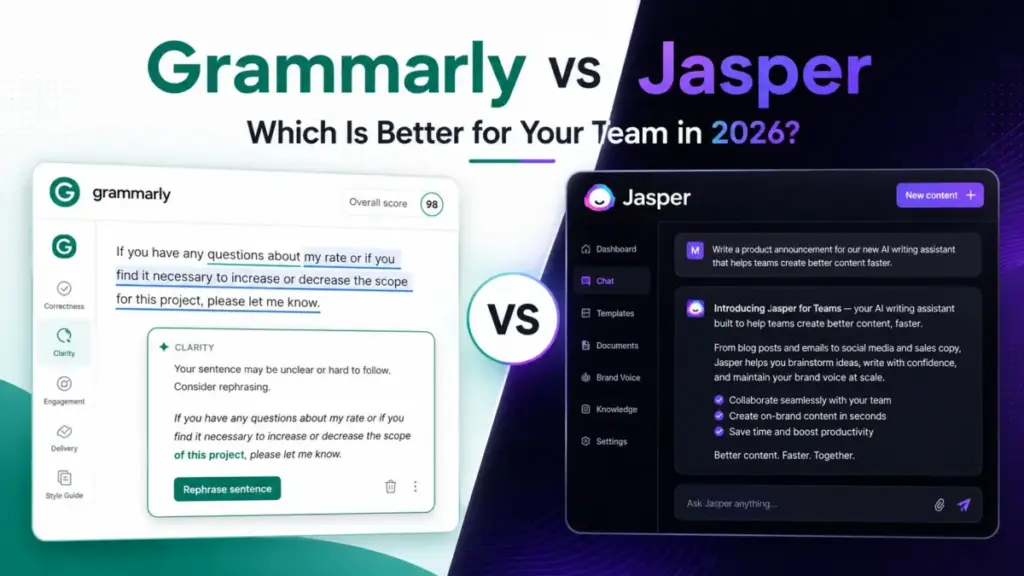
Grammarly Pro costs $12 per member per month on annual billing. Jasper Pro costs $59 per month per seat on annual billing, and that seat count is one.
That single pricing gap tells you most of what you need to know before comparing a line of features. These two tools are not solving the same job.
Grammarly is a writing assistant that corrects, rewrites, and checks text wherever you already type. Jasper is a marketing platform that generates campaign content and runs agent workflows for content teams.
Grammarly vs Jasper is really a question about which workflow you are buying for. The answer changes with team size, content volume, and how much of your stack you want to automate.
If you want the wider category first, see our roundup of the best AI writing tools before you narrow to these two. This comparison assumes you have shortlisted these two and want a decision.
Choose Grammarly if your team mostly edits emails, documents, support replies, and sales messages, and you want low per-seat cost across many apps. Choose Jasper if a marketing team needs to generate blog drafts, ads, and campaign assets at volume with brand voice and AI agents.
Some teams should buy both, and I will show the exact point where that math makes sense. This comparison covers three real workflows, pricing at scale, plan gates, security controls, setup, and buyer fit, all checked against official pages on July 6, 2026.
Quick Verdict: Grammarly vs Jasper
Here is the winner in each category that drives a buying decision. The reasons are short on purpose; the full evidence sits in the workflow sections below.
| Category | Winner | Why |
|---|---|---|
| Starting price | Grammarly | Free plan plus Pro at $12/member/month annually vs Jasper Pro at $59/month/seat annually. |
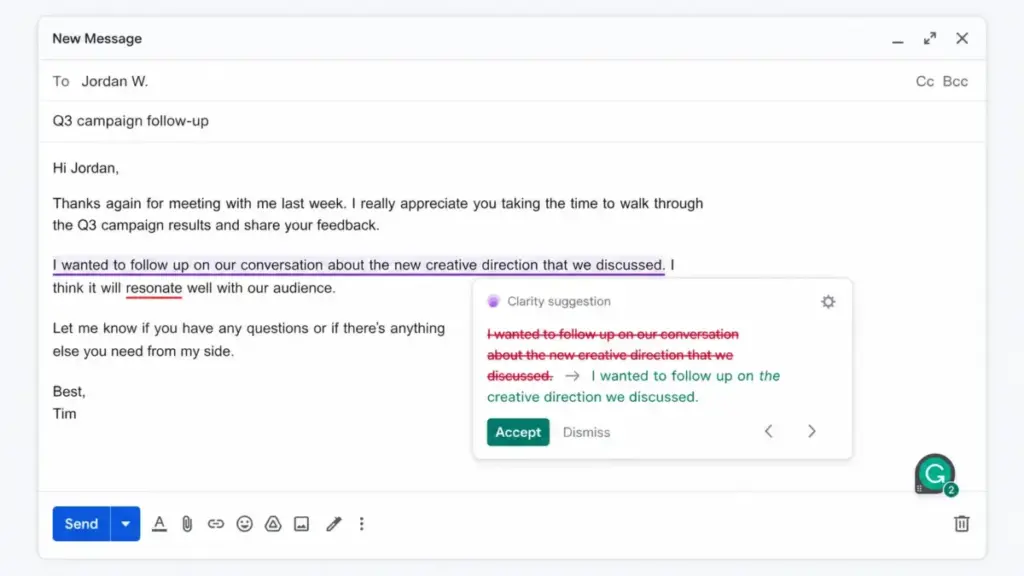
| Everyday editing | Grammarly | Real-time grammar, clarity, tone, rewrites, plagiarism, and AI detection across many apps. |
| Marketing content generation | Jasper | Canvas, marketing agents, Jasper IQ, brand voice, audiences, and knowledge assets built for campaigns. |
| Brand voice depth | Jasper | Pro includes 2 Brand Voices, 5 Knowledge assets, and 3 Audiences; Business adds unlimited IQ customization. |
| App and surface coverage | Grammarly | Works across over 1 million apps and websites; Jasper’s extension is Chrome and Edge only. |
| API and automation | Jasper | Native API, Zapier, and Slack, though all are gated to the Business plan. |
| Enterprise admin controls | Tie | Both gate SSO, audit logs, and role controls behind the top plan; the deciding control differs by team. |
| Mobile support | Grammarly | iOS and Android writing suggestions; Jasper has no confirmed mobile app in reviewed sources. |
| Value at 10 seats | Grammarly | 10 Grammarly Pro members cost about $120/month; Jasper Pro is one seat and routes teams to custom Business pricing. |
| Output ready to publish | Split | Grammarly polishes; Jasper drafts fast but official docs warn output is not guaranteed accurate. |
What this means: Grammarly wins the affordability and daily-writing categories, and Jasper wins the marketing-generation and automation categories. The enterprise decision comes down to which specific control your IT team requires.
A verdict that names one universal winner would be wrong for at least half of the teams searching this query. That is why the rest of this article is organized by workflow, not by a single scoreboard.
How I Compared Grammarly and Jasper
This comparison is documentation-based, not hands-on. I did not run private output tests, so you will see phrasing like “official pricing pages show” and “review patterns suggest” rather than “I tested.”
The pricing, plan gates, and feature limits come from official pricing pages, official help center articles, and official security pages, all checked on July 6, 2026. User sentiment comes from G2, Capterra, and TrustRadius summaries, treated as patterns rather than verified individual quotes.
Where a third-party page showed older Jasper plan names such as Starter or Boss Mode, I treated that as stale SERP data. The current official pricing is used instead throughout.
One brand-name note keeps 2026 searchers from getting confused. Grammarly is now part of Superhuman, the company that was formerly named Grammarly, and the writing product still ships under the name Grammarly, so this article uses “Grammarly” for the product and mentions the parent only where it matters.
Two limits are worth stating up front. Jasper Business pricing is custom and begins with a 12-month commitment, so I do not estimate a Business seat price.
Some Business usage is also credit-based, so high-volume automation costs need a current rate card from Jasper sales. Neither limit blocks the comparison; both change how you should budget.
Grammarly vs Jasper at a Glance
| Attribute | Grammarly | Jasper |
|---|---|---|
| Category | AI writing assistant | AI marketing and agent platform |
| Parent company | Superhuman (formerly Grammarly) | Jasper AI, Inc. |
| Best for | Professionals, support, sales, students, mixed teams | Marketing teams, agencies, content operations |
| Free plan | Yes, 100 AI prompts/month | No; 7-day Pro trial only |
| Practical paid tier | Pro, $12/member/month annually | Pro, $59/month/seat annually |
| Top tier | Enterprise, custom | Business, custom, 12-month commitment |
| Seats in Pro | Per member, individuals and eligible teams | 1 seat |
| App coverage | Over 1 million apps and websites | Web app plus Chrome and Edge extension |
| API access | No broad public product API; Enterprise Audit Logs API | Yes, Business plan only |
| Mobile | iOS and Android writing suggestions | No confirmed mobile app in reviewed sources |
| Main strength | Real-time correction everywhere you write | High-volume marketing generation with agents |
| Main weakness | Not a full campaign-generation platform | High entry cost and Business-gated automation |
You can read the deeper single-tool breakdowns in our Grammarly review and Jasper review. Those cover feature-by-feature detail on each product alone; this article stays focused on the head-to-head decision.
Workflow 1: Grammarly vs Jasper for Everyday Communication
The first workflow is the one most buyers actually spend their day in. It is writing and fixing emails, documents, Slack messages, support replies, and sales notes.
This is Grammarly’s home turf, and the gap is not close. Grammarly gives real-time correctness, clarity, and tone suggestions inside the apps where you already type.
Its official page claims coverage across over 1 million apps and websites, including Gmail, Outlook, Google Docs, Slack, Microsoft Office apps, Salesforce, Zendesk, and Jira. Pro adds full-sentence rewrites, fluency adjustments, plagiarism checking, and AI-generated text detection.
That plagiarism and AI-detection pairing matters for editors, students, and communications teams that care about originality. Grammarly does not claim its detector is perfect, and neither will I, but it is a real feature Jasper does not center.
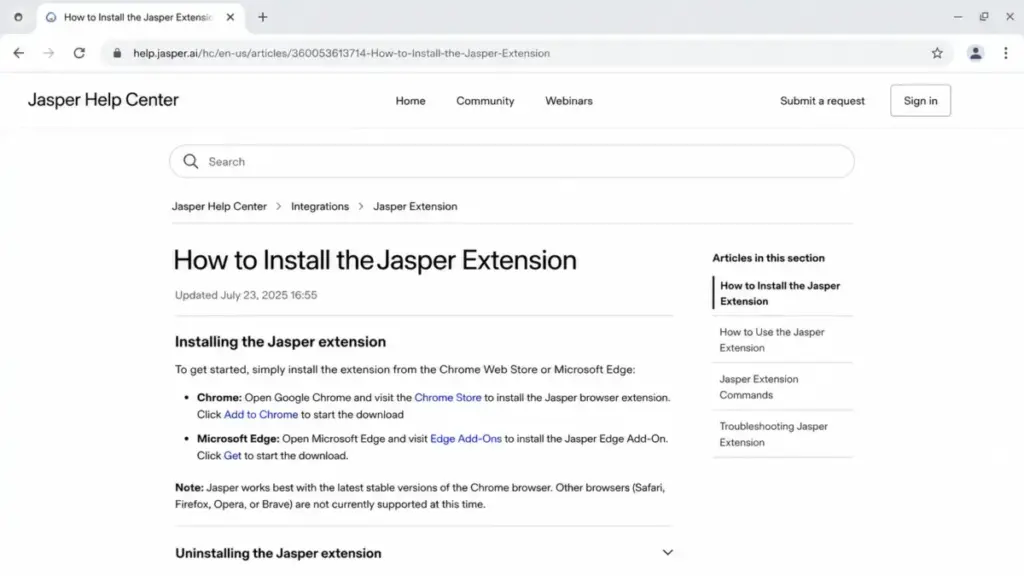
Jasper can improve and rewrite text, but it is not built to sit inside every app you type in. Its browser extension officially supports Chrome and Microsoft Edge only.
The install docs state Safari, Firefox, Opera, and Brave are not currently supported. A Safari or Firefox user loses the in-context assistant entirely, which is a real disqualifier for a daily-writing tool.
Mobile is the other split. Grammarly offers iOS and Android writing suggestions, though the Grammarly Editor is not available on Android.
So an Android user can get inline suggestions but cannot open full Grammarly documents on the phone. Jasper’s reviewed sources emphasize the web app and Chrome or Edge extension, with no confirmed mobile app, so phone-first writers should not count on it.
What breaks first here is context, not accuracy. Jasper is good at producing a marketing paragraph, but it will not quietly fix a typo in your Outlook reply or catch a tone problem in a Zendesk ticket the way Grammarly does.
For communication-heavy teams, Grammarly wins Workflow 1 on both coverage and cost. This is the workflow where per-seat price and app reach decide it, and Grammarly leads on both.
Workflow 2: Grammarly vs Jasper for Marketing Content and Campaign Assets
The second workflow flips the winner. When the job is generating blog drafts, ad variations, landing page copy, and repeatable campaign assets, Jasper is the purpose-built tool.
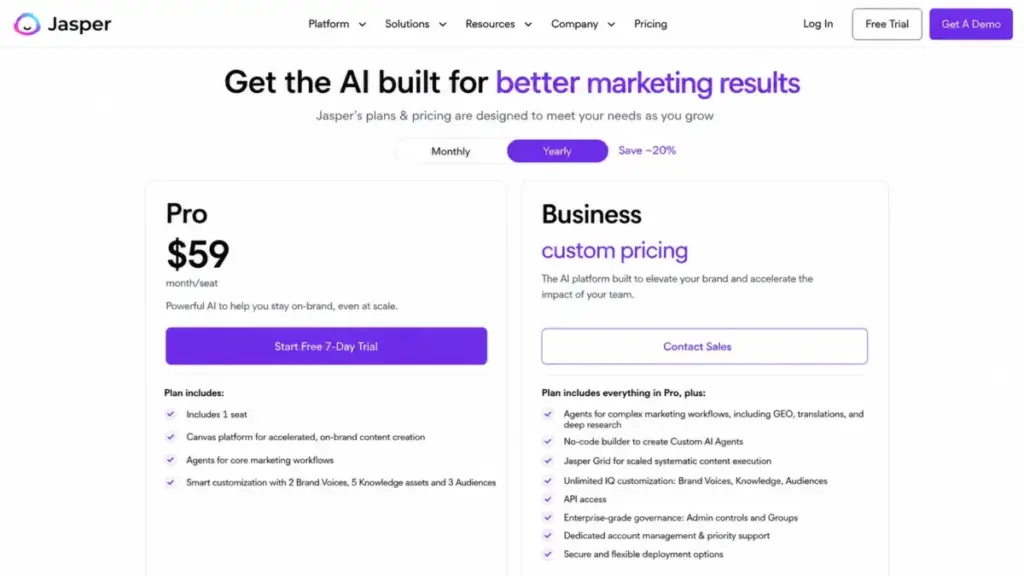
Jasper Pro includes Canvas, core marketing agents, 2 Brand Voices, 5 Knowledge assets, and 3 Audiences. That is enough context for a small team to keep output on-brand.
Jasper Business raises the ceiling with complex agents for GEO, translations, and deep research, a no-code Custom AI Agent Builder, Jasper Grid, and unlimited IQ customization. That is where agencies and multi-brand teams live.
The plan gate that catches people is Jasper Studio. Custom agent building in Jasper Studio is not available on Pro, so a solo marketer who signs up for Pro expecting to build their own agents will hit that wall.
The fix is the custom-priced Business plan. Core marketing agents run on Pro; building your own does not, and that distinction is missing from most comparisons.
Grammarly can generate text and does include AI writing prompts, but its brand controls are narrower. Grammarly Pro gives one style guide and one brand tone.
Only Enterprise unlocks unlimited style guides and brand tones. A marketing team managing several brands on Grammarly hits a governance ceiling quickly.
Here is the human-in-the-loop reality that Jasper-positive articles skip. Jasper’s own Slack app documentation warns that responses cannot be guaranteed completely accurate.
Review patterns on G2 and TrustRadius add that output can be vague and needs editing before it ships. Jasper wins Workflow 2 for generation speed and marketing depth, but treat its output as a first draft, not publish-ready copy.
The brand-control gap in numbers:
| Brand control | Grammarly Pro | Grammarly Enterprise | Jasper Pro | Jasper Business |
|---|---|---|---|---|
| Style guides / brand voices | 1 style guide | Unlimited style guides | 2 Brand Voices | Unlimited IQ customization |
| Brand tones | 1 brand tone | Unlimited brand tones | Included in Brand Voice | Included, expanded |
| Knowledge / context assets | Not a core feature | Not a core feature | 5 Knowledge assets | Unlimited |
| Audience profiles | Not a core feature | Not a core feature | 3 Audiences | Expanded |
For a single-brand voice-consistency job, Grammarly Pro is enough. For multi-brand marketing production, Jasper’s asset model is the reason to pay more.
Workflow 3: Grammarly vs Jasper for Automating Content Operations
The third workflow is automation. It means pushing content in and out of your stack through an API, Zapier, or Slack, and giving developers controlled access.
This is where Jasper’s ceiling is higher and its gate is more expensive. Jasper’s API is available on Business plans only.
The Zapier connector requires an API token and is Business-only. The Slack app also requires a Business plan with API access, so every path to “connect Jasper to my other tools” runs through the custom-priced Business tier.
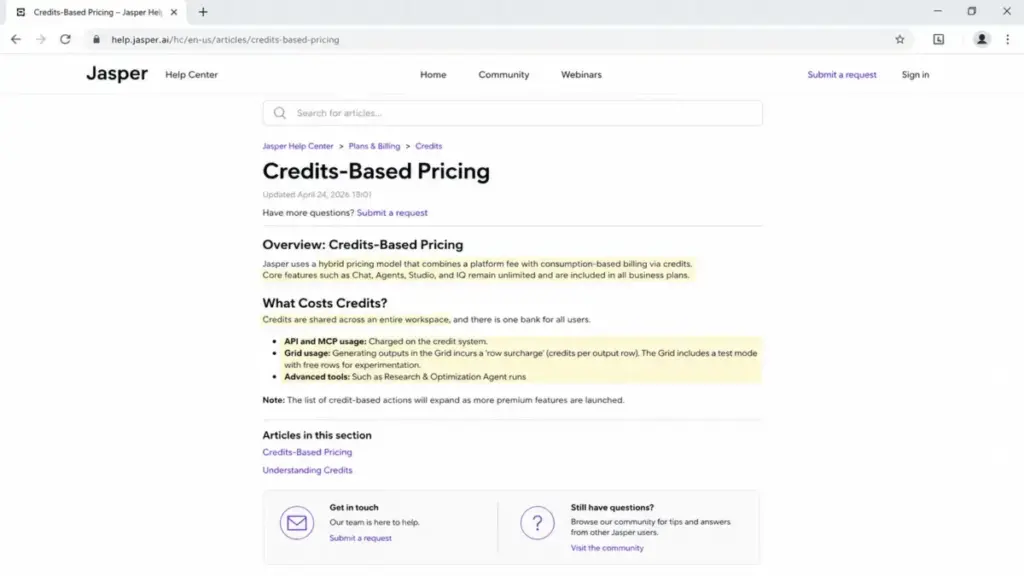
That gate matters for cost because Business uses a hybrid credit model. Official docs describe a platform fee plus credits consumed by API and MCP usage, a per-row surcharge on Jasper Grid, and credits for advanced tools.
So heavy automation is billed on top of seats and needs a current rate card before you budget. This is the part of Jasper pricing that stale SERP pages never quantify.
Developer access is more granular than most comparisons admit. Jasper’s Developer role is limited to Business and API customers and can generate API tokens.
It cannot view billing, change integration settings, see all outputs, or manage team members and roles. That is useful delegation for a marketing-ops team that wants a developer on tokens without full admin rights.
Grammarly’s automation story is different in kind. There is no broad public product API for pushing content through Grammarly.
Its strength is being present inside the apps where writing happens, plus an Enterprise-only Audit Logs API for governance rather than content pipelines. If your goal is a content pipeline that generates and routes assets programmatically, Jasper Business is the tool.
Automation plan-gate map:
| Automation surface | Grammarly | Jasper | Plan gate |
|---|---|---|---|
| Content generation API | Not offered as a broad product API | Yes | Jasper Business only |
| Zapier connector | Not the automation model | Yes, needs API token | Jasper Business only |
| Slack app | Grammarly writing suggestions in Slack | Yes, generation in Slack | Jasper Business + API |
| Developer role / tokens | Enterprise admin controls | Developer role, scoped | Jasper Business |
| Audit logs API | Enterprise | Audit log (not an open API) | Grammarly Enterprise / Jasper Business |
Jasper wins Workflow 3 on raw automation capability. The win is entirely a Business-plan capability, though, so a Pro buyer does not get it.
Pricing and Value per Dollar
Pricing is the highest-intent part of this comparison, and it is also where the SERP is least reliable. Several third-party pages still show old Jasper Starter or Boss Mode prices.
Ignore those. Use the current official figures below, checked July 6, 2026.
Grammarly has a Free plan at $0 with 100 AI prompts per month. Grammarly’s official pricing page lists Pro at $12 per member per month billed annually or $30 billed monthly, with a quarterly option at $60 per member for three months.
Jasper has no long-term free plan, only a 7-day Pro trial. Jasper’s official pricing page lists Pro at $59 per month per seat billed annually or $69 billed monthly, and annual billing saves roughly 20%.
Full plan detail lives in our Grammarly pricing breakdown and Jasper pricing guide. Both link straight to the official pages so you can re-check the prices yourself.
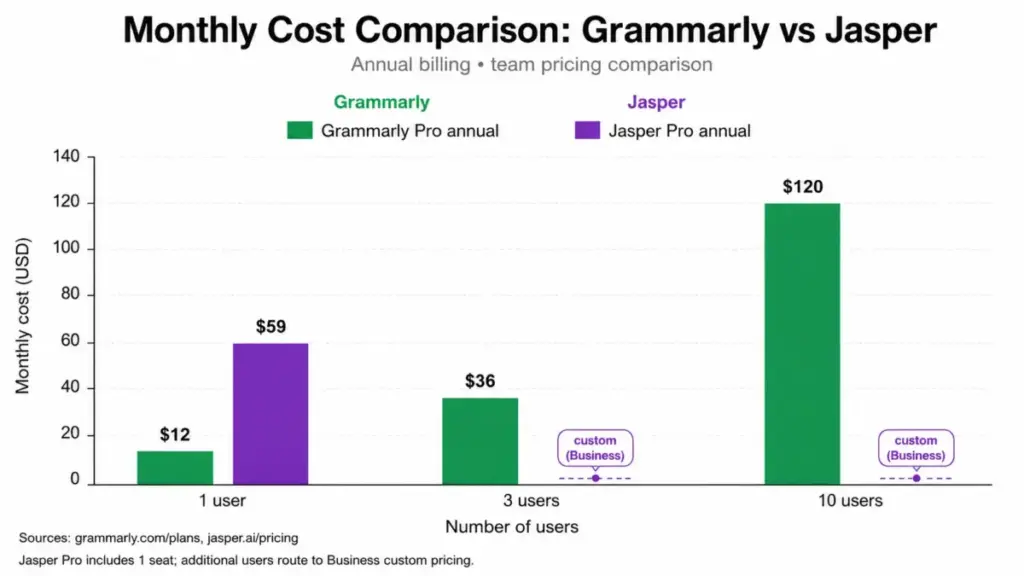
The cost gap widens with team size because Jasper Pro includes exactly one seat.
| Team size | Grammarly Pro (annual) | Jasper Pro (annual) | Note |
|---|---|---|---|
| 1 user | $12/month | $59/month | Jasper is about 5x the per-seat cost. |
| 3 users | $36/month | Not a self-serve fit | 3 Jasper seats push toward custom Business pricing. |
| 10 users | ~$120/month | Custom (Business) | Jasper Pro is 1 seat; scaling routes to Business with a 12-month commitment. |
The usage limits sit underneath the seat price and change the real value. Grammarly Free includes 100 AI prompts per month, Pro includes 2,000 AI prompts per member per month, and Enterprise is unlimited.
So a heavy AI drafter on Free will run out fast. Pro’s 2,000 works out to roughly 66 prompts a day, which is generous for editing but tighter if you draft long content daily.
| Usage lever | Grammarly | Jasper |
|---|---|---|
| Free-tier AI prompts | 100/month | None (trial only) |
| Paid AI prompt cap | 2,000/member/month (Pro), unlimited (Enterprise) | Not prompt-capped the same way |
| Automation billing | Included in plan | Business credits for API/MCP, Grid rows, advanced tools |
| Contract commitment | Monthly, annual, or quarterly | Pro monthly or annual; Business 12-month |
The value verdict has two parts. At one seat, Grammarly Pro is the cheaper, lower-risk buy, and at team scale the difference compounds because Jasper’s team path is a custom Business contract with credit-based extras.
Jasper earns its price only when the marketing output it generates saves more editing and agency time than the seat and credit cost. That is a real bar for a small team to clear, and it is the honest usage math behind the choice.
One billing caveat for Jasper is easy to miss. Cancellation refunds are not automatic, and the 7-day money-back request must be emailed within 7 days, so a trial that rolls into Pro is not refunded by default.
Security and Admin Controls
Both tools publish serious security credentials, so the enterprise decision is not about who is “secure.” It is about which specific admin control your IT team requires and which plan gates it.
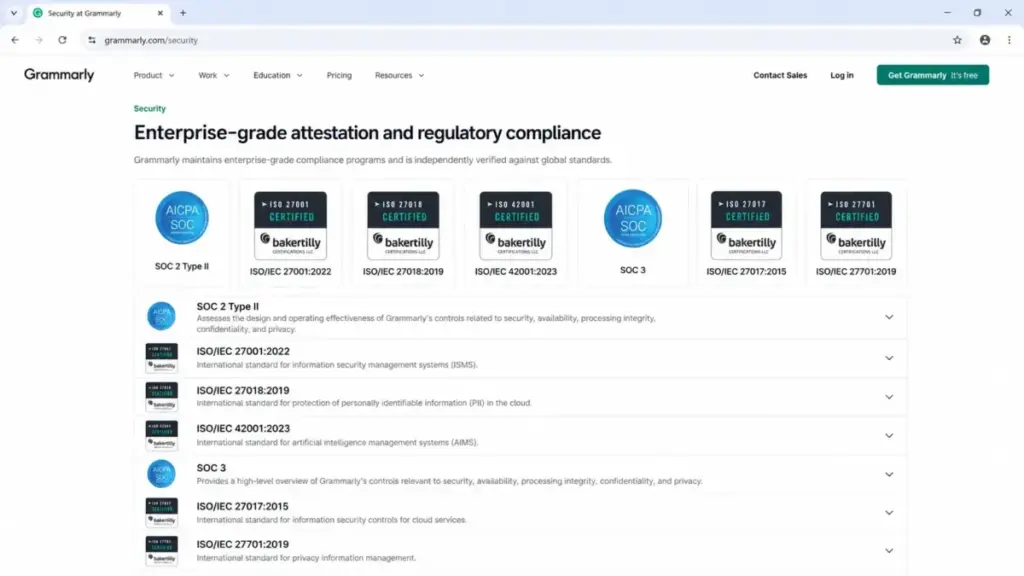
Grammarly’s security page lists SOC 2 Type II, ISO/IEC 27001:2022, ISO/IEC 27018, ISO/IEC 42001:2023, SOC 3, ISO/IEC 27017, and ISO/IEC 27701, with AWS US East hosting. Jasper lists SOC 2 Type II, GDPR, CCPA, PCI, and DPA coverage, annual third-party penetration testing, US-based data centers, TLS 1.2+ in transit, and AES-256 at rest.
The control that decides most enterprise deals is the plan gate, not the certificate. Grammarly puts SAML SSO, SCIM, DLP, BYOK encryption, custom roles, managed mode, and its Audit Logs API on Enterprise.
Jasper puts SSO/SAML, role-based access, admin controls, and its Audit Log on Business. Both make you buy the top tier to get the governance controls.
| Admin control | Grammarly | Jasper | Plan gate |
|---|---|---|---|
| SAML SSO | Yes | Yes | Grammarly Enterprise / Jasper Business |
| SCIM provisioning | Yes | Security-page indicated | Grammarly Enterprise / Jasper Business |
| DLP / data loss prevention | Yes | Not documented in reviewed sources | Grammarly Enterprise |
| BYOK encryption | Yes | Not documented in reviewed sources | Grammarly Enterprise |
| Audit logs | Audit Logs API | Audit Log, 90-day user actions, CSV/JSON | Grammarly Enterprise / Jasper Business |
| Custom roles | Yes | Role-based access + Developer role | Both top tiers |
Jasper’s Audit Log is Business-only, admin-only, and tracks user-management actions for the past 90 days with CSV or JSON export. That is narrower than a full content-level audit trail.
On data use, Grammarly states business customers have AI data training off by default and that it does not sell or monetize customer content. Jasper states customer data is not used to train AI models and that users keep content ownership.
Security is a tie because each tool holds the certificate and control set most teams ask for. Run your own IT checklist against this table: if DLP or BYOK is mandatory, Grammarly Enterprise answers it, and if you need a content-generation API with role-scoped developer access, Jasper Business does.
Support and Onboarding
Support tiers are not equal, and they matter most during a team rollout. Grammarly offers a help center on all plans, priority support on Pro, and dedicated support on Enterprise.
Jasper offers standard support and trial access on Pro. Business adds dedicated account management, priority support, and custom support or training options.
Jasper’s help pages list support availability Monday to Friday, so plan around business-hours coverage rather than a documented round-the-clock SLA. Neither vendor should be assumed to guarantee an SLA unless it is written into your contract.
The onboarding load also differs. Grammarly starts helping in minutes because it installs as an extension, while Jasper needs a marketing team to set up Brand Voices, Knowledge assets, and Audiences before output feels on-brand.
Setup and Migration Difficulty
Setup effort tracks the workflow you are buying, and neither tool has a heavy data-migration problem. You are not moving records the way you would with a CRM.
Grammarly is low-effort for individuals because it installs as an extension or app and starts suggesting immediately. It becomes medium-effort for teams that configure style guides, brand tones, SSO, SCIM, or Superhuman Go agents.
Jasper is medium-effort on Pro while a team learns Brand Voice, Knowledge assets, and Audiences. It becomes high-effort on Business when you implement API, credits, custom agents, Jasper Grid, Slack, Zapier, and governance.
| Setup dimension | Grammarly | Jasper |
|---|---|---|
| Individual onboarding | Low, install and go | Medium, learn marketing workspace |
| Team configuration | Medium, style guides, SSO, admin | High, agents, API, credits, governance |
| Migration risk | Low, no record migration | Low, no record migration |
| Training burden | Low for writing, medium for admin | Medium for Pro, high for Business ops |
The failure mode differs by tool. Grammarly’s risk is under-configuration, where a team never sets up brand tones and treats it as a spellchecker.
Jasper’s risk is over-buying Business capability that the team never operationalizes. If nobody owns the agents and credits, the platform’s most expensive features sit idle.
Where Grammarly Wins
Grammarly wins the scenarios built around correcting and improving writing across a whole team’s daily work.
It wins on cost, with a free plan and $12 per member per month on Pro that stays affordable at 10 or more seats. It wins on surface coverage, showing up across Gmail, Outlook, Google Docs, Slack, Salesforce, and Zendesk rather than a two-browser extension.
It wins for originality checks, because Pro includes plagiarism and AI-generated text detection that editors, students, and compliance-sensitive teams use. It wins for mixed communication teams in sales and support, where the job is polishing customer-facing messages, not generating campaigns.
Review patterns back this up. G2 shows Grammarly around a 4.7 rating across more than 13,000 reviews, with praise for ease of use and real-time suggestions and some notes about cross-platform integration quirks.
Capterra shows a similar 4.7 pattern, with reviewers calling it simple and helpful while some flag the price. For daily writing across a team, that sentiment matches the feature reality.
Where Jasper Wins
Jasper wins the scenarios where the core job is producing marketing content at volume and keeping it on-brand.
It wins for campaign generation, with Canvas, marketing agents, and content pipelines aimed at ads, blog drafts, and landing pages. It wins for brand-managed output, because Brand Voices, Knowledge assets, and Audiences give a marketing team structured context that Grammarly’s single style guide does not match.
It wins for agencies and multi-brand teams on Business, where unlimited IQ customization, custom agents, and Jasper Grid support many brands and large content runs. It wins for automation, because a Business team can push generation through an API, Zapier, and Slack, which Grammarly is not designed to do.
Review patterns keep this honest. G2 sentiment praises time-saving and ease of use while flagging AI limitations, cost, and context understanding as the main complaints.
TrustRadius patterns add that output can be vague and needs human intervention before posting. So the Jasper win is speed to a strong draft, not a finished asset.
Choose Grammarly, Choose Jasper, Use Both, or Avoid Both
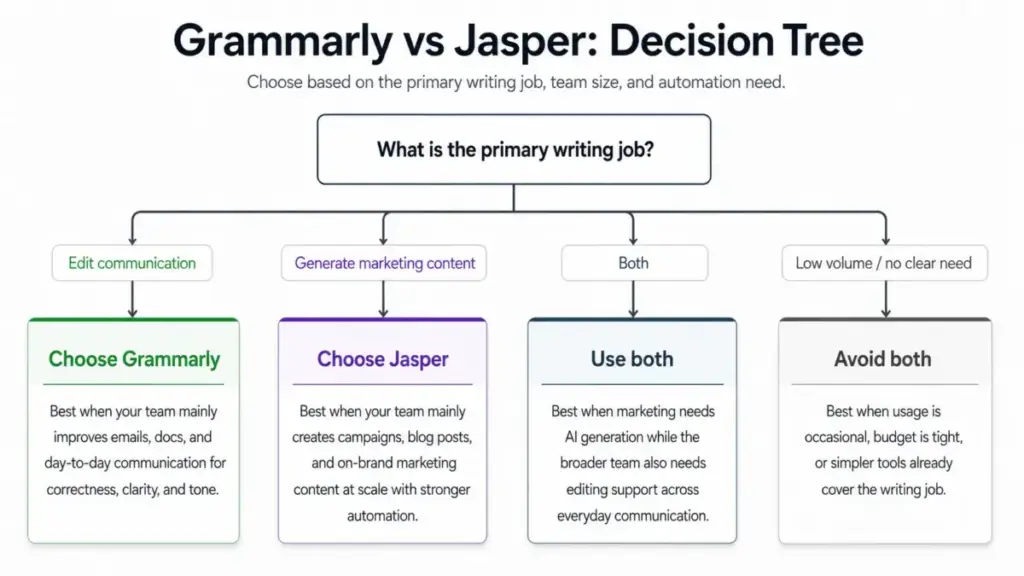
Choose Grammarly if your team mainly edits emails, documents, support tickets, and sales messages, if you want per-seat pricing that stays cheap at scale, if you need plagiarism and AI detection, or if writers work across many apps and browsers including mobile.
Choose Jasper if a marketing team generates blog posts, ads, and campaign assets at volume, if brand voice and audience context are central, if you want custom marketing agents on Business, or if you need a content-generation API and can accept a 12-month Business commitment.
Use both if a marketing team drafts high volumes in Jasper and then edits customer-facing copy across email, docs, Slack, and web apps with Grammarly. The minimum self-serve stack for one user is Grammarly Pro at $12 per month plus Jasper Pro at $59 per month, about $71 per month combined, before any Jasper Business custom cost.
Take a concrete case: a 3-person team that mostly edits support replies, sales emails, and internal docs. Three Grammarly Pro members cost about $36 per month annually and cover every app they write in, which is the clear buy.
Now flip it to a 3-person marketing team producing campaign assets weekly. Jasper may win functionally, but three seats leave Pro’s single-seat model behind, so price the Business plan before committing.
Avoid both if you are a solo user who only needs occasional grammar fixes and the free plan covers you, if your budget cannot absorb $59 per month for marketing generation you will not use weekly, or if you need one tool that both generates full campaigns and polishes every app for a low team price.
In that last case, neither tool does both cheaply. A lighter generator plus a free grammar checker, or one of the Jasper alternatives below, may fit better.
Alternatives to Grammarly and Jasper
If neither tool is the right shape, three alternatives cover the common gaps. Each has a clear “choose it if.”
Copy.ai is a marketing content generator like Jasper, often positioned around go-to-market and sales workflows. Choose it if you want campaign and sales content generation and want to compare pricing against Jasper.
Our Copy.ai review and the Jasper vs Copy.ai comparison go deeper on that head-to-head. Both cover where Copy.ai undercuts Jasper on price.
Writesonic is a lower-cost AI writer with SEO-oriented features. Choose it if you want blog and marketing generation at a lower entry price than Jasper Pro and can trade some marketing-platform depth for cost.
ProWritingAid is an editing and style tool closer to Grammarly’s job. Choose it if you want deep grammar and style analysis for long-form writing and prefer a lower-cost license model to a per-member subscription.
| Alternative | Closest to | Choose it if |
|---|---|---|
| Copy.ai | Jasper | You want marketing/sales content generation and a Jasper price comparison. |
| Writesonic | Jasper | You want lower-cost AI writing with SEO features. |
| ProWritingAid | Grammarly | You want deep editing and style analysis for long-form work. |
For the wider set of options on either side, see our Grammarly alternatives list and our roundup of AI tools for content creation.
Final Verdict
There is no single winner because Grammarly and Jasper are built for different jobs. The honest recommendation is by buyer type.
For solo professionals, support teams, sales teams, students, and any group whose main job is editing communication, Grammarly is the better and far cheaper buy at $12 per member per month. Its free plan is a real starting point, not just a trial.
For marketing teams producing campaign assets at volume, Jasper is the stronger platform at $59 per month per seat on Pro. Business is the path to agents, API, and multi-brand scale, with the trade of custom pricing and a 12-month commitment.
For content teams that both generate and polish, the smart move is often both tools rather than forcing one to do the other’s job. Budget around $71 per month per user on the self-serve stack.
The deciding factor is your primary writing job. If it is fixing what humans wrote, pick Grammarly; if it is producing marketing content machines drafted, pick Jasper; if it is both at volume, run them together and keep a human on the final edit, because Jasper’s own docs tell you its output is not guaranteed accurate.
FAQ
Is Grammarly better than Jasper?
For everyday writing, editing, tone, and originality checks across many apps, Grammarly is better and cheaper, starting free and at $12 per member per month on Pro. For generating marketing content and campaign assets at volume, Jasper is the stronger purpose-built platform, so the winner depends on whether you are editing or generating.
Can Jasper replace Grammarly?
Not cleanly for most teams, because Jasper does not sit inside every app you type in and its extension supports only Chrome and Edge. Teams that want real-time correction across email, docs, and Slack usually keep Grammarly even after adopting Jasper for content generation.
Which is cheaper, Grammarly or Jasper?
Grammarly, and the gap is large: it has a free plan and Pro at $12 per member per month annually, while Jasper Pro is $59 per month per seat annually. At 10 users, Grammarly Pro is about $120 per month, whereas Jasper Pro is a single seat and larger teams move to custom Business pricing.
Can I use Grammarly and Jasper together?
Yes, and many content teams do, generating marketing drafts in Jasper and then polishing customer-facing copy across apps with Grammarly. The minimum self-serve cost for one user is about $71 per month combined, before any Jasper Business add-ons.
Which tool is better for brand voice?
Jasper for marketing brand voice, because Pro includes 2 Brand Voices, 5 Knowledge assets, and 3 Audiences, and Business adds unlimited IQ customization. Grammarly Pro includes one style guide and one brand tone, with unlimited only on Enterprise, so it is stronger for communication governance than multi-brand marketing.
Which tool has better enterprise security?
It is close, because Grammarly gates SAML SSO, SCIM, DLP, BYOK, and its Audit Logs API on Enterprise, while Jasper gates SSO, role controls, and a 90-day Audit Log on Business. If DLP or BYOK is mandatory, Grammarly Enterprise answers it; if you need a content API with scoped developer access, Jasper Business does.
Does Jasper check grammar like Grammarly?
Not to the same depth or coverage, because Grammarly is the dedicated grammar, clarity, tone, plagiarism, and AI-detection tool that runs in real time across your apps. Jasper can refine text, but for proofreading and originality checks, Grammarly is the stronger choice.
Is Jasper worth it for small teams?
Only if content volume justifies it, since Jasper Pro is $59 per month for one seat and a multi-person team either buys several Pro seats or moves to custom Business pricing. If the team mostly edits communication rather than generating campaigns, Grammarly is the better first purchase.
Does Grammarly generate content like Jasper?
Partly, since Grammarly includes AI writing prompts capped at 100 per month on Free and 2,000 per member per month on Pro. It is not a marketing campaign platform, so for high-volume ads, blogs, and landing pages, Jasper’s generation depth is stronger.
Should I switch from Grammarly to Jasper?
Only if your job changed from editing to generating marketing content at volume, and even then, adding Jasper usually beats switching away from Grammarly. Switching fully makes sense mainly for marketing roles that no longer need broad editing coverage.