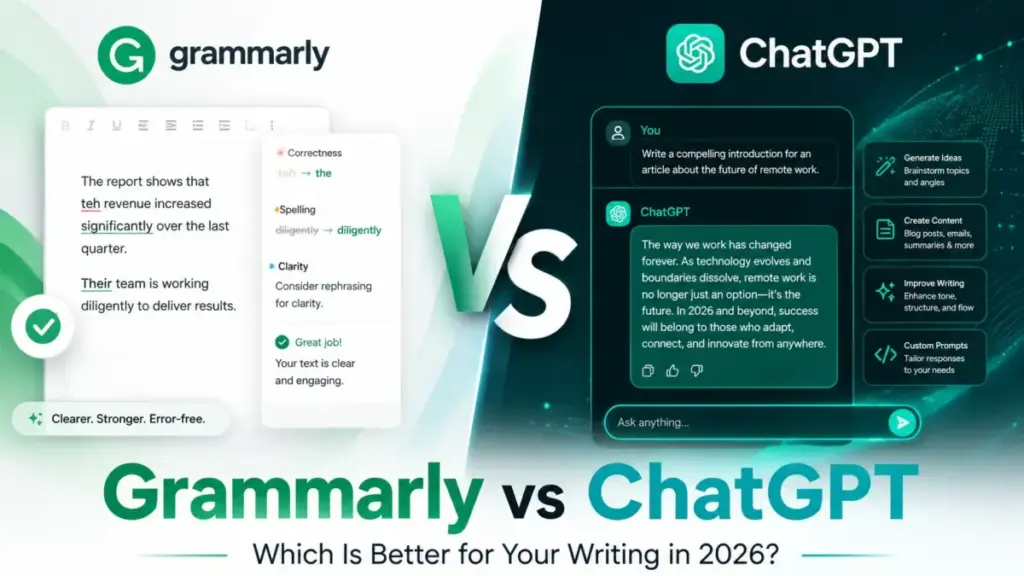
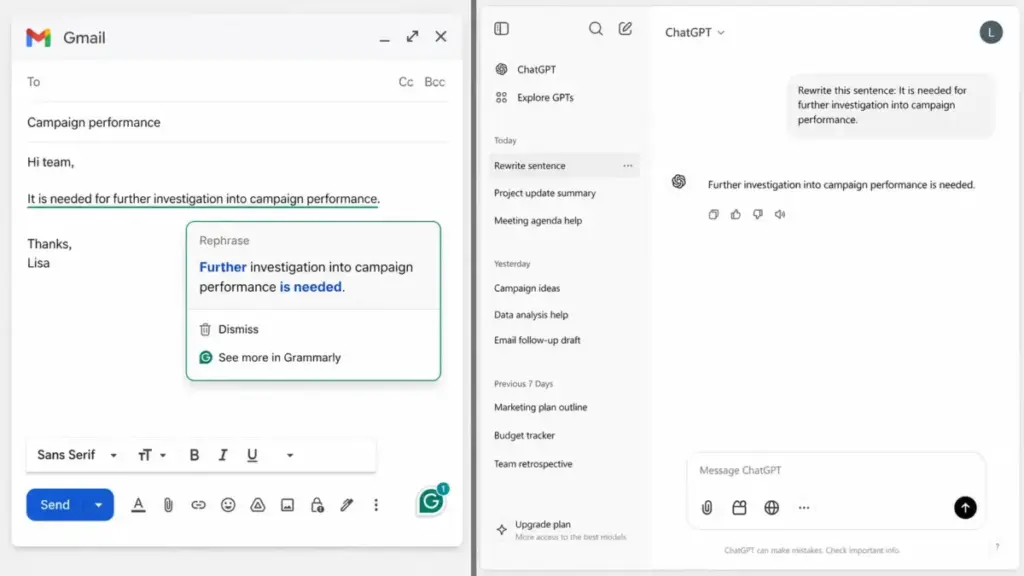
Grammarly sits inside the text field you are already typing in and corrects it as you go. ChatGPT lives in a separate window and rewrites whatever you paste into it.
That one structural difference decides most of this comparison before you ever look at price.
For inline proofreading across email, docs, and Slack, Grammarly is the faster tool because you never leave your draft. For drafting from a blank page, reasoning, research, coding, and file work, ChatGPT is the stronger engine because it does far more than fix grammar.
The wrong way to read this is “which one is better.” The right way is “which one matches the work I do most days, and what breaks first when I scale it.”
Choose Grammarly if you mostly edit writing you already have and want controlled, accept-or-reject suggestions inside every app. Choose ChatGPT if you mostly create writing, analyze files, or need an AI assistant that goes past editing.
Many people end up paying for both, and I will show you the exact point where that stops being wasteful. If you are still mapping the category, our best AI writing tools guide covers the wider field.
All pricing below was checked on official pages on July 6, 2026, in USD, for the US market. This is a documentation-based comparison, not a controlled lab test, and I will flag where the public docs stop short.
Quick Verdict: Grammarly vs ChatGPT
| Category | Winner | Why |
|---|---|---|
| Inline proofreading | Grammarly | Corrects text where you type it, no copy-paste loop |
| Drafting from scratch | ChatGPT | Built for generation, reasoning, and research |
| Voice and meaning control | Grammarly | Accept or reject each edit instead of a full rewrite |
| Free plan for daily editing | Grammarly | 100 AI prompts a month plus core grammar help, no ads |
| Free plan for general AI work | ChatGPT | Broader assistant access, though ads may appear |
| Solo price under $25/month | ChatGPT | Go at $8 and Plus at $20 cover more tasks |
| Team writing governance | Grammarly | Brand tone and inline help across customer-facing apps |
| Reasoning, coding, files | ChatGPT | Deep research, Codex, file analysis, image, and voice |
| Privacy for confidential work | Tie | Depends on plan tier and user type, not the brand |
| API for custom automation | ChatGPT | Broad usage-based OpenAI API versus specialized beta endpoints |
Six of ten categories split cleanly by whether your core job is editing or creating. The four ties and mixed rows are where the real buying decision lives, and the rest of this article resolves them.
Grammarly vs ChatGPT at a Glance
| Grammarly | ChatGPT | |
|---|---|---|
| Best for | Inline editing, tone, brand consistency | Drafting, reasoning, research, coding |
| Category | AI writing assistant | General AI assistant |
| Starting paid price | $12/member/month billed annually | $8/month (Go) |
| Practical paid tier | Pro at $12/member/month annually | Plus at $20/month |
| Free plan | Yes, 100 AI prompts/month | Yes, limited access, ads may appear |
| Team minimum | 1 seat on Pro | 2 seats on Business |
| Setup difficulty | Low for individuals | Low for individuals |
| Main strength | Real-time correction everywhere you write | Open-ended generation and analysis |
| Main weakness | Narrow beyond writing help | Meaning drift during unguided proofreading |
Grammarly and ChatGPT are not two versions of the same product. One is a writing layer that follows you across apps, and the other is a reasoning engine you visit on purpose.
How I Compared Them
This comparison is built on official research, not direct product testing. I read the current Grammarly and OpenAI pricing pages, support docs, security and admin pages, integration docs, and API pricing, then cross-checked them against third-party review platforms and one academic benchmark.
The public documentation states the pricing, plan gates, and security certifications I cite here. Where a source uses relative language such as “expanded usage” instead of a fixed number, I say so rather than inventing a cap.
I compared the tools on nine dimensions: proofreading control, drafting power, pricing and value, free-tier limits, integrations, privacy, admin controls, API, and mobile. Every price carries a July 6, 2026 check date, and every claim traces to an official page or a clearly labeled reviewer pattern.
One limit worth naming up front: I did not run either product through a controlled editing test, so accuracy claims lean on OpenAI and Grammarly documentation plus a grammatical error correction benchmark, not my own scoring.
Workflow 1: Proofreading Emails and Documents
This is the workflow most buyers actually mean when they type “Grammarly vs ChatGPT.” You already wrote something, and you want it cleaned up without changing what you meant.
Grammarly handles this inline. According to its official docs, it works across Google Docs, Microsoft Word, Gmail, Outlook, Slack, and many other apps, flagging issues as you type and letting you accept or reject each suggestion one at a time.
That accept-or-reject control is the whole point. You stay the author, and the tool proposes narrow fixes to grammar, spelling, clarity, and tone without rewriting your paragraph into something generic.
ChatGPT can proofread too, but the mechanism is different. You paste your text, prompt it, and it returns a new version, which means you have to read the output carefully to catch changes you did not ask for.
Here is the failure mode. Coursera’s comparison notes that ChatGPT tends to generate full-length responses and can overcorrect, and an arXiv grammatical error correction benchmark found it may lag specialized systems and alter surface expression, especially in longer sentences.
For legal, academic, client, or executive writing, that meaning drift is a real risk, not a rounding error. If the exact wording carries weight, an unguided rewrite can quietly change your commitment or your tone.
You can reduce the risk with a tight prompt such as “fix only grammar and spelling, keep my wording and meaning.” That works, but it is a manual guardrail you have to remember every time, which is slower than a tool that only ever proposes narrow edits.
Winner for this workflow: Grammarly. The control and the zero copy-paste loop matter more here than raw language ability, and if you want to see how the editing surface looks in practice, our Grammarly review breaks it down.
Workflow 2: Drafting, Research, Coding, and File Work
This is where the comparison flips, and where a lot of Grammarly-favoring articles quietly understate what ChatGPT does.
ChatGPT is not a grammar checker with extra features. Its official pricing and overview pages describe advanced reasoning, deep research, file uploads and analysis, image creation, voice, a canvas, projects, custom GPTs, and Codex for coding.
For a blank-page draft, ChatGPT produces a full first version from a prompt. Grammarly can rewrite and extend text, but it is positioned around improving writing you already have, not generating a 900-word draft from a one-line brief.
For research and analysis, ChatGPT can read an uploaded file, summarize it, pull structure from it, and answer follow-up questions. Grammarly has no equivalent, because that is not the job it was built for.
For developers, ChatGPT includes Codex and file analysis, and it pairs with concepts like prompt engineering to get repeatable output. Grammarly’s product is writing quality, not code generation.
The human-in-the-loop cost is different, though. ChatGPT output is prompt-dependent, and G2 and Capterra reviewer patterns mention inconsistent results on niche prompts and occasional inaccuracy in complex scenarios, so you still review everything it produces.
That review burden is the tax on generation. ChatGPT gives you a draft in seconds, then you fact-check it, because it can state something confidently and be wrong, a pattern tied to AI hallucinations.
Winner for this workflow: ChatGPT, and it is not close. Grammarly does not compete on drafting, reasoning, coding, or file analysis, and pretending otherwise would misread both products.
Workflow 3: Team Writing and Confidential Data
A three-person support or sales team writing dozens of customer-facing messages a day has a different problem than a solo drafter. Consistency and safety matter more than raw AI horsepower.
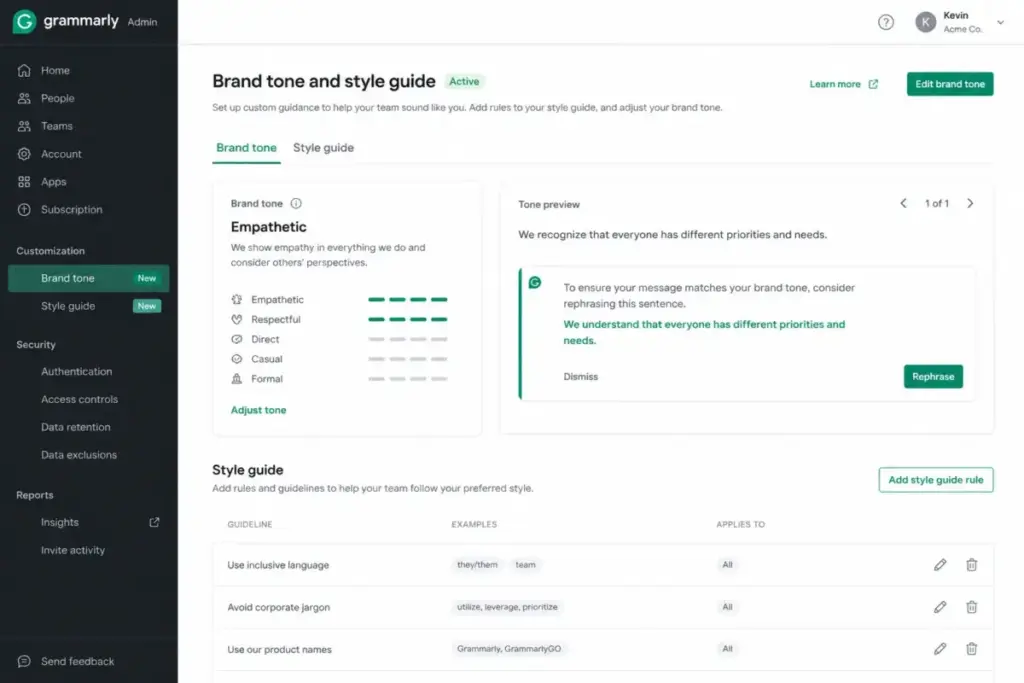
Grammarly’s strength here is brand and tone control applied inline across the apps a team already uses, per its Pro and Enterprise product pages. Reps write in Gmail, Slack, and your help desk, and the suggestions follow them without a separate window.
ChatGPT can enforce consistency too, but through a chat or connector model rather than an always-on layer inside each text field. For high-volume, in-the-flow customer writing, that is more friction per message.
The confidential-data question splits by plan, and this is where most comparisons oversimplify. OpenAI’s business documentation states that Business and Enterprise workspace data is not used to train models by default, which is the setting that matters for pasting internal content.
Consumer ChatGPT plans do not carry that same business-grade default, so treating “ChatGPT is private” as a blanket statement is wrong. The plan and user type decide the answer.
On the Grammarly side, individual users can opt out of product-improvement and model-training controls per its support docs, and managed enterprise deployments carry a different, admin-controlled privacy posture. Individual settings are not the same as enterprise governance.
Winner for this workflow: Grammarly for inline brand-consistent team writing, with a caveat that either tool can be safe for confidential work only on the right plan. I cover the exact privacy split below.
Pricing and Value per Dollar
Most competing articles compare Grammarly Pro to ChatGPT Plus and stop there. That skips ChatGPT Go, the two ChatGPT Pro tiers, Grammarly’s quarterly billing, and both custom Enterprise tiers, so the real cost picture goes missing.
| Plan | Grammarly | ChatGPT |
|---|---|---|
| Free | $0/month, 100 AI prompts/month | $0/month, limited access, ads may appear |
| Entry paid | Pro: $12/member/mo annually ($144/yr) | Go: $8/month |
| Mid paid | Pro monthly: $30/member/mo | Plus: $20/month |
| Quarterly | Pro: $60/member per 3 months | Not offered |
| High tier | Enterprise: custom | Pro: $100/mo or $200/mo |
| Team | Pro seats; Enterprise custom | Business: $25/user/mo monthly, $20/user/mo annually, min 2 seats |
| Enterprise | Custom / contact sales | Custom / contact sales |
Grammarly Pro averages $12 a member per month only if you commit annually. Paying monthly is $30, and the quarterly option is $60 per three months on the Grammarly official pricing page, so the billing cycle changes the real cost by more than 2x.
ChatGPT consumer plans have no annual discount. The ChatGPT official pricing page lists Go, Plus, and Pro as monthly only, so you cannot pre-pay a year of Plus to lower the rate the way you can with Grammarly Pro.
For a 10-person team, the math diverges. Grammarly Pro at the annual rate is about $120 a month, or $1,440 a year.
ChatGPT Business at the annual rate is about $200 a month, or $2,400 a year, and it cannot go below 2 seats.
The hidden cost on ChatGPT Business is worth naming. OpenAI’s Business billing docs describe credits used to extend usage beyond plan limits and self-serve payment constraints, so heavy teams may hit an extra spend line that a simple plan table never shows.
There is also an API trap. OpenAI API usage is billed separately from any ChatGPT subscription, so buying ChatGPT Business does not include API access for automation, a point I return to below.
Grammarly Enterprise and ChatGPT Enterprise are both custom, contact-sales pricing as of July 6, 2026. Neither publishes a public per-seat number, so any article quoting a fixed Enterprise price is guessing.
For the full breakdowns, see our Grammarly pricing guide and ChatGPT pricing guide.
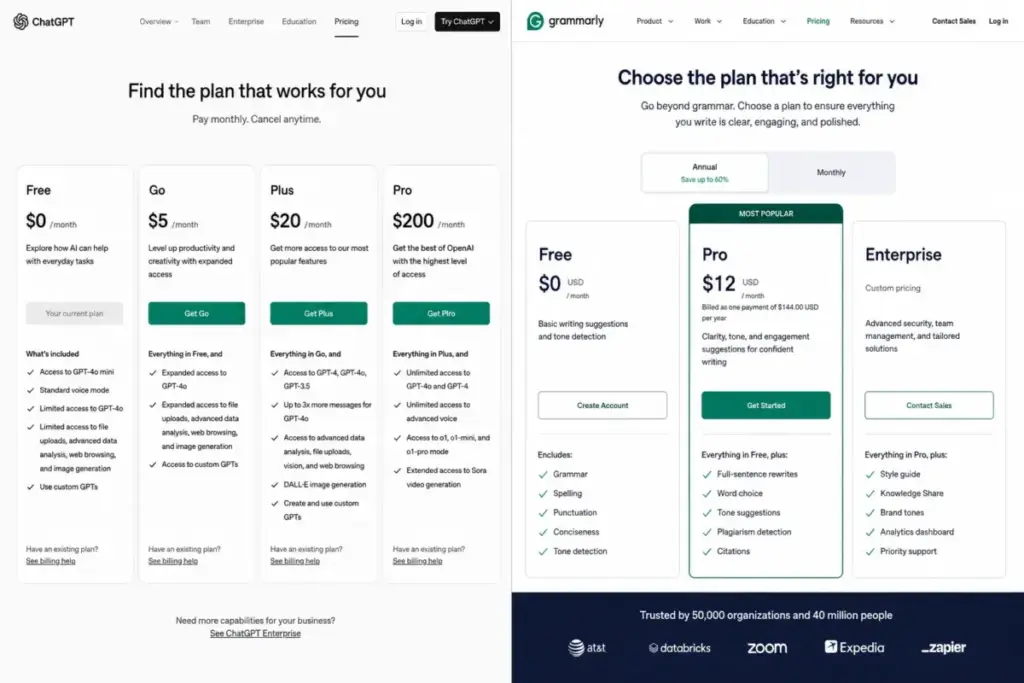
Value verdict: for a solo user who wants the most capability under $25 a month, ChatGPT Go or Plus wins on breadth. For a team that mostly needs polished, on-brand writing, Grammarly Pro at the annual rate is the cheaper entry, partly because it does not force a second seat.
The Free Plan Winner Depends on the Task
Free-plan comparisons usually list capabilities and skip the two frictions that actually decide daily use: Grammarly’s prompt cap and ChatGPT’s ads.
| Free plan factor | Grammarly Free | ChatGPT Free |
|---|---|---|
| Core use | Grammar, spelling, tone, basic help | General AI assistant, limited access |
| AI prompt limit | 100 AI prompts/month | Variable usage allowance |
| Ads | None | May appear on Free and Go |
| Best free use | Everyday inline editing | Occasional drafting and questions |
Grammarly Free gives you basic writing help plus 100 AI prompts a month, per its plan page and support docs. For light daily editing that never touches the AI-prompt features, that cap rarely bites.
ChatGPT Free gives broader assistant access but with limited usage, and OpenAI’s documentation states that ads may appear for Free and Go users. If you dislike ads, that alone can push you toward Plus.
Winner: Grammarly Free for daily inline editing, ChatGPT Free for occasional general AI work. Pick by the task, not by an overall score, because they are optimized for different jobs even at $0.
Do Not Compare Prompts and Messages 1:1
This is the caveat that stops a common but misleading comparison. Grammarly’s “2,000 AI prompts a month” on Pro and ChatGPT’s usage are not the same kind of number.
Grammarly publishes explicit monthly AI-prompt counts: 100 on Free and 2,000 on Pro, per its support docs. That is a fixed, countable refill you can plan around.
OpenAI documents tiered access and usage allowances rather than a single fixed public message cap for every consumer workflow. Usage depends on plan, model, and guardrails, so there is no clean “2,000 prompts equals X messages” conversion.
The practical consequence: if you are a heavy AI user, do not assume Grammarly Pro’s 2,000 prompts and a ChatGPT plan’s messages are interchangeable budgets. They measure different things, and treating them as equal will mislead your decision.
Feature-by-Feature Comparison
| Dimension | Grammarly | ChatGPT | Winner |
|---|---|---|---|
| Inline correction | Everywhere you type | Chat window only | Grammarly |
| Drafting from scratch | Limited | Core capability | ChatGPT |
| Tone and brand control | Built-in, plan-gated | Prompt-based | Grammarly |
| Plagiarism detection | On paid plans | Not offered | Grammarly |
| AI-text detection | On paid plans/API beta | Not offered | Grammarly |
| Research and reasoning | No | Deep research, reasoning | ChatGPT |
| File analysis | No | Yes | ChatGPT |
| Image and voice | No | Yes | ChatGPT |
| Coding | No | Codex | ChatGPT |
| Accept/reject editing | Yes | No | Grammarly |
Each tool owns a column. Grammarly wins the editing-control and detection rows, ChatGPT wins every generation and analysis row, and there is little overlap in the middle.
Grammarly’s plagiarism and AI-generated-text detection on paid plans, and its beta detector API, are real differentiators for editors, students, and compliance reviewers. ChatGPT is not positioned as a plagiarism checker at all.
One caution on detection: AI-text detection should be treated as a signal, not proof of authorship. Both false positives and false negatives happen, so do not build a disciplinary decision on a detector score alone.
Integrations: Inline Layer vs Connector Model
Logo-wall comparisons hide the real difference. Grammarly and ChatGPT connect to your tools in structurally different ways.
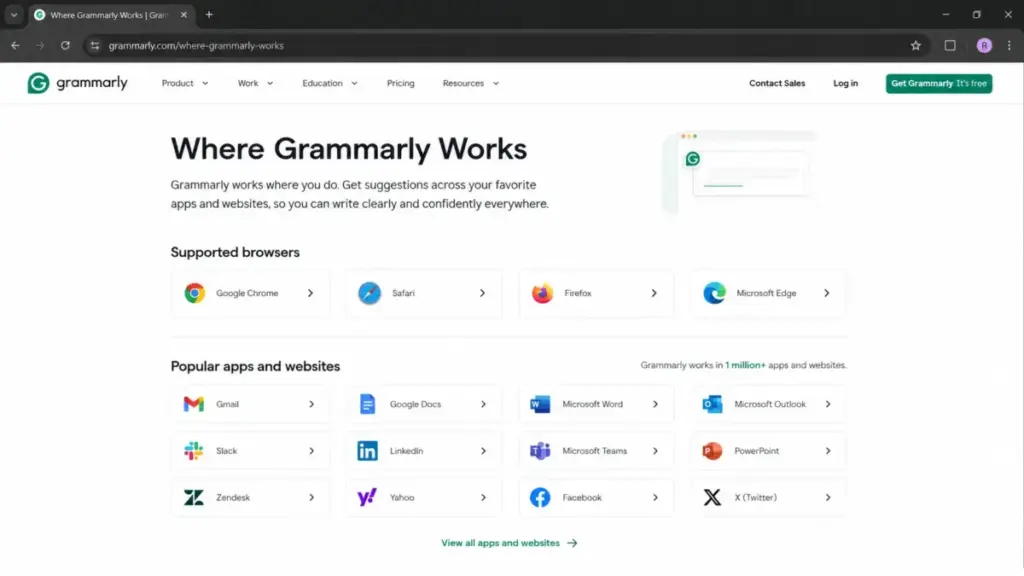
Grammarly is an inline writing layer. Its docs describe it working across a very large number of apps and sites, including Google Docs, Microsoft Word, Gmail, Outlook, Slack, and Salesforce, correcting text in place.
ChatGPT uses apps and connectors to pull data in. Its help docs describe Apps in ChatGPT, connectors, custom MCP apps, and Company Knowledge that connects to sources like Microsoft 365, Google Drive, and Slack for retrieval, not inline correction.
There is a real limit on the ChatGPT side. Company Knowledge requires at least one connected app with file search and is web-only per OpenAI’s help docs, so it is not yet an everywhere feature the way Grammarly’s editing layer is.
There is a real limit on the Grammarly side too. Its official browser-support page lists Chrome, Safari, Firefox, and Edge extensions, but Opera and Brave are not supported, so users on those browsers lose the inline extension and fall back to desktop or web editors.
Winner: Grammarly for inline editing coverage, ChatGPT for connected knowledge retrieval. They are not competing for the same integration slot, so match the model to how you actually work.
Privacy and Security by User Type
“Both tools are secure” is the laziest line in this category. Security depends on the exact plan and user type, and the defaults are not the same.
| User type | Training on your data by default | Notes |
|---|---|---|
| Grammarly individual | Opt-out available | Individual settings, not managed |
| Grammarly Enterprise | Admin-controlled | DLP, BYOK, custom roles |
| ChatGPT Free/Go/Plus/Pro | Consumer defaults apply | Not business-grade by default |
| ChatGPT Business/Enterprise | No training on workspace data | Business-grade default |
OpenAI’s business docs state that Business and Enterprise workspace data is not used for training by default, and cite AES-256 at rest, TLS 1.2+ in transit, SOC 2 Type 2, and ISO certifications. That is the setting a company should require before pasting internal material.
Grammarly’s security page lists SOC 2 Type 2, SOC 3, and a stack of ISO certifications including ISO 27001 and ISO 42001, plus data-ownership commitments and admin tooling. Individual users can opt out of product-improvement training, which is a different control than a managed enterprise default.
Winner: tie, with a condition. Either tool can be enterprise-safe on the right plan, but neither consumer tier should be treated as business-grade for confidential work.
Business and Enterprise Admin Controls
Feature tables rarely show which plan opens the controls IT actually needs. These are tier-gated, not standard.
Grammarly gates SCIM provisioning to Enterprise, and it requires SAML SSO, with supported identity providers including Okta, Microsoft Entra ID, OneLogin, and Rippling per its support docs. DLP, BYOK encryption, custom roles, and cost-center visibility also sit on Enterprise.
ChatGPT Business includes SAML SSO and MFA, admin controls, and analytics, while SCIM, RBAC, EKM, data residency, and advanced retention controls are Enterprise-tier per OpenAI’s security docs. Do not assume SCIM ships on every paid plan for either product.
On support and procurement, the tiers separate sharply. Grammarly Enterprise includes dedicated support, and ChatGPT Enterprise adds priority support, an SLA, custom legal terms, invoicing, volume discounts, and AI advisors.
Winner: tie at the top tier. The deciding factor is whether your primary need is writing governance across apps, which favors Grammarly, or broad AI deployment with data residency and EKM, which favors ChatGPT Enterprise.
API and Automation
For developers, this is not “Grammarly subscription vs ChatGPT subscription.” The API boundary is where teams buy the wrong thing.
OpenAI’s API is broad, usage-based per token and model, and billed separately from any ChatGPT subscription per its developer pricing page. If you want custom generative automation, you buy API usage, not a ChatGPT seat.
Grammarly’s listed APIs are specialized and mostly beta or custom, including a Writing Score API, an AI Detector API, and a Plagiarism API, per its API page. Those are narrow endpoints, not a general self-serve writing-generation API.
Winner: ChatGPT for open-ended custom automation, because the OpenAI API is built for exactly that. Choose Grammarly’s APIs only when your workflow specifically needs a writing-score, plagiarism, or AI-detection endpoint.
Mobile Apps
“Both have apps” hides what you actually do on each phone app. The jobs are different.
Grammarly on iOS and Android focuses on editing text where supported, including its keyboard, so mobile use is about polishing what you type. ChatGPT on iOS and Android supports voice conversations, photo questions, synced history, and general assistant tasks per its app pages.
Winner: ChatGPT for mobile AI assistant work like voice and image questions, Grammarly for mobile text polishing. Neither replaces the other on a phone.
What Changed in 2026
If you see “Superhuman” in Grammarly’s pricing or admin flows, that is not a mistake. Grammarly is now part of the Superhuman suite following company changes, though the writing product is still called Grammarly per its About page.
The product name for search and daily use has not changed. You still buy Grammarly, and the suite context mainly shows up in company and admin surfaces, so do not let the rebrand confuse the purchase.
There is one trust caveat worth noting separately from features. Reputable news coverage reported a 2026 backlash around a Grammarly Expert Review feature, which is a reputational data point rather than a reason to dismiss the core editing product.
Academic Use Needs Its Own Verdict
Students and academics face rules that business writers do not: institutional AI policies, citation accuracy, and integrity checks.
Use Grammarly for final proofreading and for its plagiarism and AI-detection workflows, which map to how many institutions review submissions. Use ChatGPT for brainstorming and for explaining concepts, and only where your institution’s policy allows it.
Two warnings. Do not outsource citations to ChatGPT, because it can fabricate references, and do not submit AI-generated text as your own work without permission, because both AI-text detectors and academic-integrity rules can catch or penalize it.
What Users Complain About
Reviewer sentiment is often more decision-changing than a feature list, so here are the recurring patterns, phrased as patterns rather than universal facts.
For Grammarly, reviewer patterns on Capterra and TrustRadius mention suggestions that feel generic or too neutral, occasional app-specific friction, and edits that do not always learn a user’s tone. One Capterra reviewer noted rewrites that felt too neutral.
For ChatGPT, G2 and Capterra patterns praise versatility for content and coding while flagging inconsistent output on niche prompts, the need for detailed prompts, and occasional inaccuracy in complex scenarios. A Reddit thread on proofreading captured the split: ChatGPT handles context, but Grammarly is convenient and strict.
Watch out if you need consistency without prompt effort, which is where ChatGPT frustrates people, or if you need creative rewriting rather than narrow correction, which is where Grammarly can feel limiting.
Setup and Migration Difficulty
| Tool | Individual setup | Team setup |
|---|---|---|
| Grammarly | Low | Moderate |
| ChatGPT | Low | Higher |
Grammarly is low-effort for individuals: install the browser extension, desktop, or mobile app and it starts correcting. Team setup is moderate, because configuring brand tones, snippets, style guides, SSO, SCIM, roles, and DLP takes admin work.
ChatGPT is low-effort for individual chat use, but Business and Enterprise rollout is higher-effort, involving connectors, Company Knowledge, compliance configuration, and procurement. There is no data to migrate in the traditional sense for either tool, so the real cost is configuration and training, not data portability.
Winner: Grammarly for the simplest individual start, tie for teams, because both require real admin configuration at scale.
Where Grammarly Wins
Grammarly wins when the job is correcting writing you already have, across the apps you already use, with control over each edit.
It wins for high-volume daily editors who write dozens of emails and messages and cannot afford a copy-paste loop for each one. It wins for customer-facing teams that need consistent brand tone inline.
It wins for editors and students who want plagiarism and AI-text detection built in. And it wins for anyone who needs to preserve exact meaning, because narrow accept-or-reject edits protect the original.
Where ChatGPT Wins
ChatGPT wins the moment the task is bigger than editing.
It wins for drafting from a blank page, for research and summarization, for coding with Codex, for file and data analysis, and for multimodal work like images and voice. It wins for solo users who want one flexible assistant under $25 a month instead of a single-purpose editor, and our ChatGPT review covers how those capabilities are gated by plan.
And it wins for developers who need a broad, usage-based API for custom automation.
Choose Grammarly, Choose ChatGPT, or Use Both
Choose Grammarly if your main job is polishing writing across apps, you need accept-or-reject control, you want plagiarism or AI-text detection, or you run a customer-facing team that needs brand consistency inline.
Choose ChatGPT if you draft from scratch, do research, write code, analyze files, want multimodal AI, or need one assistant that does more than fix grammar. Its wider assistant role is why it also shows up in our best AI chatbots coverage.
Use both if you draft in ChatGPT and polish in Grammarly, which is a common and defensible stack for content teams, writers, and students. The point where paying for both stops being wasteful is simple: when you generate long-form text often and also send high-volume polished writing daily, each tool earns its own line item.
Avoid leaning on either alone if you need guaranteed grammatical accuracy for high-stakes text. In that case, keep a human editor in the loop, because ChatGPT can overcorrect and Grammarly can miss nuance.
Alternatives to Grammarly and ChatGPT
If neither fits, a few adjacent tools solve specific failure modes.
Choose a dedicated writing generator like Jasper or Writesonic if you want marketing-focused drafting with brand controls beyond Grammarly and more structure than raw ChatGPT. Choose a different assistant like Claude or Gemini if you want ChatGPT-style reasoning with different model behavior or pricing.
Choose ProWritingAid or LanguageTool if you want grammar checking with a different feature or price profile than Grammarly.
For a wider shortlist, our Grammarly alternatives and ChatGPT alternatives guides map who each option is for.
Final Verdict
Grammarly and ChatGPT are not rivals so much as tools for two different stages of writing. Grammarly polishes what exists, and ChatGPT creates and analyzes.
For solo editors and customer-facing teams whose day is proofreading and on-brand writing, Grammarly is the better single purchase, and its annual Pro rate makes it the cheaper team entry. For solo creators, researchers, developers, and anyone who needs an assistant past editing, ChatGPT is the better single purchase, and Go or Plus covers far more ground per dollar.
If your work spans both, the honest answer is to buy both once your writing volume and drafting volume are each high enough to justify a line item. That is not a dodge, it is the point where the two tools stop overlapping and start compounding.
FAQ
Is Grammarly better than ChatGPT?
For inline proofreading, tone, and brand-consistent editing across apps, yes. For drafting, research, coding, and file analysis, no, ChatGPT is stronger. They are built for different jobs, so “better” depends on whether you mostly edit or mostly create.
Can ChatGPT replace Grammarly?
Only partly. ChatGPT can proofread if you prompt it carefully, but it works in a separate window and can change your meaning or tone, while Grammarly corrects inline with accept-or-reject control. For high-volume daily editing, ChatGPT does not fully replace it.
Is Grammarly worth paying for if I already have ChatGPT Plus?
Yes, if you edit a lot of email, docs, and messages every day and want inline, controlled corrections plus plagiarism or AI-text detection. No, if you rarely edit existing text and mostly draft or research, since ChatGPT Plus already covers that.
Which is cheaper for a small team?
Grammarly Pro at the annual rate is about $120 a month for 10 users and fits a single seat. ChatGPT Business is about $200 a month for 10 users at the annual rate and requires a minimum of 2 seats, so Grammarly is the cheaper writing-focused entry.
Which is better for students?
Use Grammarly for final proofreading and its plagiarism and AI-detection features, and ChatGPT for brainstorming and explanations where your institution allows it. Do not submit AI-generated text as your own or trust ChatGPT for citations.
Does ChatGPT check grammar as well as Grammarly?
It can catch grammar issues, but a grammatical error correction benchmark found it may lag specialized systems and overcorrect longer sentences. Grammarly is more consistent for narrow, controlled correction.
Is ChatGPT safe for confidential business writing?
On Business and Enterprise plans, yes, since OpenAI says workspace data is not used for training by default. On consumer Free, Go, Plus, and Pro plans, do not treat it as business-grade for confidential material.
Do I need the API for ChatGPT automation?
Yes, and it is billed separately. A ChatGPT Business seat does not include OpenAI API usage, so custom generative automation requires paying for the API on top of any subscription.
Why does Grammarly show "Superhuman" now?
Grammarly is part of the Superhuman suite after 2026 company changes, but the writing product is still called Grammarly. The suite name mainly appears in company and admin surfaces, not in the core editing product.
Which free plan is better?
Grammarly Free for daily inline editing, with 100 AI prompts a month and no ads. ChatGPT Free for occasional general AI work, with broader access but limited usage and possible ads. Pick by whether you mostly edit or mostly ask.