Most Zoho vs Salesforce comparisons frame the decision as “cheap CRM versus powerful CRM.” That framing misses the point. The real question is whether your team has the admin capacity, workflow complexity, and budget tolerance to justify Salesforce’s enterprise architecture, or whether Zoho CRM delivers what you need at a fraction of the cost and setup time. I evaluated both platforms across official pricing, feature gates, API structures, support economics, and migration paths to build the decision framework that most comparisons skip.
This comparison draws on official documentation, verified 2026 pricing data, user sentiment from Gartner Peer Insights and Reddit communities, and competitive analysis across top CRM software options. Every price cited links to an official source, and every claim traces to the evidence ledger below.
The short answer: Zoho CRM wins on cost, setup speed, and native business-suite value. Salesforce wins on enterprise customization, AI depth, third-party integrations, and support infrastructure. The right choice depends on your admin resources, deal complexity, and total budget, not on which product has more features on paper.
| Category | Winner | Why |
|---|---|---|
| Pricing at scale | Zoho CRM | 4.4x cheaper at Enterprise tier for 50 users |
| Setup and admin overhead | Zoho CRM | Lower learning curve, less admin dependency |
| Enterprise customization | Salesforce | AppExchange, Flow Builder, sandbox options, advanced permissions |
| AI and revenue operations | Salesforce | Agentforce, predictive AI, Data Cloud, deeper AI ecosystem |
| Native business suite | Zoho CRM | Tight integration with Zoho Desk, Projects, Finance Suite, Analytics |
| Third-party ecosystem | Salesforce | AppExchange, AgentExchange, MuleSoft, broader integration partners |
| Support depth | Salesforce | Structured Standard, Premier, and Signature Success Plans |
How I Evaluated Zoho CRM and Salesforce
I structured this comparison around the dimensions that actually change buying decisions: cost at scale (not just entry price), feature gates by plan tier, API and automation capacity, support-plan economics, migration complexity, and admin overhead. Each dimension declares a winner with evidence.
Pricing data comes from Zoho CRM’s official pricing page and Salesforce Sales Cloud pricing (both verified May 2026). Zoho’s pricing page dynamically localizes by region; the USD figures here align with Salesforce’s own published Zoho comparison and multiple current references. I recommend verifying exact amounts at checkout.
Both platforms show 4.4-star ratings on Gartner Peer Insights in the Sales Force Automation Platforms category: Salesforce with 1,930 reviews and Zoho CRM with 556 reviews (as of May 2026). The difference in review volume reflects Salesforce’s larger enterprise install base, not a quality gap.
Zoho vs Salesforce Pricing: The Cost Gap Most Reviews Understate
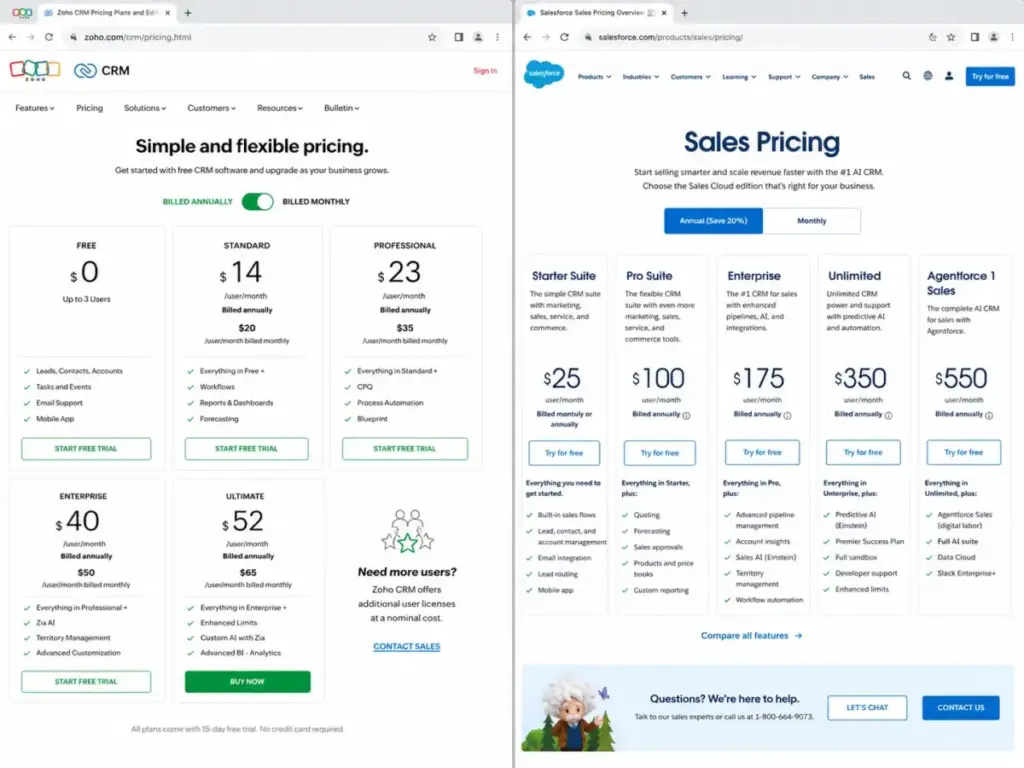
Zoho CRM Enterprise costs $40/user/month billed annually. Salesforce Enterprise costs $175/user/month billed annually. That is a 4.4x multiplier before either platform’s add-ons enter the picture.
Here is what that gap looks like at scale (annual billing, Enterprise tier):
| Team Size | Zoho CRM Enterprise | Salesforce Enterprise | Monthly Difference |
|---|---|---|---|
| 5 users | $200/month | $875/month | $675 |
| 10 users | $400/month | $1,750/month | $1,350 |
| 25 users | $1,000/month | $4,375/month | $3,375 |
| 50 users | $2,000/month | $8,750/month | $6,750 |
At 50 users, a team choosing Salesforce Enterprise over Zoho CRM Enterprise pays $81,000 more per year in license fees alone. That figure does not include Salesforce’s Premier Success Plan, add-ons, or implementation costs.
Zoho CRM Plan Tiers (as of May 2026)
| Plan | Monthly Price | Annual Price | Key Additions |
|---|---|---|---|
| Free | $0 (up to 3 users) | $0 | Basic CRM starter kit |
| Standard | $20/user/month | $14/user/month | Core workflows, reports, dashboards, forecasting |
| Professional | $35/user/month | $23/user/month | CPQ, email intelligence, process automation, inventory |
| Enterprise | $50/user/month | $40/user/month | Zia AI, journey orchestration, territory management, portals |
| Ultimate | $65/user/month | $52/user/month | Enhanced limits, consulting, custom AI/ML, data preparation |
Zoho offers both monthly and annual billing on every paid tier. That flexibility matters for startups and seasonal businesses that avoid annual lock-in.
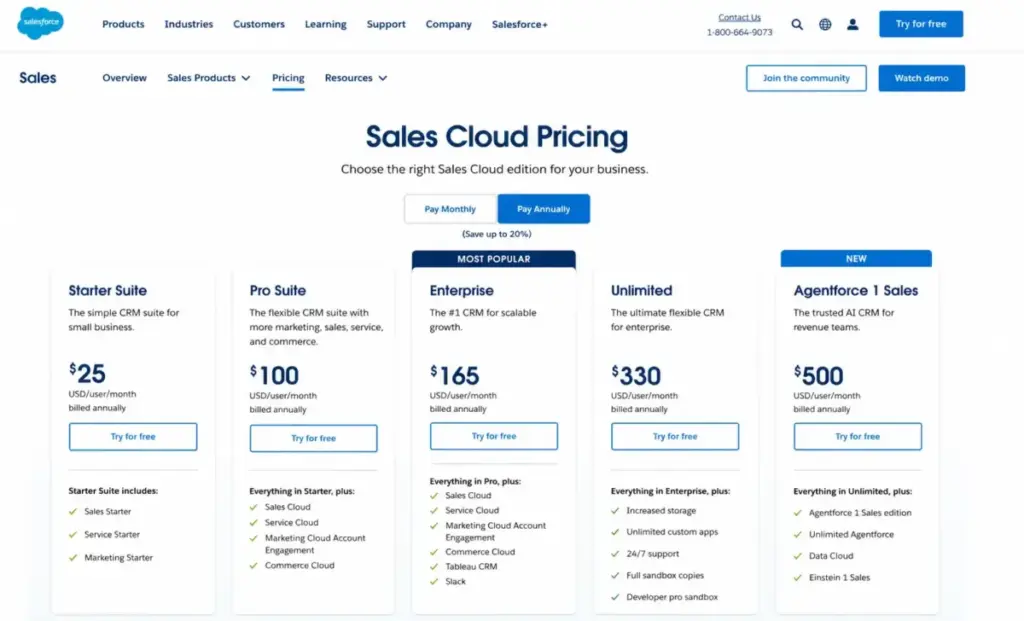
Salesforce Sales Cloud Plan Tiers (as of May 2026)
| Plan | Price (Billed Annually) | Key Additions |
|---|---|---|
| Starter Suite | $25/user/month | Core CRM, sales flows, lead routing, email sync |
| Pro Suite | $100/user/month | Quoting, forecasting, AppExchange, more automation |
| Enterprise | $175/user/month | Web API, advanced pipeline, deal insights, Agentforce |
| Unlimited | $350/user/month | Predictive AI, Sales Engagement, Premier Success Plan, Full Sandbox |
| Agentforce 1 Sales | $550/user/month | Full AI suite, unmetered Agentforce, Spiff, Tableau Next, Slack Enterprise+ |
Salesforce requires annual billing on Pro Suite and above. Monthly billing is available only on Starter Suite.
The Hidden Cost Checklist
The license price is the starting point, not the total bill. Here is what to verify before signing either contract:
| Cost Area | Zoho CRM Exposure | Salesforce Exposure | What to Verify |
|---|---|---|---|
| Support plan | Classic Support included on paid plans | Standard included; Premier is30% of net license fees (bundled with Unlimited only) | Ask whether Premier is included or an add-on at your tier |
| API access | Credit-based, included in all paid plans | Enterprise includes Web API; pricing table shows additional $25/user/month API line | Confirm API access is included or priced separately |
| AI features | Zia AI starts at Enterprise ($40/user/month annual) | Agentforce included at Enterprise; full AI suite at Agentforce 1 Sales ($550/user/month) | Map which AI features you need to which plan |
| Add-ons | WhatsApp credits, Premium Support, extra API credits | Agentforce for Sales from $125/user/month; Sales Programs from $100/user/month | List every add-on and price it before signing |
| Implementation | Self-serve for most; consulting on Ultimate | Partner implementation often required for Enterprise+ | Budget $0-$10K for Zoho; $20K-$100K+ for Salesforce |
| Integration costs | Zoho Marketplace; some extensions limited on lower tiers | MuleSoft, integration partners, or AgentExchange apps | Check if your integrations need paid middleware |
Salesforce’s FAQ states that products integrate with many outside applications, but for cases without built-in integration, buyers can purchase MuleSoft, work with integration partners, or use AgentExchange apps. Each option adds cost.
Feature Gates: What Each Plan Actually Unlocks
Most comparisons list features without telling you which plan unlocks them. That gap leads buyers to assume entry-level plans include capabilities that require a 3x or 5x upgrade.
| Feature | Zoho CRM Plan Gate | Salesforce Plan Gate | Buyer Impact |
|---|---|---|---|
| Basic CRM (leads, contacts, deals) | Free (3 users) | Starter Suite ($25/user/month) | Zoho’s free tier covers micro-teams; Salesforce charges from day one |
| Workflow automation | Standard ($14/user/month annual) | Starter Suite ($25/user/month) | Both include basic automation early |
| CPQ (configure-price-quote) | Professional ($23/user/month annual) | Pro Suite ($100/user/month) | Zoho CPQ costs77% less at equivalent tier |
| Sales forecasting | Standard ($14/user/month annual) | Pro Suite ($100/user/month) | Zoho includes forecasting 4 tiers lower |
| AppExchange / Marketplace | Marketplace (limited on Standard/Professional) | Pro Suite ($100/user/month) | Salesforce locks AppExchange behind Pro Suite |
| AI sales assistant | Enterprise ($40/user/month annual): Zia AI | Enterprise ($175/user/month): Agentforce | Zoho AI costs$135/user/month less at AI tier |
| Territory management | Enterprise ($40/user/month annual) | Enterprise ($175/user/month) | Same tier name, 4.4x price difference |
| Custom functions / advanced automation | Enterprise ($40/user/month annual) | Enterprise ($175/user/month) | Zoho unlocks custom code earlier and cheaper |
| Predictive AI | Ultimate ($52/user/month annual) | Unlimited ($350/user/month) | Salesforce predictive AI costs6.7x more |
| Full sandbox | Not applicable (Zoho uses sandbox in Enterprise+) | Unlimited ($350/user/month) | Full sandbox requires Salesforce’s second-highest tier |
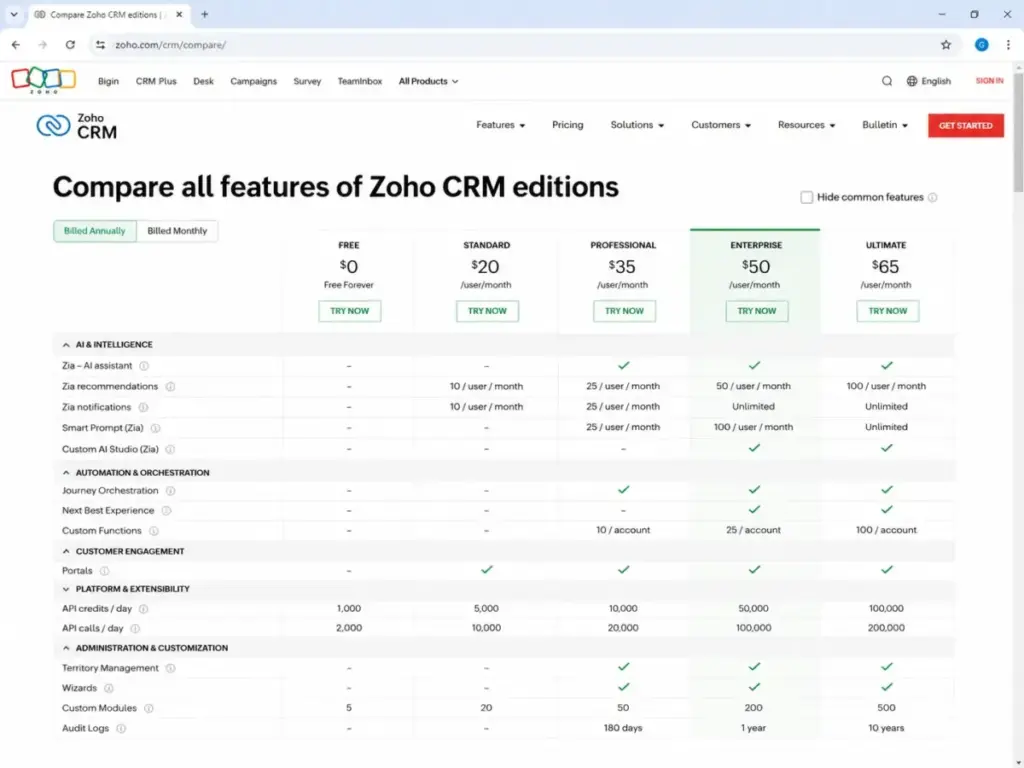
The pattern is consistent: Zoho gates features at lower price points. Salesforce gates similar features at higher price points but adds deeper enterprise architecture at each level.
AI in 2026: Zia vs Agentforce
Zoho’s Zia AI assistant ships with Enterprise tier ($40/user/month annual). Zia provides sales predictions, lead scoring suggestions, and workflow recommendations. Zoho’s Ultimate tier adds custom AI/ML via QuickML and data preparation tools at $52/user/month annual.
Salesforce distributes AI across three tiers. Enterprise ($175/user/month) includes Agentforce and conversation intelligence. Unlimited ($350/user/month) adds predictive AI and Sales Engagement. Agentforce 1 Sales ($550/user/month) includes unmetered Agentforce usage, 1 million Flex Credits, and 2.5 million Data Cloud Credits per org per year.
The practical question is not “which AI is better” but “which AI your team can actually use.” Salesforce’s AI ecosystem is deeper, but it demands cleaner data pipelines, larger budgets, and implementation maturity to produce ROI. Zoho’s AI is narrower but accessible at a price point where most SMBs can justify the experiment.
Choose Zoho if your team wants AI sales assistance without a six-figure AI budget. Choose Salesforce if your organization has dedicated data infrastructure, clean CRM data, and the budget to invest in Agentforce, Data Cloud, and the surrounding ecosystem.
Automation and API Limits: The Technical Buyer’s Checklist
Zoho CRM uses a credit-based API system. Credits refresh every 24 hours, and limits scale by edition and user count:
- Standard/Starter: 50,000 + 250 credits per user (max 100,000). Concurrency: 10.
- Professional: 50,000 + 500 credits per user (max 3,000,000). Concurrency: 15.
- Enterprise/Zoho One: 50,000 + 1,000 credits per user (max 5,000,000). Concurrency: 20.
- Ultimate/CRM Plus: 50,000 + 2,000 credits per user (unlimited max). Concurrency: 25.
Salesforce includes Web API access starting at Enterprise tier. Salesforce developer documentation describes API request allocations by edition and license count, with Enterprise allocations starting at 100,000 requests per 24-hour period plus per-license additions. The Salesforce pricing table also shows an additional $25/user/month line for Web Services API in the feature comparison.
For integration-heavy teams running 10+ connected apps, verify API limits against your actual call volume before committing to either platform. Zoho’s credit model is transparent and published; Salesforce’s API economics require closer reading of the pricing table and developer documentation.
Integrations: Native Suite vs Third-Party Ecosystem
This is where the Zoho vs Salesforce comparison splits into two fundamentally different strategies.
Zoho CRM integrates natively with the broader Zoho ecosystem: Zoho Desk, Zoho Projects, Zoho Finance Suite, Zoho Campaigns, Zoho Forms, Zoho Analytics, Google Workspace, Microsoft Office 365, Slack, LinkedIn Sales Navigator, WhatsApp Business (with credits), and more. If your business runs on Zoho apps, adding Zoho CRM creates a unified operating layer without middleware.
Salesforce connects through AppExchange, AgentExchange, native integrations, and API-based connectors. For cases without built-in integration, Salesforce’s pricing FAQ recommends MuleSoft, integration partners, or AgentExchange apps. The AppExchange library is significantly larger than Zoho’s Marketplace, and Salesforce’s enterprise integration patterns support complex multi-system architectures.
Choose Zoho CRM if you want native suite consolidation with minimal integration overhead. Choose Salesforce if you need enterprise ecosystem extensibility with thousands of pre-built connectors and a mature integration partner network.
One limitation to flag: some Zoho CRM Marketplace extensions are not available on Standard and Professional editions. If you need specific third-party integrations, verify availability on your planned tier before purchasing.
Support Plans: What You Get and What You Pay
Zoho CRM includes Classic Support on all paid plans. Classic Support covers email, phone, chat, and remote assistance. Free edition users receive Basic Support through email, social, community forums, and knowledge base.
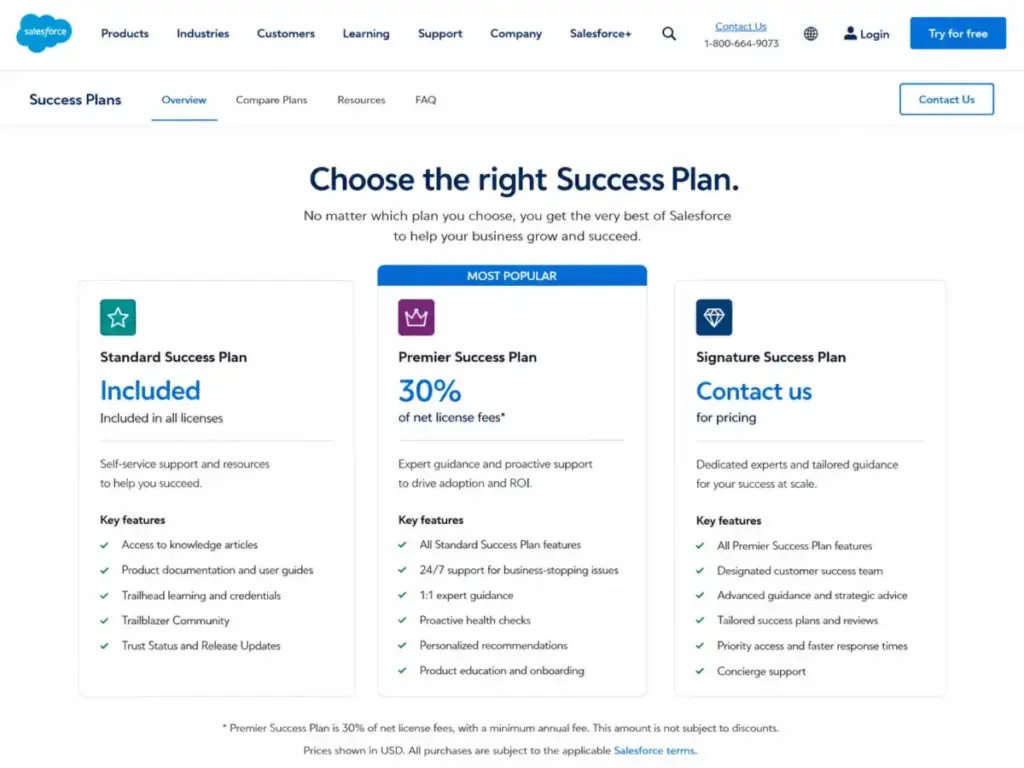
Salesforce structures support into three tiers. Standard Success Plan (included with all licenses) provides knowledge articles, documentation, Trailhead, and Trailblazer Community. Premier Success Plan costs 30% of net license fees and includes expert guidance, product education, health checks, recommendations, and 24/7 support for business-stopping issues. Premier is bundled with Unlimited Edition at no extra charge. Signature Success Plan requires custom pricing through your account executive and adds designated customer success management and proactive monitoring.
The budget math matters here. A team of 25 users on Salesforce Enterprise ($175/user/month = $52,500/year) adding Premier Support pays an additional $15,750/year (30% of net). That single support upgrade costs more than the entire Zoho CRM Enterprise license for the same team ($12,000/year).
Security and Compliance
Zoho states SOC 2 Type 2 compliance across all cloud services and SOC 1 Type 2 for products including Zoho CRM. Zoho’s data security page documents AES/AES-256 encryption, GDPR support, HIPAA safeguards as a business associate, audit logs, IP restrictions, two-factor authentication, real-time backups, and US/EU data center choice.
Salesforce maintains a compliance portal with certifications and attestations. Sales Cloud buyers should validate specific SOC, HIPAA, GDPR, and regional compliance documents for their purchased services and region through this portal.
Both platforms meet enterprise security requirements. The difference is in depth of documentation and audit scope. Salesforce’s compliance infrastructure reflects its larger enterprise customer base and regulatory exposure. Zoho’s compliance posture covers the needs of most SMB and mid-market buyers.
Migration: Switching Costs in Both Directions
Salesforce to Zoho CRM
Zoho CRM provides migration options with a custom setup to migrate from Salesforce, Pipedrive, Highrise, Insightly, MS Dynamics, and other vendors. Migration can reduce license costs significantly, but it requires careful mapping of objects, fields, automations, reports, attachments, ownership, permissions, and business processes.
Reddit users considering this switch frequently cite Salesforce being too expensive and overly complex for their needs. The common advice: begin with a system architecture audit. Map entity relationships, workflow diagrams, automation rules, and reporting requirements before touching data.
Difficulty: Medium to High. Data moves relatively well through CSV/API. Business logic, automations, and reports rarely migrate cleanly without redesign.
Zoho CRM to Salesforce
Moving from Zoho to Salesforce becomes difficult when custom modules, functions, blueprints, journey orchestrations, and Zoho app dependencies need to be rebuilt in Salesforce’s architecture. Salesforce provides Data Loader for bulk import/export, insert, update, delete, and export of records.
Difficulty: High. The data migration is manageable, but rebuilding Zoho-specific logic inside Salesforce typically requires a certified implementation partner and a multi-month project.
In both directions, budget for workflow and report redesign, not just data movement. The CRM switch that “saves money” on licenses but costs $50,000 in implementation and 3 months of lost productivity is not a savings.
The Verdict: Choose by Admin Capacity, Not Feature Count
The Zoho vs Salesforce decision is not about which CRM platform has more features. Both platforms cover leads, contacts, deals, pipelines, forecasting, automation, and reporting. The decision is about operational fit.
Choose Zoho CRM if:
- Your team has fewer than 25 users and no dedicated CRM admin
- Budget predictability matters more than enterprise extensibility
- You use (or plan to use) other Zoho apps like Desk, Projects, or Finance Suite
- You need a CRM that works within weeks, not months
- Your sales pipeline is straightforward without multi-department governance
Zoho CRM earns its position among the best CRM options for small businesses because it delivers practical CRM functionality without requiring a dedicated admin or six-figure implementation budget.
Choose Salesforce if:
- Your organization has dedicated RevOps or Salesforce admin resources
- You need enterprise-grade governance, permissions, and multi-org architecture
- AppExchange integrations are critical to your sales stack
- AI-heavy revenue operations (Agentforce, Data Cloud, predictive analytics) are strategic priorities
- Annual contracts and add-on costs are justified by deal complexity and revenue scale
For teams evaluating Salesforce’s full capabilities, our Salesforce CRM review covers the platform’s architecture, pricing traps, and enterprise fit in detail.
When Neither Product Fits
If your team needs simple visual pipeline tracking without a full CRM platform, consider alternatives like Pipedrive (visual deal management, lower complexity), HubSpot (marketing-led CRM with strong free tier), or Monday Sales CRM (board-based workflows for cross-functional teams). Our Zoho CRM alternatives guide maps exit reasons to replacement recommendations, and our Salesforce alternatives guide does the same for teams outgrowing or leaving Salesforce.
Buyer Scenario Quick Reference
| Scenario | Likely Winner | Key Reason |
|---|---|---|
| 5-person startup, first CRM | Zoho CRM | Free tier for 3 users; Standard at $14/user/month annual |
| 10-person SMB, sales automation + forecasting | Zoho CRM | Professional/Enterprise gives automation and Zia at 77%+ lower cost |
| 25-person sales team with RevOps admin | Depends on workflow complexity | Zoho wins on cost; Salesforce wins if team needs advanced pipeline, APIs, AppExchange |
| 50-person enterprise, multi-department, AI roadmap | Salesforce | Enterprise/Unlimited/Agentforce 1 designed for this scale |
| Salesforce customer migrating for cost savings | Zoho CRM (if requirements are simplified first) | Migration works when data model and workflow complexity are addressed upfront |
For a deeper look at how Zoho CRM performs as a standalone product, our Zoho CRM review breaks down the platform tier by tier. Teams comparing Zoho against other mid-market options can also check our Zoho CRM pricing breakdown and Salesforce pricing analysis.
FAQ: Zoho vs Salesforce
Is Zoho CRM cheaper than Salesforce?
Zoho CRM is significantly cheaper at every comparable tier. At Enterprise level, Zoho costs $40/user/month (annual) versus Salesforce’s $175/user/month (annual). For 25 users, that gap equals $40,500/year in license savings before factoring in Salesforce add-ons and support plan costs.
Can Zoho CRM replace Salesforce?
Zoho CRM can replace Salesforce for teams that do not need deep enterprise governance, complex AppExchange integrations, or Salesforce-specific AI capabilities. The migration requires mapping objects, workflows, and reports. Teams with heavily customized Salesforce orgs should simplify requirements before migrating to avoid recreating complexity inside Zoho.
Which CRM is easier to set up?
Zoho CRM is faster to set up for standard sales workflows. Most teams can configure pipelines, workflows, and basic reports within days. Salesforce requires more configuration time, and Enterprise-level deployments typically involve implementation partners and multi-week projects.
Is Salesforce worth it for small businesses?
Salesforce Starter Suite at $25/user/month is viable for small teams that plan to scale. The challenge is that meaningful automation, forecasting, and AppExchange access require Pro Suite ($100/user/month) or higher. Most small businesses get equivalent functionality from Zoho CRM Professional at $23/user/month annual.
What are the hidden costs of Salesforce?
Premier Success Plan (30% of net license fees), implementation partner costs, Agentforce add-on ($125/user/month), Sales Programs ($100/user/month), Web Services API ($25/user/month shown in pricing table), and Data Cloud/Flex credits beyond included allocations. A 25-user Enterprise deployment with Premier Support and one add-on can exceed $70,000/year in total cost.
Does Zoho CRM have AI features?
Zoho CRM includes Zia AI starting at Enterprise tier ($40/user/month annual). Zia provides sales predictions, lead scoring, and workflow recommendations. Ultimate tier adds custom AI/ML capabilities via QuickML and data preparation tools at $52/user/month annual.
Which CRM has better automation?
Both platforms offer strong automation. Zoho includes workflow rules and assignment rules from Standard tier. Salesforce offers Flow Builder and deeper automation patterns from Enterprise tier. Zoho’s automation is sufficient for most SMB workflows. Salesforce’s automation handles complex multi-step, cross-object processes better for enterprise teams with dedicated admin resources.
Can I migrate from Salesforce to Zoho without a consultant?
Small deployments with straightforward data models can self-migrate using Zoho’s built-in Salesforce migration tool. Complex deployments with custom objects, advanced automations, extensive reports, and multi-app integrations typically need professional guidance. Budget for workflow and report redesign regardless of approach.
How do Zoho and Salesforce compare on integrations?
Zoho excels at native business-suite integrations (Desk, Projects, Finance, Analytics). Salesforce excels at third-party ecosystem breadth (AppExchange, AgentExchange, MuleSoft). Choose based on whether your integration needs lean toward suite consolidation or enterprise ecosystem extensibility. Teams using HubSpot as a middle ground can compare in our HubSpot vs Salesforce analysis.
Which CRM is better for enterprise sales teams?
Salesforce wins for enterprise teams with 50+ users, dedicated admins, complex pipeline rules, multi-department governance, and AI-heavy revenue operations. The cost is justified when deal complexity and revenue volume demand Enterprise, Unlimited, or Agentforce 1 Sales tier capabilities. Teams evaluating CRM options for sales teams will find both platforms on most shortlists, but Salesforce dominates at enterprise scale.