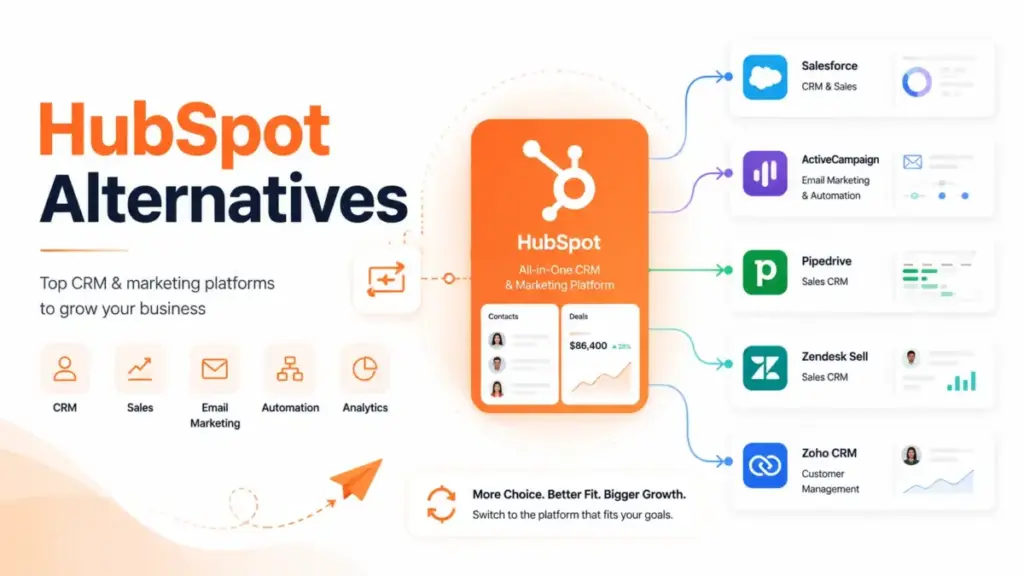
Most teams do not leave HubSpot because the CRM software is bad. They leave when Starter stops being enough, Professional pricing reshapes the budget, or the team realizes it only needs sales pipeline management, not a full customer platform. HubSpot Marketing Hub Professional starts at $890/month. HubSpot Sales Hub Professional starts at $100/seat/month. Add onboarding fees, contact overages, and extra hubs, and the bill grows fast.
I compared 10 HubSpot alternatives by exit reason, real switching cost, migration difficulty, and daily sales fit. Every recommendation maps to a specific reason a buyer wants to leave. If you are evaluating best CRM software options beyond HubSpot, this guide covers what actually matters: pricing at equivalent feature levels, not just entry tiers.
Best HubSpot Alternatives: Quick Verdict
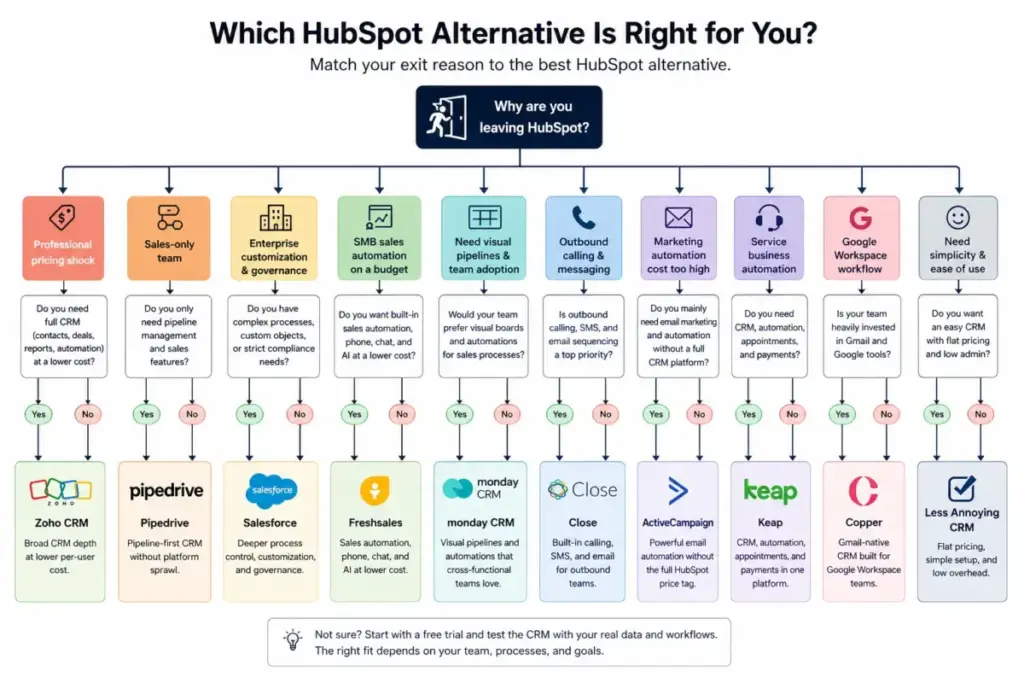
The best HubSpot alternative depends on why you are leaving, not which CRM has the longest feature list. A sales-only team switching to a full platform wastes money. A marketing-heavy team switching to a sales-only CRM loses automation. Match the exit reason to the tool.
| HubSpot Exit Reason | Best Alternative | Why |
|---|---|---|
| Professional pricing shock | Zoho CRM | Broad CRM depth at lower per-user cost |
| Sales-only team | Pipedrive | Pipeline-first CRM without platform sprawl |
| Enterprise customization | Salesforce | Deeper process control and governance |
| SMB sales automation | Freshsales | Sales automation, phone, chat, and AI at lower cost |
| Visual workflow adoption | monday CRM | Boards and automations fit cross-functional teams |
| Outbound calling | Close | Built-in calling, SMS, and email |
| Marketing automation cost | ActiveCampaign | Email automation without full HubSpot platform cost |
| Service business automation | Keap | CRM, automation, appointments, and payments |
| Google Workspace workflow | Copper | Gmail-native relationship management |
| Simplicity | Less Annoying CRM | Flat pricing and low admin burden |
TL;DR:
- Best overall sales-only alternative: Pipedrive
- Best value replacement: Zoho CRM
- Best enterprise replacement: Salesforce
- Best SMB sales suite: Freshsales
- Best marketing automation switch: ActiveCampaign
Why Are Users Leaving HubSpot?
HubSpot is a strong CRM platform, but its cost structure punishes growth. Teams that start on free or Starter tiers face a sharp jump when they need Professional features. The exit reasons below drive most switching decisions.
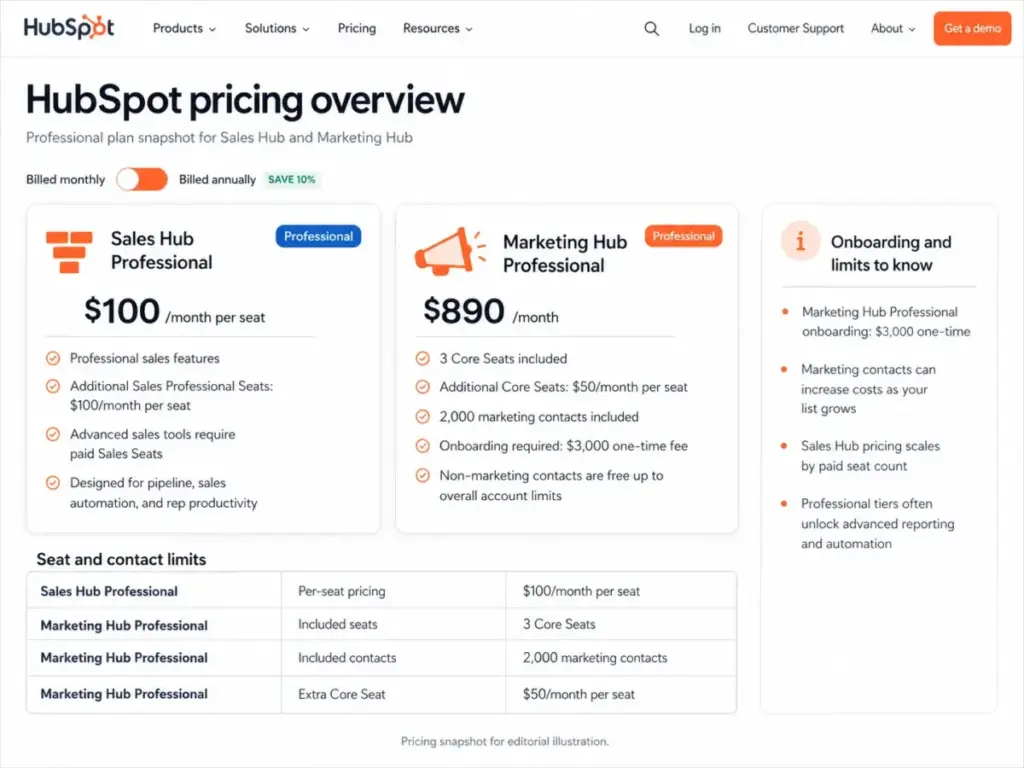
Professional pricing shock. HubSpot Sales Hub Professional costs $100/seat/month. Marketing Hub Professional costs $890/month with only 3 Core Seats included. For a 10-person sales team adding marketing, the monthly bill can exceed $1,800 before contact overages. As one Capterra reviewer noted: “Outside of the free tier the pricing gets very expensive.” For a full breakdown, see our HubSpot pricing guide.
Contact-based cost growth. Marketing Hub Professional includes 2,000 marketing contacts. Marketing Hub Enterprise includes 10,000. Every contact above those limits adds cost. Teams with large email lists pay more as they grow, even if engagement stays flat.
Onboarding fees. Marketing Hub Professional requires a $3,000 onboarding fee. Marketing Hub Enterprise requires $7,000. Sales Hub Enterprise and Service Hub Enterprise each require $3,500. These are one-time costs, but they add friction for budget-conscious teams.
Feature gating. Advanced reporting, custom objects, calculated properties, and enterprise controls sit behind higher tiers. A team that needs one advanced feature may have to upgrade an entire hub.
Complexity creep. HubSpot starts simple. Multi-hub accounts do not stay simple. Properties, lifecycle stages, workflows, lists, and reports need governance. Teams without a dedicated HubSpot admin can lose control of their own system.
Overkill for sales-only teams. A 5-person sales team that needs pipeline management, email sync, and reporting does not need a customer platform with marketing, service, content, and commerce hubs. One Reddit user shared: “Between the 2 accounts we’re paying over $1,600/mo.” That cost makes sense for a multi-hub operation. It does not make sense for pipeline and email tracking alone.
Migration fear. HubSpot records can be exported. Workflow logic cannot. Forms, landing pages, email templates, lists, scoring rules, attribution reports, and integrations require manual rebuilding. That friction keeps teams on HubSpot longer than the ROI justifies.
How I Ranked These HubSpot Alternatives
Every alternative was scored against six weighted criteria, not just features or price. A CRM that costs less but cannot replace HubSpot’s core workflow is not a real alternative. A CRM that matches features but takes six months to implement is not a practical one.
Scoring weights:
- Pricing and TCO: 20%. What does the switcher actually pay at equivalent scope?
- Feature parity: 20%. Does it replace what the team uses in HubSpot?
- Exit reason fit: 20%. How well does it solve the specific pain driving the switch?
- Migration difficulty: 15%. How hard is the data, workflow, and integration move?
- Daily usability: 15%. Will the team adopt it without heavy training?
- Scalability and integrations: 10%. Can it grow with the team and connect to existing tools?
For more detail on how SaaSZap evaluates software, see our review methodology.
HubSpot Alternatives Compared by Exit Reason
Choosing the right HubSpot replacement starts with identifying the exit reason, not browsing feature lists. The table below maps each alternative to the HubSpot pain point it solves best.
| HubSpot Exit Reason | Best Alternative | Starting Price | Migration Difficulty | Best For |
|---|---|---|---|---|
| Professional pricing shock | Zoho CRM | ~$14/user/month | Moderate-Hard | Budget-conscious SMBs wanting CRM depth |
| Sales-only team overpaying | Pipedrive | ~$14/user/month (verify) | Moderate | 3-30 person B2B sales teams |
| Enterprise customization gaps | Salesforce | $25/user/month (Starter) | Hard | 50+ person orgs with RevOps support |
| SMB sales automation cost | Freshsales | $9/user/month | Moderate | SMBs needing phone, chat, email, scoring |
| Visual workflow needs | monday CRM | $12/seat/month | Moderate | Cross-functional teams blending sales and ops |
| Outbound calling focus | Close | $9/month (verify plans) | Moderate | SDR teams and outbound agencies |
| Marketing automation cost | ActiveCampaign | ~$15/month (1K contacts) | Hard | Email-driven marketing teams |
| Service business automation | Keap | $249/month | Moderate-Hard | Coaches, consultants, local service SMBs |
| Google Workspace workflow | Copper | $9/seat/month | Moderate | Gmail-based agencies and consultants |
| Simplicity and flat pricing | Less Annoying CRM | $15/user/month | Easy-Moderate | 1-15 person businesses |
Pricing reflects publicly available rates at time of writing. Verify on official pricing pages before purchasing.
Best HubSpot Alternatives Ranked
These 10 CRM alternatives are ranked by overall score, but the best pick for your team depends on your exit reason. A 5-person sales team and a 50-person marketing organization will not choose the same tool. Read the exit reason mapping above first, then use the reviews below to confirm fit.
Pipedrive – Best for Pipeline-Focused Teams

Score: 9.2/10 — Excellent
Pipedrive is the strongest HubSpot alternative for sales teams that only need pipeline management, deal tracking, and email sync. It solves the most common HubSpot exit reason: paying for a full customer platform when the team only sells from a pipeline.
Best for: 3-30 person B2B sales teams that need pipeline, activities, forecasting, and email sync.
Pricing: Pipedrive restructured its plans to Lite, Growth, Premium, and Ultimate tiers after 2025. Older public references show pricing ranging from approximately $14 to $79/user/month billed annually depending on tier. Verify current pricing on the official Pipedrive pricing page before purchasing.
Key features: Visual pipeline, deal tracking, email sync, automation, sales forecasting, AI sales assistant, 500+ integrations.
Why switch from HubSpot: HubSpot’s Sales Hub Professional costs $100/seat/month. Pipedrive delivers core sales pipeline functionality at a fraction of that cost for teams that do not need marketing, service, or content hubs.
Where it beats HubSpot: Cleaner pipeline focus. Less platform complexity. Faster team adoption for sales-only use cases. As one Capterra reviewer described it: “The visual pipeline is easy to use, keeps our team accountable, and ensures no follow-ups are missed.”
Where HubSpot is better: Marketing automation, service tools, content management, reporting depth across multiple functions, and all-in-one platform breadth.
Hidden cost or limitation: Add-ons for advanced features (LeadBooster, Web Visitors, Campaigns, Smart Docs, Projects) can raise total cost. Sales teams that need marketing features will end up buying separate tools.
Migration difficulty: Moderate. Contacts, companies, deals, and activities transfer well through CSV import. Workflows, forms, and marketing assets from HubSpot need rebuilding.
Best-fit micro-cohort: B2B sales teams with 3-30 reps who sell through a visual pipeline and need email sync, activity tracking, and forecasting without marketing platform overhead.
Not for: Teams replacing HubSpot Marketing Hub or Service Hub. Pipedrive is a sales CRM, not a customer platform.
Alex Morrison’s quick take: Pipedrive works best when the team agrees to sell from the pipeline every day. If your reps live in deals and activities, Pipedrive replaces HubSpot Sales Hub at lower cost. If your team also runs email campaigns, nurture sequences, and support tickets, Pipedrive alone will not replace HubSpot.
Read our full Pipedrive CRM review for a deeper look at features, limitations, and pricing tiers.
Zoho CRM – Best Value Replacement

Score: 9.1/10 — Excellent
Zoho CRM is the best value HubSpot alternative for SMBs that need broad CRM functionality without HubSpot’s escalating per-hub, per-seat, per-contact pricing. It solves the exit reason of cost growth: teams that need CRM depth but cannot justify HubSpot Professional pricing.
Best for: 5-50 person SMBs that want CRM depth, workflows, reporting, and an app ecosystem without HubSpot pricing.
Pricing: Free for 3 users. Standard is approximately $14/user/month billed annually. Professional is approximately $23. Enterprise is approximately $40. Ultimate is approximately $52. Verify current pricing on the official Zoho CRM pricing page.
Key features: Leads, deals, workflows, reports, Zia AI assistant, multiple pipelines, Zoho app ecosystem (40+ products), sales automation, territory management.
Why switch from HubSpot: HubSpot Marketing Hub Professional at $890/month and Sales Hub Professional at $100/seat/month can cost a 10-person team over $1,800/month. Zoho CRM Enterprise at $40/user/month for 10 users costs $400/month. The savings are large if the team can handle Zoho’s setup curve.
Where it beats HubSpot: Breadth-to-price ratio. Zoho offers CRM, email, projects, analytics, desk, forms, campaigns, and more as separate affordable apps or bundled in Zoho One. No mandatory onboarding fees.
Where HubSpot is better: Onboarding experience, UI polish, marketing-sales handoff configuration, and overall ease of use for non-technical teams.
Hidden cost or limitation: Zoho’s UI and initial setup can feel less polished than HubSpot. The ecosystem is broad, but connecting Zoho apps requires planning. Advanced customization in Zoho CRM Enterprise adds complexity that smaller teams may not be ready for.
Migration difficulty: Moderate to Hard. Zoho has strong import tools, but field mapping across CRM objects, workflow recreation, and Zoho ecosystem setup take significant planning. HubSpot marketing assets (forms, landing pages, emails) need full rebuilding.
Best-fit micro-cohort: Budget-conscious SMBs with 5-50 users who need CRM, email, and project tools and prefer one vendor ecosystem at lower cost.
Not for: Teams that want the smoothest onboarding and cleanest UX. Zoho rewards patient admins. It frustrates teams that want every decision pre-designed.
Alex Morrison’s quick take: Zoho CRM is the best dollar-for-dollar HubSpot replacement I can recommend. But “value” means you get a lot of capability for less money, not that setup is effortless. Budget the time for field mapping and process design. The savings are real if the admin effort is realistic.
Read our full Zoho CRM review for details on plans, features, and limitations.
Salesforce – Best for Enterprise Control
Score: 9.0/10 — Excellent
Salesforce Sales Cloud is the HubSpot alternative for organizations that need deeper process customization, enterprise governance, and advanced reporting control. It solves the exit reason of enterprise limitations: teams that outgrow HubSpot’s customization ceiling.
Best for: 50+ person sales organizations with RevOps support and the process maturity to manage Salesforce administration.
Pricing: Starter Suite at $25/user/month. Pro Suite at $100/user/month. Enterprise at $175/user/month. Unlimited at $350/user/month. Agentforce 1 Sales at $550/user/month. Verify current pricing on the official Salesforce pricing page.
Key features: Advanced customization, enterprise workflows, reporting and dashboards, AppExchange (thousands of apps), AI via Agentforce, sales process control, territory and forecast management, custom objects.
Why switch from HubSpot: HubSpot’s enterprise tier offers good customization, but organizations with complex approval workflows, multi-level permissions, custom object relationships, and advanced reporting often hit HubSpot’s ceiling. Salesforce was built for this complexity.
Where it beats HubSpot: Deeper customization, enterprise-grade governance, more granular permissions, richer object model, larger app marketplace, and stronger fit for complex sales processes.
Where HubSpot is better: Easier onboarding, faster adoption for non-technical teams, better native marketing-sales alignment for mid-market teams, and lower admin burden.
Hidden cost or limitation: Salesforce is not always cheaper than HubSpot. Starter is low-entry, but Enterprise and Unlimited tiers exceed many HubSpot Sales scenarios. Implementation often requires a Salesforce consultant or admin. AppExchange apps add cost. AI features (Agentforce) carry premium pricing.
Migration difficulty: Hard. Object mapping, permission configuration, reporting rebuild, integration reconnection, and automation design require serious implementation work. Most teams need a Salesforce implementation partner or dedicated admin.
Best-fit micro-cohort: Mid-market to enterprise sales organizations (50+ reps) with RevOps teams, complex deal processes, and the budget for proper Salesforce implementation.
Not for: Small teams that want quick adoption without admin overhead. Salesforce only beats HubSpot when the company has the process maturity to use it.
Alex Morrison’s quick take: Salesforce is the right move when HubSpot’s flexibility is the bottleneck, not its price. If you are leaving HubSpot because it costs too much, Salesforce Enterprise will not save money. If you are leaving because HubSpot cannot model your sales process, Salesforce is the answer.
Read our full Salesforce CRM review for implementation guidance and tier comparisons.
Freshsales – Best SMB Sales Suite

Score: 8.8/10 — Very Good
Freshsales is a strong HubSpot alternative for SMB sales teams that need built-in phone, chat, email, and AI contact scoring at a lower per-user cost. It solves the exit reason of SMB sales automation cost: HubSpot Sales Hub Professional at $100/seat/month is too expensive for small sales teams.
Best for: SMB sales teams that need phone, chat, email, sequences, and AI scoring in one tool.
Pricing: Free for 3 users. Growth at $9/user/month billed annually. Pro at $39/user/month. Enterprise at $59/user/month. Verify current pricing on the official Freshsales pricing page.
Key features: Kanban views for contacts, accounts, and deals. Built-in chat, email, and phone. Freddy AI contact scoring. Sales sequences. Custom reports. Multiple pipelines.
Why switch from HubSpot: Freshsales Pro at $39/user/month is far below HubSpot Sales Hub Professional at $100/user/month. For a 10-person sales team, that is $610/month in savings on per-seat cost alone. Freshsales includes built-in phone and chat that HubSpot charges extra for or gates behind higher tiers.
Where it beats HubSpot: Lower per-user cost for equivalent sales functionality. Built-in phone and chat without add-ons. Freddy AI scoring included at lower tiers. Simpler pricing model.
Where HubSpot is better: All-in-one platform depth. Marketing automation. Content management. Service hub. Reporting breadth across sales, marketing, and service data.
Hidden cost or limitation: Freshsales is part of the Freshworks ecosystem. Teams that need marketing automation depth will need Freshmarketer separately. The marketing suite is not as deep as HubSpot Marketing Hub. Phone credits and advanced AI features may have usage-based costs.
Migration difficulty: Moderate. Sales CRM migration (contacts, companies, deals, activities) is manageable. Marketing suite migration needs separate planning if the team uses HubSpot for campaigns, forms, and landing pages.
Best-fit micro-cohort: SMB sales teams with 5-25 reps who need CRM, built-in communication channels, and AI scoring without HubSpot’s per-seat premium.
Not for: Companies replacing HubSpot CMS, Marketing Hub, and Service Hub together. Freshsales is a sales suite, not a full customer platform replacement.
Alex Morrison’s quick take: Freshsales makes the most sense when sales productivity matters more than brand-side marketing workflows. The Growth plan at $9/user/month is one of the lowest entry points for a capable sales CRM with built-in calling. But do not expect it to replace HubSpot’s marketing engine.
Read our full Freshsales review for a deeper look at pricing tiers and feature limits.
monday CRM – Best Visual CRM Workflow

Score: 8.6/10 — Very Good
monday CRM is the right HubSpot alternative for cross-functional teams that think in boards, statuses, and visual workflows rather than traditional CRM records. It solves the exit reason of rigidity: HubSpot feels too CRM-specific for teams that blend sales pipeline, project handoff, onboarding, and client work.
Best for: Teams that blend sales pipeline management with project handoff, client onboarding, and cross-functional workflows.
Pricing: Basic at $12/seat/month billed annually. Standard at $17/seat/month. Pro at $28/seat/month. Ultimate is custom pricing. Verify current pricing on the monday CRM pricing page. Also available on the official monday CRM pricing page.
Key features: Visual boards, unlimited customizable pipelines, automations, dashboards, email tracking, AI features, workflow templates.
Why switch from HubSpot: monday CRM costs less than HubSpot Professional for teams that need lightweight CRM plus workflow management. The visual board interface drives faster adoption for teams that are not traditional CRM users.
Where it beats HubSpot: Visual workflow flexibility. Faster adoption for non-CRM-native teams. Better fit for teams that manage sales, projects, and client work in one system. Lower price at comparable lightweight CRM scope.
Where HubSpot is better: CRM depth, marketing automation, service tools, advanced reporting, lifecycle management, and enterprise CRM governance.
Hidden cost or limitation: CRM depth is lighter than dedicated enterprise CRMs. Teams with complex RevOps needs, multi-touch attribution, or advanced lead scoring will find monday CRM too lightweight. The Ultimate plan with advanced features requires custom pricing.
Migration difficulty: Moderate. monday CRM’s flexible board structure means the team needs to design the right layout before importing. HubSpot’s rigid CRM structure does not map one-to-one to monday’s board model, so planning is needed.
Best-fit micro-cohort: Teams with 5-30 people who manage sales deals alongside project delivery, client onboarding, or operational workflows and want one visual system.
Not for: Complex RevOps teams needing deep CRM governance, advanced attribution, or enterprise-grade sales process control.
Alex Morrison’s quick take: monday CRM wins adoption when the team already thinks in boards and statuses. If your sales reps resist traditional CRM interfaces, monday’s visual approach can get higher daily usage. But it is not a deep CRM. Do not expect HubSpot-level reporting or marketing automation.
Close – Best for Outbound Calling

Score: 8.5/10 — Very Good
Close is the HubSpot alternative built for outbound sales teams that live on the phone. It solves the exit reason of calling focus: HubSpot’s calling features are available but not purpose-built for high-volume outbound workflows.
Best for: SDR teams, outbound agencies, and high-call B2B sales teams.
Pricing: Paid plans start at $9/month according to Close pricing page snippets. Growth is $99/seat/month billed annually. Verify current plan names and pricing on the official Close pricing page.
Key features: Built-in calling, SMS, email, Power Dialer, AI email assistant, automated workflows, outbound sales productivity tools.
Why switch from HubSpot: Close bundles calling, SMS, and email into one sales communication stack. HubSpot offers calling through integrations or higher tiers, but Close’s outbound workflow is tighter. SDR teams that dial 50+ calls per day need a dialer-first CRM.
For teams evaluating whether Close itself is the right endpoint or just another migration step, the Close CRM competitors breakdown compares the outbound CRM category beyond HubSpot. The sharper two-tool decision is covered in our HubSpot and Close comparison.
Where it beats HubSpot: Built-in Power Dialer, native SMS, tighter outbound calling workflow, and sales communication stack designed for high-activity reps.
Where HubSpot is better: Marketing automation, service tools, content management, inbound lead capture, and all-in-one platform breadth.
Hidden cost or limitation: Close can be expensive per seat at the Growth tier ($99/seat/month), which approaches HubSpot Sales Hub Professional pricing. The value comes from replacing separate dialer, SMS, and email sequence tools. But teams that do not make heavy outbound calls will not see enough ROI to justify the per-seat cost.
Migration difficulty: Moderate. Sales communication data (contacts, leads, calls, emails) transfers well. Marketing assets, forms, landing pages, and complex HubSpot workflows do not apply to Close’s scope.
Best-fit micro-cohort: SDR teams with 3-20 reps who make 30+ outbound calls per day and need calling, SMS, email, and follow-up tasks in one interface.
Not for: Inbound marketing teams or companies needing multi-hub customer operations. Close is a sales communication CRM, not a customer platform.
Alex Morrison’s quick take: Close is the best choice when every rep lives in calls, SMS, and follow-up tasks. The Power Dialer alone can justify switching from HubSpot for high-volume outbound teams. But Close is narrow by design. Do not choose it to replace HubSpot’s marketing or service functions.
Read our full Close CRM review for detailed feature and pricing analysis.
ActiveCampaign – Best Marketing Automation Switch

Score: 8.4/10 — Good
ActiveCampaign is the strongest HubSpot alternative for teams whose primary exit reason is marketing automation cost. It does not replace HubSpot’s full platform, but it replaces HubSpot Marketing Hub’s email automation, segmentation, and campaign workflows at a lower price.
Best for: Marketers that need email automation, segmentation, and campaign workflows more than full CRM suite depth.
Pricing: Starter at approximately $15/month (1,000 contacts). Plus at approximately $49/month. Pro at approximately $79/month. Enterprise at approximately $145/month. Pricing scales by contacts and features. Verify on the official ActiveCampaign pricing page.
Key features: Email marketing, visual automation builder, CRM pipelines, segmentation, predictive sending, site tracking, 1,000+ integrations.
Why switch from HubSpot: HubSpot Marketing Hub Professional costs $890/month for 2,000 marketing contacts. ActiveCampaign Pro at approximately $79/month for a similar contact count delivers strong email automation at a fraction of the cost. Teams whose HubSpot usage centers on email campaigns, drip sequences, and list segmentation can save thousands annually.
Where it beats HubSpot: Marketing automation value for email-driven teams. Visual automation builder depth. Lower cost per contact for email-heavy workloads. Predictive sending and deliverability tools.
Where HubSpot is better: CRM centrality, sales-marketing handoff, service hub, content management, and unified reporting across go-to-market functions.
Hidden cost or limitation: ActiveCampaign’s CRM is not as central as HubSpot CRM. Teams that need a single system for sales pipeline, marketing automation, and customer service will still need additional tools alongside ActiveCampaign. Contact growth and add-ons increase cost over time. ActiveCampaign is a marketing automation replacement, not a full HubSpot platform replacement.
Migration difficulty: Hard for marketing-heavy HubSpot accounts. Email templates, automation workflows, lists, scoring rules, and segmentation logic require manual rebuild. Contact data and basic properties transfer, but marketing logic does not migrate automatically.
Best-fit micro-cohort: Marketing teams with 2,000-50,000 contacts who run email campaigns, drip sequences, and behavioral automations and want to reduce marketing software cost.
Not for: Teams wanting one system for sales, service, CMS, and marketing. ActiveCampaign is a better marketing automation replacement than a full HubSpot platform replacement.
Alex Morrison’s quick take: ActiveCampaign is the right move when HubSpot Marketing Hub’s cost exceeds the value your team gets from it. If your team sends campaigns, runs automations, and segments lists, ActiveCampaign can do that for less. But you will need a separate CRM (like Pipedrive) for sales pipeline management if your sales team is also switching.
Keap – Best for Service SMBs

Score: 8.2/10 — Good
Keap is a HubSpot alternative built for small service businesses that need CRM, automation, appointments, payments, and follow-up sequences in one system. It solves the exit reason of platform mismatch: HubSpot feels too enterprise for coaches, consultants, and appointment-led SMBs.
Best for: Coaches, consultants, local service businesses, and appointment-led SMBs.
Pricing: Keap starts at $249/month. Verify current package details, contact limits, and user limits on the official Keap pricing page.
Key features: CRM, lifecycle automation, landing pages, forms, email marketing, text marketing, payments, invoicing, appointment scheduling, small-business automation.
Why switch from HubSpot: Service SMBs often use HubSpot for basic CRM, email, and automation but pay for platform features they never touch. For service businesses weighing bundled payments, scheduling, and automation, the HubSpot and Keap comparison is the more precise next read.
Keap bundles CRM, automation, appointments, payments, and invoicing in one system built for small businesses. The workflow is designed for follow-up sequences and transaction-led processes, not enterprise sales cycles.
Where it beats HubSpot: CRM, payments, invoicing, appointments, and automation in one SMB-focused system. Built for service business workflows, not enterprise sales funnels.
Where HubSpot is better: Platform breadth, marketing depth, reporting, enterprise governance, and fit for larger teams with complex sales processes.
Hidden cost or limitation: Keap’s starting price of $249/month is not cheap. It is not always less expensive than HubSpot Starter. The value comes from consolidating CRM, payments, scheduling, and automation that would otherwise require three or four separate tools. Teams with high-volume marketing lists may find contact limits restrictive. When those contact limits or workflow migration costs become the blocker, compare Keap replacement options that split CRM, marketing automation, scheduling, and payments more flexibly.
Migration difficulty: Moderate to Hard. CRM data transfers, but automation sequences, payment workflows, and form logic need careful mapping. HubSpot marketing assets require rebuilding.
Best-fit micro-cohort: Solo operators and small teams (1-10 people) in coaching, consulting, health and wellness, home services, or professional services who need follow-up automation and payment collection.
Not for: Teams that need a low-cost CRM-only tool. Keap’s value is in its all-in-one SMB automation, not bare-bones contact management.
Alex Morrison’s quick take: Keap works when the business has clear follow-up sequences and transaction workflows. If you book appointments, send invoices, and automate follow-ups, Keap consolidates that. If you just need a sales pipeline, Keap is overbuilt and overpriced for the job.
Copper CRM – Best for Google Workspace

Score: 8.1/10 — Good
Copper is the best HubSpot alternative for teams that run their business from Gmail and Google Workspace. It solves the exit reason of platform weight: HubSpot is too heavy for relationship-based teams that work inside Gmail, Google Calendar, and Google Drive.
Best for: Google Workspace-based agencies, consultants, and relationship-led sales teams.
Pricing: Basic at $23/seat/month. Professional at $59/seat/month. Business at $99/seat/month. Verify on the official Copper pricing page.
Key features: Google Workspace integration, tasks, activity feed, pipelines, project management, contact enrichment, workflow automation, bulk email, reporting.
Why switch from HubSpot: Copper lives inside Gmail. Contacts, companies, deals, and activities surface in the Gmail sidebar without switching tabs. For teams that manage relationships through email conversations, Copper removes the friction of switching between a CRM tab and an email client.
Where it beats HubSpot: Gmail-native workflow. Less context switching. Faster adoption for teams already in Google Workspace. Lighter CRM footprint for relationship management.
Where HubSpot is better: Marketing automation, service tools, reporting depth, enterprise customization, and breadth for multi-department organizations.
Hidden cost or limitation: Contact limits and feature gates appear early in Copper’s tiers. Serious pipeline management and reporting push users to the Professional plan at $59/seat/month. Copper does not serve Microsoft-heavy teams at all.
Migration difficulty: Moderate. Google-based teams adapt fast because Copper integrates with existing Gmail and Calendar workflows. But HubSpot workflows, forms, landing pages, and marketing assets need full rebuilding.
Best-fit micro-cohort: Agencies, consultancies, and professional services firms with 3-25 people who live in Gmail and manage relationships through email, not traditional CRM workflows.
Not for: Microsoft-heavy teams or advanced marketing automation teams. Copper’s strength is Gmail integration, not broad platform functionality.
Alex Morrison’s quick take: Copper is strongest when Gmail is the team’s real workspace. If reps already live in Gmail and resist opening a separate CRM, Copper brings CRM into their existing workflow. But it is a lightweight CRM, not a HubSpot platform replacement.
Read our full Copper CRM review for feature details and tier comparisons.
Less Annoying CRM – Best Simple CRM

Score: 8.0/10 — Good
Less Annoying CRM is the HubSpot alternative for teams that want radical simplicity and predictable pricing. It solves the exit reason of complexity: HubSpot has become too complex for a small team that needs contact management and follow-up discipline, nothing more.
Best for: 1-15 person businesses that need contact management, pipeline tracking, and follow-up discipline without platform complexity.
Pricing: $15/user/month plus tax. No pricing tiers, no hidden fees, no contracts. See the official Less Annoying CRM pricing page.
Key features: Unlimited contacts and companies, unlimited pipelines, email logging, user permissions, custom fields, 25GB file storage per user, task management, mobile access.
Why switch from HubSpot: Less Annoying CRM costs $15/user/month. Period. No tier upgrades, no onboarding fees, no contact overages, no hub additions. For a 5-person team, that is $75/month versus hundreds or thousands on HubSpot Professional.
Where it beats HubSpot: Predictable flat pricing. Zero complexity. No feature gating. No onboarding fees. No contact-based cost growth. Fastest time to value for small teams.
Where HubSpot is better: Marketing automation, advanced reporting, custom objects, workflow depth, integration breadth, enterprise controls, and every feature beyond basic CRM.
Hidden cost or limitation: Less Annoying CRM is intentionally limited. No advanced automation, no marketing campaigns, no built-in calling, and minimal reporting. Teams that need any of those features will outgrow it. That is by design.
Migration difficulty: Easy to Moderate. Simple CRM data (contacts, companies, deals, notes, tasks) imports cleanly. Complex HubSpot setups with dozens of workflows, marketing assets, and custom objects should not migrate to Less Annoying CRM. Reducing scope is part of the switch.
Best-fit micro-cohort: Solo operators, freelancers, and small businesses with 1-15 people who need a place to track contacts, deals, and follow-ups without platform overhead.
Not for: Teams needing marketing automation, enterprise controls, or complex reporting. Less Annoying CRM is not a HubSpot clone. That is the point.
Alex Morrison’s quick take: Less Annoying CRM is the most honest CRM I have reviewed. It does less than HubSpot on purpose. If your team’s real need is contact management and follow-up tracking, this is the cheapest and simplest path away from HubSpot. If you need anything beyond that, look elsewhere on this list.
Read our full Less Annoying CRM review for a detailed look at features and limitations.
HubSpot Competitors Feature Matrix
No single HubSpot alternative matches every feature across sales, marketing, service, and content. The matrix below shows which alternatives are strongest in each feature area. Use it to confirm that your top pick covers the features your team actually uses in HubSpot.
| Feature Area | HubSpot | Best Alternative Match | Notes |
|---|---|---|---|
| Sales pipeline | Strong | Pipedrive, Freshsales, Close | Pipedrive is cleanest for pipeline-only teams |
| Marketing automation | Strong at higher tiers | ActiveCampaign, Keap | ActiveCampaign is strongest email automation substitute |
| Enterprise customization | Moderate to strong | Salesforce | Salesforce wins on complex process control |
| Reporting | Strong but gated | Salesforce, Zoho CRM | Advanced reporting often requires higher tiers |
| Built-in calling | Available by tier | Close, Freshsales | Close is the outbound specialist |
| Google Workspace workflow | Good | Copper | Copper is more native to Gmail habits |
| Simplicity | Good at first | Less Annoying CRM | HubSpot gets complex across hubs |
| All-in-one platform | Excellent | Zoho, Keap, Freshsales | None fully match HubSpot’s platform breadth |
| Migration ease | Moderate | Less Annoying CRM, Pipedrive | Simpler target systems reduce rebuild scope |
| Cost predictability | Mixed | Less Annoying CRM, Zoho CRM | HubSpot cost rises with seats, hubs, contacts, and add-ons |
HubSpot Alternatives Pricing Matrix
Entry pricing tells you what the CRM costs to try. Equivalent-tier pricing tells you what it costs to use. Most HubSpot switchers need features found in Professional-level plans, not free or starter tiers. The table below compares pricing at the tier a HubSpot Professional user actually needs.
| Alternative | Entry Price | Equivalent Pro Tier | 10-User Monthly Cost (Est.) | Key Pricing Difference vs HubSpot |
|---|---|---|---|---|
| HubSpot Sales Hub | Free | Professional: $100/seat/mo | $1,000/mo | Anchor comparison point |
| Pipedrive | ~$14/user/mo | Growth/Premium (verify) | ~$240-$490/mo (verify) | No onboarding fees, no contact-based pricing |
| Zoho CRM | Free (3 users) | Enterprise: ~$40/user/mo | ~$400/mo | No mandatory onboarding, broad ecosystem |
| Salesforce | $25/user/mo | Enterprise: $175/user/mo | $1,750/mo | More expensive at enterprise tier |
| Freshsales | Free (3 users) | Pro: $39/user/mo | $390/mo | Built-in phone and chat included |
| monday CRM | $12/seat/mo | Pro: $28/seat/mo | $280/mo | Visual workflow included, lighter CRM |
| Close | $9/mo (verify) | Growth: $99/seat/mo | ~$990/mo | Built-in calling, SMS, and dialer included |
| ActiveCampaign | ~$15/mo | Pro: ~$79/mo (1K contacts) | N/A (contact-based) | Priced by contacts, not seats |
| Keap | $249/mo | Single plan (verify) | $249/mo+ | Flat-ish pricing, includes payments |
| Copper | $9/seat/mo | Professional: $59/seat/mo | $590/mo | Gmail-native, no separate CRM tab |
| Less Annoying CRM | $15/user/mo | $15/user/mo (only tier) | $150/mo | Flat pricing, no hidden fees |
All pricing reflects publicly available rates. Verify on official pricing pages before purchasing. HubSpot Marketing Hub Professional ($890/mo) is a separate comparison anchor for marketing automation switchers.
Real Switching Cost From HubSpot
Switching from HubSpot saves money only when the replacement also reduces process scope. A cheaper CRM can still cost more in the first 90 days if the team must rebuild workflows, forms, lists, reports, integrations, and email templates.
Use this formula:
Real switching cost = software savings – implementation time – data cleanup – workflow rebuild – training cost – reporting disruption.
If the result is negative for the first 12 months, the switch may not be worth it yet.
Cost buckets to estimate:
- Data export and cleanup: Time to export contacts, companies, deals, tickets, and activities. Clean duplicates and inconsistent lifecycle stages.
- Property and field mapping: Match HubSpot properties to destination CRM fields. Custom properties need manual mapping.
- CRM record migration: Import contacts, companies, deals, tickets, activities, and associations.
- Workflow rebuild: HubSpot workflow views can be exported, but logic must be rebuilt manually. See HubSpot export documentation.
- Form and landing page replacement: Rebuild forms, landing pages, and lead capture in the new tool.
- Email template and sequence rebuild: Recreate email templates, sequences, and drip campaigns.
- Reporting rebuild: Recreate dashboards, custom reports, and attribution models.
- Integration rebuild: Reconnect CRM integrations, Zapier automations, and third-party tools.
- User retraining: Train sales, marketing, and service teams on the new system.
- Lost reporting continuity: Historical data in HubSpot reports will not appear in the new CRM. Plan for a reporting gap.
| Cost Bucket | Low Risk | High Risk |
|---|---|---|
| Contacts and companies | Clean fields, standard properties | Duplicate records and inconsistent lifecycle stages |
| Deals | Simple single pipeline | Multiple pipelines with custom properties |
| Workflows | Few automations (under 10) | Dozens of branching workflows across hubs |
| Marketing assets | Basic email templates | Forms, landing pages, lists, lead scoring rules |
| Reporting | Standard dashboards | Attribution models, custom objects, multi-touch reports |
| Training | Sales-only team (5-10 people) | Sales, marketing, service, and ops teams (30+ people) |
HubSpot Migration Considerations
HubSpot migration is easy at the CSV level and hard at the workflow level. Records can move, but the logic around those records rarely transfers cleanly. Plan for data migration in days and workflow rebuilding in weeks.
What to Export From HubSpot
- Export contacts, companies, deals, tickets, products, and custom objects where available.
- Preserve record IDs in a backup spreadsheet for cross-reference.
- Export property definitions before mapping fields to the new CRM.
- Export workflow views and take screenshots of complex workflow logic.
- Export lists with their segmentation rules documented.
What Must Be Rebuilt
- Workflow automation logic (branching, delays, actions, triggers).
- Forms and landing pages.
- Email templates and sequences.
- Lead scoring rules.
- Attribution reports and custom dashboards.
- Integrations and connected apps.
See HubSpot’s content and data export documentation for details on what can be exported.
Migration Difficulty by Alternative
| Alternative | Difficulty | Why |
|---|---|---|
| Pipedrive | Moderate | Sales objects map well; marketing assets do not |
| Zoho CRM | Moderate-Hard | Strong import tools, but field and process mapping takes work |
| Salesforce | Hard | Requires object model, permissions, and reporting rebuild |
| Freshsales | Moderate | Sales migration is manageable; marketing suite migration needs planning |
| monday CRM | Moderate | Flexible boards require careful structure design |
| Close | Moderate | Best for sales communication data, not full marketing asset migration |
| ActiveCampaign | Hard | Marketing automation migration requires workflow rebuild |
| Keap | Moderate-Hard | Automation and payments need careful mapping |
| Copper | Moderate | Google-based teams adapt fast; HubSpot workflows need rebuild |
| Less Annoying CRM | Easy-Moderate | Simple CRM data is easy; complex HubSpot setups should not move here |
30-Day HubSpot Migration Plan
Days 1-3: Export and audit data. Export all CRM records from HubSpot. Document property definitions, workflow logic, list rules, and integration inventory.
Days 4-7: Map fields and users. Match HubSpot properties to new CRM fields. Map user roles and permissions. Identify workflows that need rebuilding versus workflows that can be simplified or dropped.
Days 8-14: Import CRM records. Import contacts, companies, deals, and activities into the new CRM. Verify data accuracy and association integrity. Run deduplication.
Days 15-21: Rebuild workflows, forms, templates, and integrations. Recreate essential automations. Rebuild active forms and email templates. Reconnect critical integrations.
Days 22-30: Run parallel testing and train users. Operate both systems simultaneously. Verify that new workflows trigger correctly. Train team members on daily CRM workflows. Set a hard cutover date.
When to Stay With HubSpot
HubSpot is still the right CRM when platform unity matters more than software savings. Leaving makes sense for focused teams, but multi-hub organizations can lose more in rebuild cost than they save in subscription fees.
Stay with HubSpot if:
- Sales, marketing, service, and website teams already work from one HubSpot database. Replacing that shared data layer with three or four separate tools creates new integration problems.
- Your reporting depends on lifecycle stages, attribution, and HubSpot dashboards. Custom reporting built over months or years does not transfer to a new CRM.
- You use multiple hubs together. The value of HubSpot increases when Sales Hub, Marketing Hub, and Service Hub share one customer record. Single-hub users get less platform value.
- You have mature workflows that would take months to rebuild. If your team runs 50+ active workflows across hubs, the rebuild cost can exceed 12 months of subscription savings.
- Your team adopted HubSpot well. High adoption is hard to replicate. A cheaper CRM that nobody uses is more expensive than HubSpot.
- Your switch would replace HubSpot with three or more separate tools. The cheapest alternative can become expensive if you rebuild HubSpot with five disconnected products.
- Your annual savings are lower than estimated migration and retraining cost. If switching saves $200/month but costs $10,000 in implementation, the payback period is over four years.
HubSpot is expensive, but not every expensive tool is overpriced. HubSpot becomes overpriced when a team pays for platform breadth while only using sales pipeline features.
For a detailed look at HubSpot’s strengths and limitations, read our HubSpot CRM review.
HubSpot Alternatives FAQ
What is the best HubSpot alternative in 2026?
The best HubSpot alternative depends on your exit reason. Pipedrive is best for sales-only teams. Zoho CRM is best for value. Salesforce is best for enterprise customization. ActiveCampaign is best for marketing automation cost.
What is the cheapest HubSpot alternative?
Less Annoying CRM at $15/user/month is the cheapest paid option with no hidden fees. Freshsales and Zoho CRM offer free plans for up to 3 users. Copper starts at $9/seat/month billed annually.
Is Pipedrive better than HubSpot?
Pipedrive is better than HubSpot for sales-only teams that need pipeline management without platform complexity. HubSpot is better when sales, marketing, and service must share one database. See our HubSpot vs Pipedrive comparison for detail.
Is Zoho CRM better than HubSpot?
Zoho CRM offers more CRM functionality per dollar than HubSpot. HubSpot offers a smoother onboarding experience and stronger marketing-sales integration. Zoho wins on value. HubSpot wins on ease of use.
Is Salesforce better than HubSpot?
Salesforce is better for enterprise organizations with complex sales processes and dedicated admin teams. HubSpot is better for mid-market teams that want faster adoption without heavy implementation. See our HubSpot vs Salesforce comparison.
What is the best free HubSpot alternative?
Freshsales and Zoho CRM both offer free plans for up to 3 users with basic CRM functionality. HubSpot’s own free CRM remains one of the strongest free options. The limitations appear when teams need Professional-tier features.
What HubSpot alternative is best for marketing automation?
ActiveCampaign is the best HubSpot alternative for marketing automation. It offers email automation, segmentation, and campaign workflows at a lower cost than HubSpot Marketing Hub Professional ($890/month). Keap is a strong option for service SMBs that also need payments and appointment scheduling.
How hard is it to migrate from HubSpot?
CRM data migration (contacts, companies, deals) is manageable for most alternatives. The hard part is rebuilding workflows, forms, landing pages, email templates, scoring rules, and integrations. Plan 2-4 weeks for a focused migration and up to 8 weeks for complex multi-hub accounts.
Which HubSpot alternative is best for small sales teams?
Pipedrive and Freshsales are the best HubSpot alternatives for small sales teams. Pipedrive excels at visual pipeline management. Freshsales adds built-in phone, chat, and AI scoring at lower per-user cost. Both serve teams of 3-30 reps well.
Should I leave HubSpot or downgrade my plan?
Downgrade first if your team uses multiple HubSpot hubs together. The switching cost of moving to a new CRM often exceeds the savings from downgrading within HubSpot. Leave if your team only uses one hub and the Professional-tier cost is not justified by the features you actually use.
Final Verdict
Choosing a HubSpot alternative is not about finding a cheaper CRM. It is about matching the right tool to the reason you are leaving.
Choose Pipedrive if HubSpot is too much platform for a sales-only team. Pipedrive delivers clean pipeline management at a fraction of HubSpot Sales Hub Professional cost.
Choose Zoho CRM if value is the priority. Zoho offers the best CRM depth-to-price ratio for SMBs that need more than basic contact management.
Choose Salesforce if enterprise process control matters more than ease of use. Salesforce is the answer when HubSpot’s customization ceiling is the problem.
Choose Freshsales if your SMB sales team needs built-in phone, chat, email, and AI scoring without HubSpot’s per-seat premium.
Choose ActiveCampaign if HubSpot Marketing Hub Professional’s $890/month price tag does not match the value your team gets from email automation.
Choose Close if your team dials 50+ calls per day and needs a CRM built around outbound communication.
Choose monday CRM if your team blends sales, projects, and client work and prefers visual boards to traditional CRM interfaces.
Choose Less Annoying CRM if your team needs contact management and follow-up tracking, nothing more.
Stay with HubSpot if your GTM team depends on one shared customer platform across sales, marketing, service, and reporting. Leaving HubSpot only saves money when the team also reduces process scope. If your operation runs on multi-hub HubSpot workflows, the rebuild cost of switching often exceeds 12 months of subscription savings.
The right CRM alternative is the one that fits the team you have, not the platform you think you need.