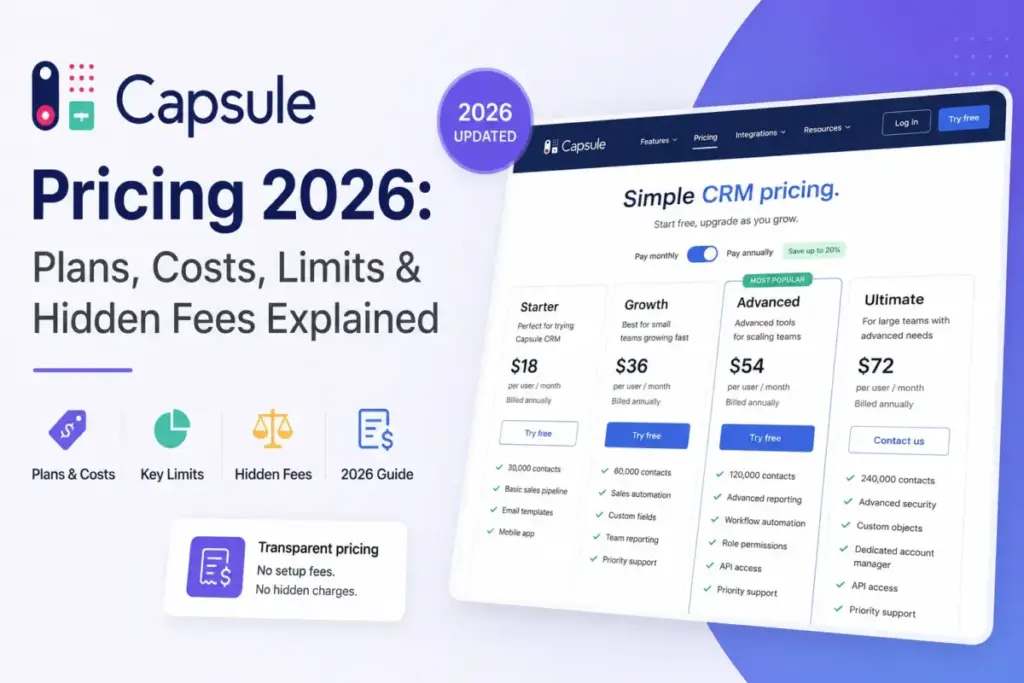
Capsule CRM pricing starts at $18 per user per month on annual billing. That number describes a plan most sales teams stop fitting inside within a quarter.
The tier that runs a real sales team is Growth at $36 per user per month on annual billing. For five seats that is $2,160 a year before tax.
Everything a sales manager assumes is standard sits above Starter: workflow automation, multiple pipelines, contact ownership, and team permissions. Capsule competes at the simple end of the category we cover in our best CRM software rankings, and the entry price reflects that.
This guide prices every plan at both billing cycles, calculates the bill at 1, 5, 10, 25, and 50 seats, and names the contract terms that move the total. Every figure was checked against Capsule’s official pages on July 23, 2026.
Quick Pricing Verdict
| Buyer question | Answer, checked July 23, 2026 |
|---|---|
| Starting paid price | $18 per user per month billed annually, $21 billed monthly |
| Free plan | Yes, permanent. Maximum 2 users, 250 contacts, 5 custom fields, 1 pipeline |
| Free trial | 14 days on a paid plan, no card required, unlimited trial users |
| Best plan for most sales teams | Growth, $36 per user per month annually |
| Plan to avoid | Starter, for any team that needs automation or shared permissions |
| Biggest disclosed extra | Marketing add-on from $11 per month, plus prorated seat true-ups on annual terms |
| Real annual discount | 14.3% on Starter, 5.3% on Growth, 10% on Advanced, 4% on Ultimate |
| Best cheaper alternative | Less Annoying CRM at $15 per user per month |
| Not included in listed prices | Sales tax |
The line that matters most in that table is the discount row. Capsule’s own pricing toggle advertises a single headline saving, but the real percentage collapses on the two tiers a growing team is most likely to buy.
Prices, plan names, and limits change without notice. Confirm the checkout total on Capsule’s site before you commit a budget.
Executive Summary: Capsule CRM Cost by Team Size
Capsule charges per user per month, so the bill scales linearly with headcount. There is no volume discount published for larger teams.
That seat-based model is the standard billing shape for what CRM software does, and it means headcount forecasting matters more than feature comparison here.
| Team size | Plan assumed | Monthly billing, per month | Monthly billing, 12 months | Annual billing, per year | Annual saving |
|---|---|---|---|---|---|
| 1 user | Starter | $21 | $252 | $216 | $36 |
| 5 users | Growth | $190 | $2,280 | $2,160 | $120 |
| 10 users | Growth | $380 | $4,560 | $4,320 | $240 |
| 25 users | Advanced | $1,500 | $18,000 | $16,200 | $1,800 |
| 50 users | Ultimate | $3,750 | $45,000 | $43,200 | $1,800 |
Plan selection in that table is an editorial assumption, not a Capsule requirement. A 25-person team with modest pipeline needs can stay on Growth at $10,800 a year, and a 50-person team can stay on Advanced at $32,400.
The jump from 10 to 25 users is where budget conversations usually start. Moving 25 seats from Growth to Advanced costs an extra $5,400 a year, purely for capacity rather than new workflow ability.
Add the Marketing add-on and the five-seat scenario rises to at least $2,292 a year. That figure uses the published $11 monthly starting price and will rise with list size.
I would budget from the Growth column, not the Starter column, for any team with more than two people selling.
Capsule CRM Pricing Plans Compared
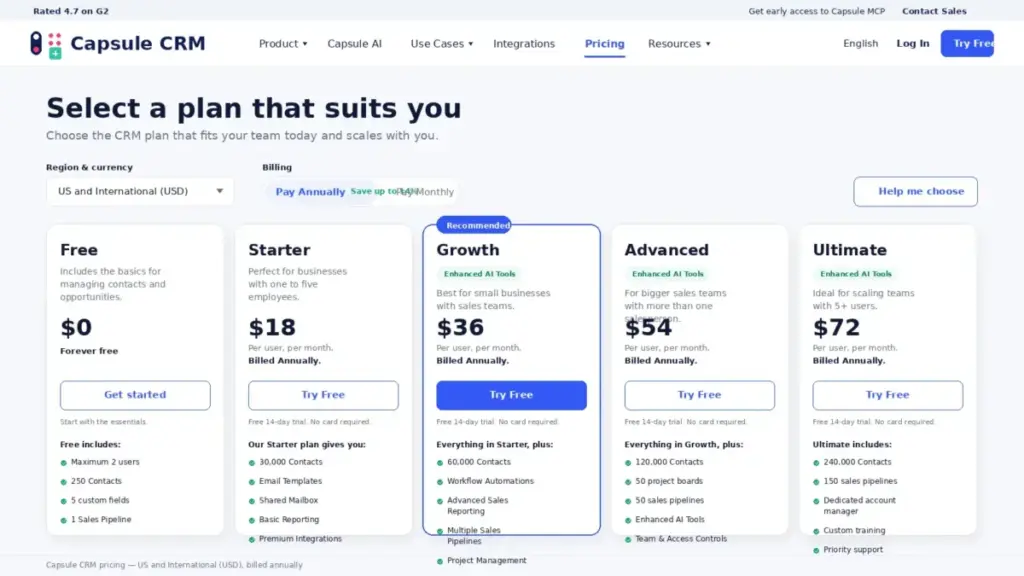
Capsule publishes five current plans for the US and international USD region. Free is a permanent tier rather than a trial.
| Plan | Billed monthly | Billed annually | Annual cash per seat | Billing basis | Best for | Key limits |
|---|---|---|---|---|---|---|
| Free | $0 | $0 | $0 | Per account, 2 users maximum | Solo consultants tracking under 250 records | 250 contacts, 5 custom fields, 1 pipeline |
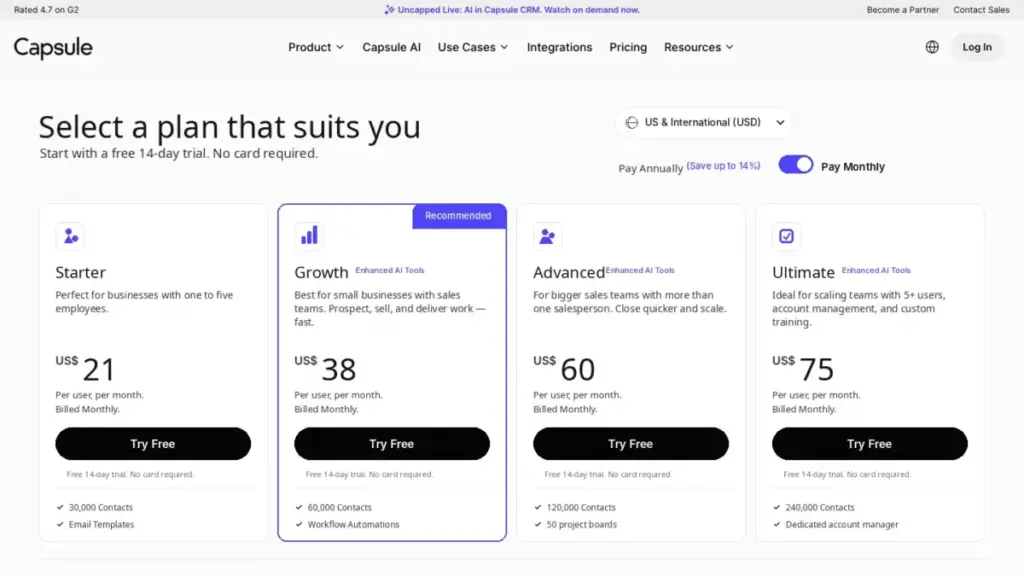
| Starter | $21 per user | $18 per user | $216 | Per user per month | 1 to 5 person relationship teams running one process | 30,000 contacts, 10GB per user, 50 custom fields, 5 email templates |
| Growth | $38 per user | $36 per user | $432 | Per user per month | 3 to 10 person sales teams that need automation | 60,000 contacts, 20GB per user, 150 custom fields, 50 email templates |
| Advanced | $60 per user | $54 per user | $648 | Per user per month | Teams running many parallel pipelines and delivery boards | 120,000 contacts, 30GB per user, 300 custom fields, 50 pipelines, 50 boards |
| Ultimate | $75 per user | $72 per user | $864 | Per user per month | Scaling teams that want an account manager and custom training | 240,000 contacts, 50GB per user |
Prices and plan structure come from Capsule’s official pricing page and its own comparison content, cross-checked with independent 2026 pricing reports on the same date. All figures are per user per month in USD and exclude tax.
Read the annual column vertically and a pattern appears. Each step up costs exactly $216 more per user per year, or $18 per user per month, from Starter through Ultimate.
The monthly column does not follow that rule. Steps of $17, $22, and $15 mean the annual ladder is engineered and the monthly ladder is not, which is why the annual discount varies so much by tier.
Professional, Teams, and Enterprise Are Legacy Plans
Several high-ranking pricing pages still list Capsule plans called Professional, Teams, or Enterprise. Those names are obsolete for anyone buying today.
Capsule moved to the current five-plan structure in October 2023. Its own legacy plan documentation confirms that Professional and Teams cannot be newly purchased, and that leaving a legacy plan is irreversible.
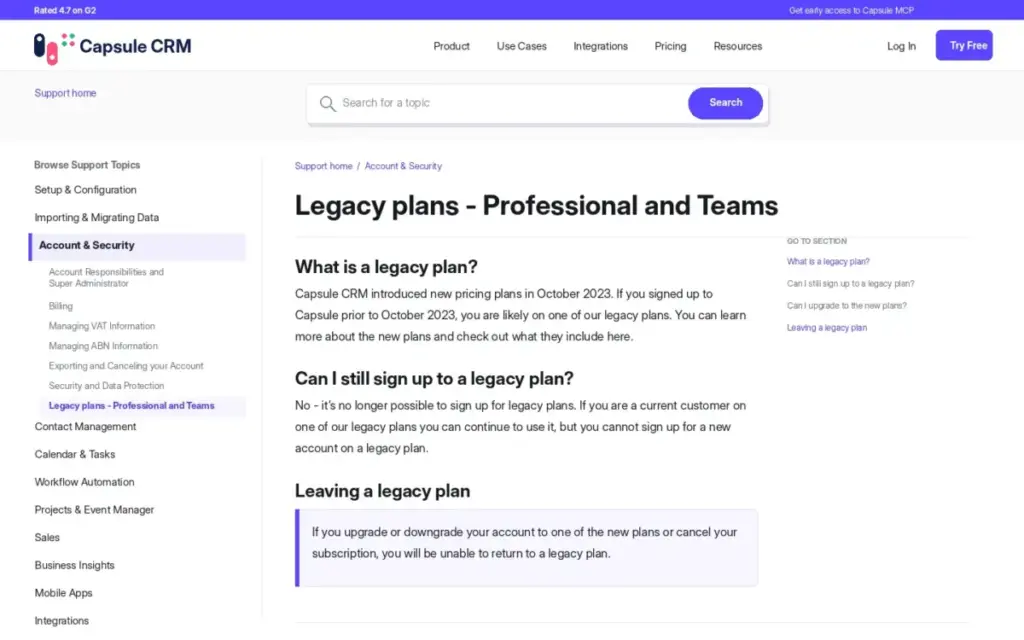
If a comparison page quotes you a Professional plan price, it is describing a product you cannot buy. Treat any article showing those tiers as stale, including the pricing table currently displayed on TrustRadius.
What Each Capsule CRM Plan Includes
Each plan below is judged on what it adds, what it withholds, and the team size where it stops working. Capsule’s own documentation is the source for every limit named here.
Free: Real, but Capped at 250 Records
Capsule’s free tier supports two users, 250 contacts, five custom fields, and one sales pipeline. It is a permanent plan rather than a countdown trial.
Missing: workflow automation, team and access controls, multiple pipelines, project boards, contact ownership, and the AI enrichment tools.
The 250-contact ceiling is smaller than it looks, because Capsule counts a person and an organisation as two separate records. A consultancy tracking 60 client companies and their 120 contacts has already consumed 180 of its 250 records.
Avoid if: you store both people and companies, or you expect to add a third user. Free works for a solo operator with a small, personal book of relationships, which is the same audience served by most tools in our best free CRM software roundup.
Verdict: a genuine free CRM, not a functional trial of the paid product.
Starter at $18: The Plan That Creates Upgrade Pressure
Starter costs $216 per seat per year on annual billing and lifts the contact ceiling to 30,000. It adds email templates, a shared mailbox, basic reporting, and goals.
Premium direct integrations such as Xero and Zendesk arrive here, along with the AI Pipeline Generator.
Missing: workflow automation, multiple pipelines, project boards, contact ownership, team permissions, advanced reporting, dashboards, and AI enrichment.
That missing list is the reason Starter is the tier I would treat with the most caution. A team buys it for $18, discovers it cannot assign contact owners or automate a follow-up, then pays double.
Avoid if: more than two people update records, or your process has more than one pipeline. Starter fits a one-process business where the CRM is a shared address book with deals attached.
Verdict: correctly priced for solo and two-person use, structurally thin for a sales team.
Growth at $36: The First Tier That Runs a Sales Team
Growth costs $432 per seat per year annually. Capacity doubles to 60,000 contacts, 20GB per user, 150 custom fields, and 50 email templates.
It is the first verified tier for workflow automation, advanced reporting, dashboards, multiple pipelines, and project boards. Team and access controls, contact ownership, and AI enrichment also start here.
Missing: the 50-pipeline and 50-board capacity of Advanced, and the account management attached to Ultimate.
Almost every feature a sales manager assumes is baseline arrives here at once. Contact ownership matters more than the marketing suggests, because without it Free and Starter users have to fake ownership with a custom field or tag.
Avoid if: you are a solo user who will never build an automation. For everyone else with a real pipeline, Growth is the honest starting price of Capsule.
Verdict: the practical tier, and the number I would put in a budget.
Advanced at $54: Capacity, Not New Capability
Advanced costs $648 per seat per year annually. Limits rise to 120,000 contacts, 30GB per user, 300 custom fields, and 500 email templates.
It also allows up to 50 sales pipelines, 50 project boards, and 5 shared outboxes.
Missing: Capsule’s public pages do not establish a clear set of new workflow features beyond that capacity increase.
This is a volume plan. At 25 seats it costs $5,400 a year more than Growth, and the justification has to be pipeline count, board count, or database size rather than better selling tools.
Avoid if: your team runs three pipelines and 40,000 contacts. You would be paying a 50% premium for headroom you will not touch.
Verdict: buy it when a specific limit blocks you, never as a default upgrade.
Ultimate at $72: Buying People, Not Software
Ultimate costs $864 per seat per year annually and lists 240,000 contacts and 50GB per user. The differentiator is service: a dedicated account manager, custom training, and a sales-assisted onboarding path.
Missing: a published service-level agreement, a published response time, and public confirmation of any contractual seat minimum.
Capsule positions Ultimate for teams with five or more users. This research did not verify a hard contractual minimum, so confirm that point with Capsule sales before assuming it applies.
Avoid if: you are buying purely for capacity. At 50 seats, Ultimate costs $10,800 a year more than Advanced, which is the price of the human support layer rather than the database.
Verdict: justified only when guided implementation and training genuinely reduce your internal admin load.
Feature Gates: Where Capsule Locks the CRM
Capsule’s plan structure has one dominant gate, and it sits between Starter and Growth. Almost every collaboration and automation capability crosses at that line.
| Capability | Free | Starter | Growth | Advanced | Ultimate |
|---|---|---|---|---|---|
| Workflow automation | No | No | Yes | Yes | Yes |
| Multiple sales pipelines | No, 1 only | No, 1 only | Yes | Yes, up to 50 | Yes |
| Project boards | No | No | Yes | Yes, up to 50 | Yes |
| Team and access controls | No | No | Yes | Yes | Yes |
| Contact ownership and reassignment | No | No | Yes | Yes | Yes |
| Advanced reporting and dashboards | No | Basic reporting only | Yes | Yes | Yes |
| Email templates and shared mailbox | No | Yes | Yes | Yes | Yes |
| Premium integrations (Xero, Zendesk, Import2) | No | Yes | Yes | Yes | Yes |
| AI Pipeline Generator | No | Yes | Yes | Yes | Yes |
| AI summaries and contact enrichment | No | No | Yes | Yes | Yes |
| Important Fields, 50 maximum | No | No | Yes | Yes | Yes |
| Dedicated account manager and custom training | No | No | No | No | Yes |
Nine of the twelve rows change state at Growth. A buyer who reads a feature list without reading the gate column will price Capsule at $18 and operate it at $36.
Contact ownership is the row I would flag hardest for sales managers. Without it, a rep cannot be formally assigned a book of accounts, and territory reporting becomes a manual tagging exercise.
One Feature Gate Capsule’s Own Pages Disagree On
Custom Activity Types appear under Starter on Capsule’s current pricing page. Capsule’s own setup and data-enrichment documentation lists the same feature as available on Growth, Advanced, and Ultimate only.
Both pages were checked on July 23, 2026 and both are official. This guide does not pick a winner, because a wrong call would push a buyer onto the wrong plan.
If custom activity types matter to your process, ask Capsule to confirm the gate in writing before you pay for Starter.
Starter Versus Growth: The Only Comparison That Matters
| Requirement | Starter can do it | Growth can do it | Annual cost of the difference |
|---|---|---|---|
| Automate a follow-up task after a stage change | No | Yes | $216 per user |
| Run separate new-business and renewal pipelines | No | Yes | Included in the same step |
| Assign contact owners to reps | No | Yes | Included in the same step |
| Restrict record visibility by team | No | Yes | Included in the same step |
| Build a dashboard for pipeline forecasting | No | Yes | Included in the same step |
| Enrich a contact record with AI | No | Yes | Included in the same step |
The whole upgrade costs $216 per user per year and delivers six capabilities at once. For a five-person team that is $1,080 a year to make the CRM behave like a shared system rather than a shared list.
I would not put a five-rep outbound team on Starter unless the team already knows it will never automate anything.
Plan Limits That Force an Upgrade
Feature gates decide what Capsule can do. Numeric limits decide when you have to pay more anyway.
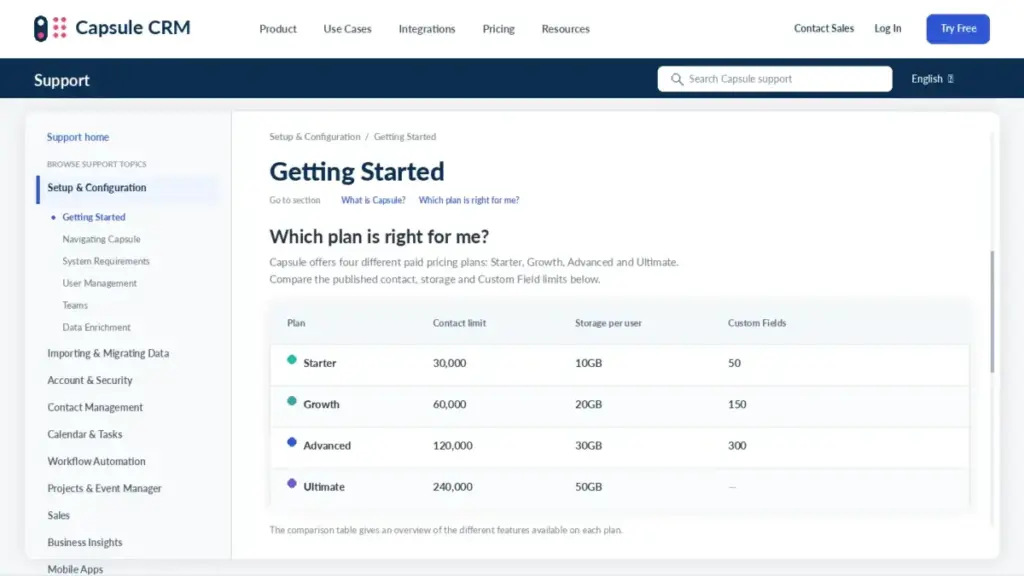
| Limit | Free | Starter | Growth | Advanced | Ultimate |
|---|---|---|---|---|---|
| Users | 2 maximum | Paid per seat | Paid per seat | Paid per seat | Paid per seat |
| Contact records | 250 | 30,000 | 60,000 | 120,000 | 240,000 |
| File storage per user | Not published | 10GB | 20GB | 30GB | 50GB |
| Custom fields | 5 | 50 | 150 | 300 | Not published |
| Email templates | Not available | 5 | 50 | 500 | Not published |
| Sales pipelines | 1 | 1 | Multiple, cap not published | 50 | Not published |
| Project boards | None | None | Multiple, cap not published | 50 | Not published |
| Stages per project board | Not applicable | Not applicable | 30 | 30 | 30 |
| Important Fields | Not available | Not available | 50 | 50 | 50 |
| API requests | 4,000 per user per hour on every plan |
Where this table says “not published”, Capsule’s public pages did not expose a current numeric cap on the research date. Nothing has been estimated to fill those cells.
Third-party reviews sometimes publish higher storage figures than the ones above. Capsule’s own setup documentation is the source used here, and it takes priority over editorial reviews.
Capsule Counts People and Companies Separately
Capsule’s contact documentation states that a Person linked to an Organisation consumes two contact records. Each record type counts against the plan cap independently.
Take a B2B database of 3,000 customer companies with an average of four named contacts each. That is 3,000 organisation records plus 12,000 person records, or 15,000 of your plan’s contact allowance.
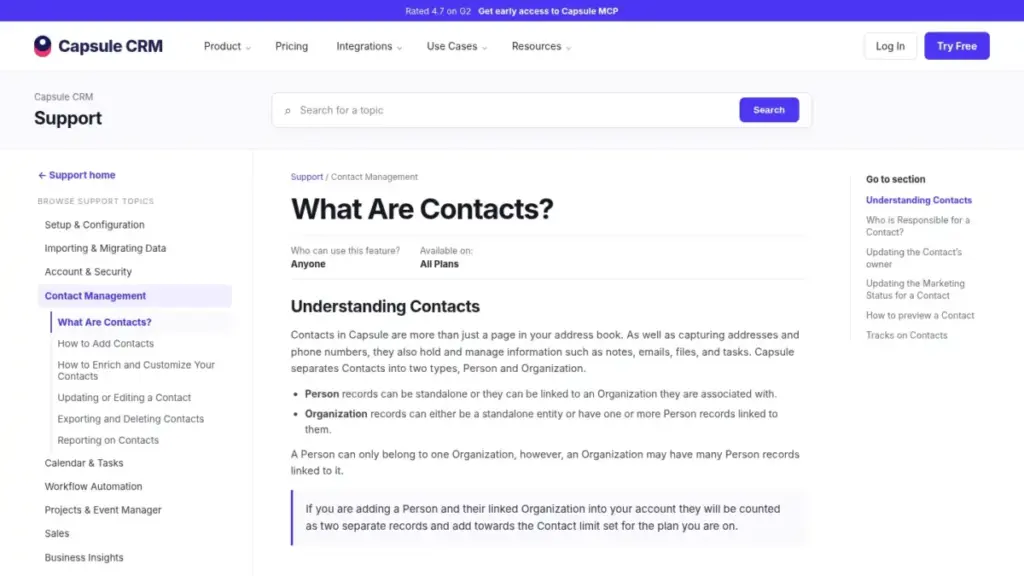
Model both record types before you choose a tier. A database that looks like 30,000 customers can consume closer to 45,000 records once companies are stored properly, which is the difference between Starter and Growth.
The mechanics here follow standard contact management principles, but the record-counting rule is specific to Capsule.
The 30-Stage Ceiling on Project Boards
Capsule caps each project board at 30 stages. For a normal onboarding or delivery process that is irrelevant.
For an agency modelling a 40-step production workflow it is a hard design constraint. You either consolidate stages or run the process in a dedicated project tool alongside the CRM.
Line-Item Cost Breakdown: Every Billable Item
A Capsule invoice has fewer moving parts than most CRMs. That is a genuine advantage, and it is worth naming precisely.
| Line item | How it is charged | Published amount |
|---|---|---|
| CRM seats | Per user per month, monthly or annual | $18 to $75 per user per month |
| Marketing add-on | Separate subscription, scales with usage | From $11 per month |
| Setup and onboarding | Not charged | $0 |
| Data migration | Offered by Capsule, no published fee | Not published |
| Sales tax | Added to listed fees by jurisdiction | Varies |
| Seats added mid-term on annual | Prorated invoice for the remaining term | Varies |
| Third-party connectors | Billed by the third party, not Capsule | Not published by Capsule |
Two of those lines are the ones that surprise finance teams. Mid-term seat additions and the marketing add-on are both real recurring costs that never appear in a plan comparison table.
There is no per-record overage fee. When you hit a contact limit, Capsule’s answer is an upgrade rather than a metered charge, which makes the bill predictable but the upgrade steps large.
Hidden Costs and Add-Ons
Capsule’s advertised price is closer to the real price than most CRMs. It is still not the whole invoice.
| Cost | Amount | What triggers it |
|---|---|---|
| Marketing add-on, Transpond | From $11 per month | Email campaigns, forms, marketing analytics, marketing automation |
| Sales tax | Not included in listed fees | Every invoice, by jurisdiction |
| Mid-term seats on an annual plan | Prorated for the remaining term | Capsule reviews annual account user counts monthly |
| Unused prepaid time | No refund and no credit | Cancelling part-way through a paid period |
| Third-party connectors | Set by each provider | Zapier, migration tools, or partner apps that need their own account |
| Email sending capacity | No Capsule fee | Google or Microsoft account sending limits |
| Downgrade cleanup | Staff time, no listed fee | Reducing data and configuration to fit a lower plan |
Ranked by how often it changes a budget, the marketing add-on is first and the annual seat true-up is second. Everything below those is a smaller correction.
The Marketing Add-On Is a Separate Product
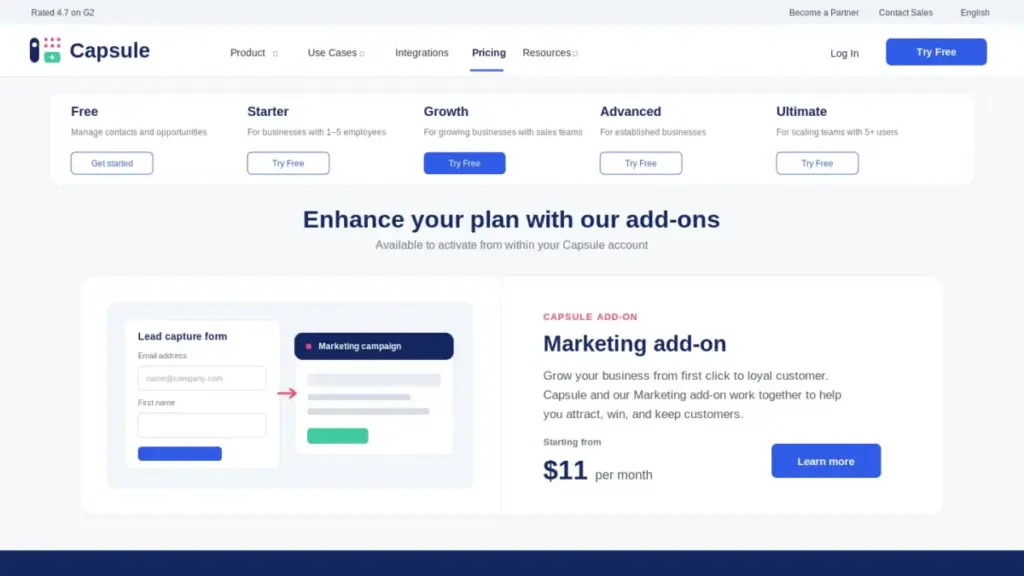
Capsule’s Marketing add-on starts at $11 per month and is powered by Transpond, which Capsule owns and integrates natively. It covers campaigns, signup forms, marketing analytics, and marketing automation.
Capsule’s base CRM plans include email templates, a shared mailbox, and email sending through your own provider. They do not include campaign sending or marketing automation sequences.
Only the $11 starting price is published. Actual cost scales with your marketing package, so treat $132 a year as a floor rather than a forecast.
That distinction is the one buyers get wrong most often. A team that reads “email templates included” and plans a nurture programme has under-budgeted its stack.
Adding a Seat Mid-Year Costs More Than You Think
Capsule’s customer terms state that annual accounts are reviewed monthly for user count, and additional users are invoiced for the remainder of the term. Paying annually does not freeze your headcount.
Here is an illustrative example. A five-seat Growth account hires a sixth rep with six months left on the term, producing a prorated charge of roughly $216 on top of the original $2,160.
That number assumes a simple month-by-month proration at the annual rate. Capsule does not publish its exact billing-day convention, so treat the figure as a planning estimate rather than a quoted price.
Cancel Anytime Does Not Mean Refund Anytime
Capsule’s customer terms confirm that subscriptions are billed in advance, renew automatically, exclude taxes, and provide no refund or credit for a partial period.
Cancelling in month two of an annual term ends the renewal. It does not return ten months of prepaid fees.
For a 25-seat Advanced account, that policy puts up to $16,200 of prepaid value at stake in a single decision. I would run the paid trial at full team size before committing to an annual term at that scale.
Annual vs Monthly Billing: The Real Savings Math
Capsule advertises a single headline discount for annual billing. The actual saving differs on every tier, and the difference is large enough to change the decision.
| Plan | 12 monthly payments | Annual commitment | Dollar saving | Percentage saving |
|---|---|---|---|---|
| Starter | $252 | $216 | $36 | 14.3% |
| Growth | $456 | $432 | $24 | 5.3% |
| Advanced | $720 | $648 | $72 | 10.0% |
| Ultimate | $900 | $864 | $36 | 4.0% |
These are calculations from the verified monthly and annual rates, not figures quoted by Capsule. Capsule’s own pricing toggle and pricing FAQ state slightly different headline percentages, so plan-level math is the safer basis.
Starter buyers get the best relative deal at 14.3%. Growth buyers, who are the largest realistic segment, save 5.3%, or $24 per seat per year.
My recommendation splits by plan. On Starter, take the annual term because 14.3% is a real saving on a low-risk commitment.
On Growth, Advanced, or Ultimate, run monthly for the first quarter. Saving 4% to 10% is not worth locking a large prepaid balance into a no-partial-refund policy while the team is still deciding whether the tool sticks.
Billing, Renewal, and Cancellation Rules
Capsule’s contract terms are short but consequential. Four rules affect the total cost of ownership directly.
Subscriptions bill in advance and renew automatically. Listed fees exclude taxes, and Capsule gives notice before price changes take effect.
Annual accounts have their user count reviewed each month, with added seats invoiced for the remaining term. Partial periods are not refunded or credited when you cancel.
After cancellation, account data becomes inaccessible. Capsule’s terms describe a 14-day restoration window, with backups persisting up to 50 days.
Export before you cancel, not after. Two weeks is a short runway for a CRM migration, and the process deserves the same planning as any other CRM migration project.
The Trial Path Matters More Than the Trial Length
Capsule offers a 14-day trial of a paid plan with no card required and no feature restrictions. Unlimited users can join during the trial.
That is a genuinely useful evaluation window.
The sequence matters. Capsule’s terms state that a Free user who upgrades to a paid service is charged immediately, without a further trial period.
If you want to evaluate Growth properly, start the paid-plan trial first. Starting on Free and upgrading later can cost you the evaluation window entirely.
Downgrading Is Work, Not a Toggle
Capsule’s pricing FAQ is explicit that a downgrade requires your data and usage to fit the lower plan first. Its own example describes deleting 30,000 contacts to move from a full Growth account down to Starter.
Before any downgrade, audit contacts, custom fields, pipelines, boards, templates, and premium integrations against the target plan’s caps. Export anything you will lose, reduce usage, then switch.
Budget the admin hours. A downgrade that saves $216 per seat can cost a day of cleanup on a large database.
Integrations, API Limits, and Email Capacity
Capsule lists more than 60 integrations. The catalog includes Gmail, Microsoft 365, Outlook, Xero, QuickBooks, Mailchimp, and Zapier.
Support responsibility across that catalog is not uniform.
Capsule’s customer terms state that third-party integrations are not warranted or supported by Capsule. Native features and the Capsule-owned marketing add-on sit inside Capsule’s support scope; a broken partner connector generally does not.
The 4,000-Request Hourly API Ceiling
Capsule’s developer documentation caps bearer-token API access at 4,000 requests per user per hour. Requests beyond that return a 429 response, and sustained excess load can trigger temporary blocking.
The official API documentation recommends throttling with roughly a one-second delay between calls, reading the reset headers, and caching results.
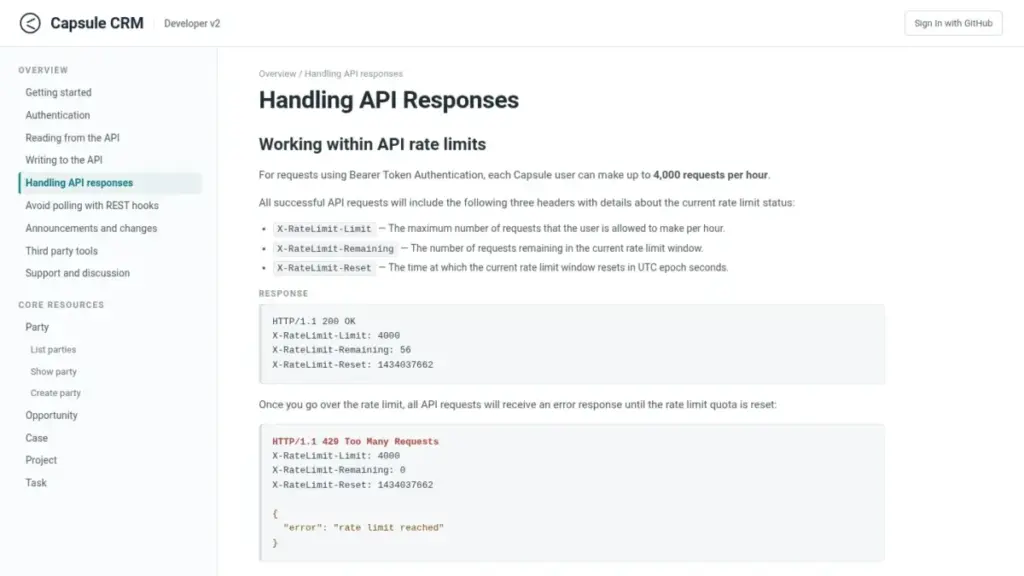
For a nightly two-way sync of 50,000 records, that ceiling is a design input rather than a blocker. Build in backoff and incremental sync from day one, or the integration will fail in production.
Capsule Does Not Control Your Email Quota
Capsule’s email documentation confirms that messages sent through the CRM remain subject to your Google or Microsoft account sending limits. The CRM plan does not raise them.
Provider limits vary by account type and were not researched here, so no number is quoted. Check your own Google Workspace or Microsoft 365 limit before planning high-volume one-to-one outreach.
Security, Compliance, and the Sensitive-Data Rule
Capsule states that data is encrypted in transit and at rest. It also lists role-based access controls, activity logging, GDPR compliance, and regular security audits.
Capsule’s data-protection material references ISO 27001 and SOC 2 attestations held by its third-party data centers.
Read those two claims separately. A data-centre attestation is not the same as a product-level certification, and procurement teams should request the specific scope in writing.
One clause disqualifies some buyers outright. Capsule’s customer terms prohibit uploading listed categories of sensitive personal data, including health data and certain biometric and sex-life data.
That is a contractual restriction, not a compliance verdict. A clinic, a therapy practice, or any team storing patient information should review the terms directly and get written confirmation before adopting Capsule at any price.
Which Capsule CRM Plan Should You Choose?
Team size alone does not answer this. Automation, ownership, and record count decide it.
| Your situation | Plan | Annual cost | Reason |
|---|---|---|---|
| Solo consultant, under 250 total records, no automation | Free | $0 | The cap fits, and the missing features are not in your process |
| 1 to 2 users, one pipeline, needs templates and shared inbox | Starter | $216 per seat | Reporting and integrations without paying for team controls |
| 3 to 10 person sales team needing automation and ownership | Growth | $432 per seat | The only tier where the CRM behaves as a shared system |
| Established team running more than 10 pipelines or boards | Advanced | $648 per seat | Capacity: 50 pipelines, 50 boards, 120,000 contacts |
| Scaling team wanting an account manager and custom training | Ultimate | $864 per seat | Service layer, not extra software |
Two rules cut through that table. If more than two people update records, start at Growth.
If your database stores companies as well as people, size the contact cap at roughly 1.5 times your customer count.
A five-person agency selling professional services lands on Growth at $2,160 a year. A 12-person team running new business, renewals, and onboarding boards in parallel also lands on Growth, at $5,184.
That team moves to Advanced only when it passes 60,000 records.
Cost is only half the decision. Our full Capsule CRM review covers day-to-day usability and reporting depth, which this pricing guide deliberately leaves alone.
Which Capsule Plan Should You Avoid?
Starter is the plan I would avoid for any real sales team. It looks like the value tier and behaves like a single-user tool.
The specific gate is automation and ownership. A team on Starter cannot automate a follow-up, cannot assign contact owners, cannot restrict visibility, and cannot build a forecasting dashboard.
Teams typically discover this in week three, after the data is already loaded. The upgrade then costs $216 per seat per year on top of what they have already committed.
Starter still fits one buyer well: a one-or-two-person business that wants a shared address book with deals, email templates, and Xero or QuickBooks sync. That buyer will never touch the missing features.
The second candidate is Advanced for teams under 60,000 records. Paying $216 more per seat per year for pipeline headroom you will not use is the clearest overspend in Capsule’s ladder.
Capsule CRM Pricing vs Competitors
Comparing entry prices across CRMs only works when the billing cycle is stated. All figures below were checked on July 23, 2026 on each vendor’s official US pricing page.
| CRM | Entry price | Billing basis shown | Entry-tier cost, 10 users, 12 months |
|---|---|---|---|
| Capsule CRM Starter | $18 per user per month | Annual | $2,160 |
| Capsule CRM Growth | $36 per user per month | Annual | $4,320 |
| Less Annoying CRM | $15 per user per month | Monthly, single tier | $1,800 |
| Zoho CRM Standard | $14 per user per month | Official US pricing calculator | $1,680 |
| Pipedrive Lite | $14 per seat per month | Annual, $168 per seat per year | $1,680 |
Higher tiers for the three competitors were not verified in this research, so no equivalent-tier comparison is offered. Comparing Capsule Growth against a rival’s entry plan would be misleading.
On entry price, Capsule is the most expensive of the four. Its counter-argument is a permanent free tier that Pipedrive does not publish, plus a simpler plan ladder than Zoho’s.
Less Annoying CRM’s official pricing is the sharpest contrast. One tier at $15 per user per month, plus tax, with a 30-day trial and no feature gates to map.
That single-tier model removes the upgrade-pressure problem entirely, which our Less Annoying CRM pricing guide breaks down against Capsule’s ladder.
Zoho Standard undercuts Capsule Starter by $4 per user per month and adds far deeper customization, at the cost of a heavier setup. Our Zoho CRM pricing breakdown covers where that complexity starts to bite.
At ten seats, the entry-tier gap between Capsule Starter and the cheapest rival is $480 a year. That gap widens to $2,640 once you compare Capsule Growth against those entry plans, which is the honest comparison for a team that needs automation.
Capsule’s counterweight is that its Growth tier includes automation and permissions at all, which several entry plans do not. Feature equivalence at the entry level should not be assumed in either direction.
Pipedrive’s Lite plan is the closest structural rival for pipeline-first teams at $168 per seat per year. It offers a 14-day trial and no permanent free plan.
If you need automation on the cheapest possible tier, Capsule is not the pick. If you need a free plan that survives past a trial and a plan ladder you can explain to a CFO in one slide, it is.
Is Capsule CRM Worth the Price?
Worth it if you have three to ten people selling, you want automation and contact ownership without an implementation project, and $432 per seat per year is inside budget. Capsule’s zero setup fee, free onboarding, and short plan ladder genuinely reduce the cost of getting live.
Worth it if your database stays under 60,000 combined person and organisation records. Capsule’s price advantage disappears once you are forced onto Advanced for capacity alone.
Not worth it if you are buying Starter to save money. You are buying a $216 plan that becomes a $432 plan, and the migration effort in between is wasted.
Not worth it if you need phone support, a contractual response time, advanced enterprise reporting, or marketing automation inside the base price. Capsule’s terms specify technical support by email, and no public service-level agreement was found.
Not worth it at any price if you store sensitive personal data that Capsule’s terms prohibit. That is a compliance stop, not a budget question.
For teams that outgrow this ladder entirely, our Capsule CRM alternatives guide covers the switch targets in more detail.
My verdict: Capsule is fairly priced at Growth and poorly positioned at Starter. Buy the tier that matches your workflow, not the one that matches the advertised headline.
How to Avoid Overpaying for Capsule CRM
- Start the paid-plan trial before creating a Free account. Free users who upgrade are charged immediately with no further trial, so the sequence costs you an evaluation window.
- Trial at full team size. The 14-day trial allows unlimited users and all plan features, which is the only honest way to test permissions and ownership.
- Count organisations as well as people. Size your plan at roughly 1.5 times your customer count if you store companies, or you will upgrade for capacity you did not plan.
- Run monthly for the first quarter on Growth and above. The annual saving is 4% to 5.3% on those tiers, which does not justify prepaying into a no-partial-refund policy.
- Take the annual term on Starter. At 14.3%, that discount is worth the commitment on a low-value plan.
- Price the marketing add-on separately. Add at least $132 a year to the budget if campaigns or nurture sequences are part of the plan.
- Forecast hiring before signing an annual term. Seats added mid-term are invoiced for the remainder, so a six-month hire on Growth adds roughly $216 to the year.
- Confirm the Custom Activity Types gate in writing. Capsule’s pricing page and support docs disagree, and the answer can move you a tier.
How We Verified This Capsule CRM Pricing Data
This guide is based on official Capsule pricing, support, developer, security, and customer-terms pages checked on July 23, 2026, plus SaaSZap editorial analysis. No Capsule account was created and no hands-on product testing was performed, so every functional statement above comes from published documentation rather than personal use.
Where Capsule’s dynamic pricing page did not expose a numeric price to the crawler, rates were cross-checked against Capsule’s own comparison content and independent 2026 pricing reports. Third-party review platforms were used for sentiment patterns only, never as the source for a price or a plan limit.
Where two official Capsule pages conflict, that conflict is stated rather than resolved. Where a limit was not published, the table says so instead of estimating.
Alex Morrison covers CRM software and sales operations for SaaSZap. Pricing changes frequently, so confirm the checkout total on Capsule’s site before purchase.
FAQ
How much does Capsule CRM cost per user?
Capsule CRM costs $18 to $72 per user per month on annual billing, or $21 to $75 billed monthly, as of July 23, 2026. Starter is $18, Growth is $36, Advanced is $54, and Ultimate is $72 per user per month annually.
A free plan supports two users, and prices exclude tax.
Is Capsule CRM free?
Yes, Capsule has a permanent free plan, not just a trial.
It supports a maximum of two users, 250 contact records, five custom fields, and one sales pipeline. Workflow automation, team controls, multiple pipelines, project boards, and contact ownership are excluded.
It suits a solo operator with a small relationship database.
What is the difference between Capsule Starter and Growth?
Growth costs $216 more per user per year and adds six things Starter lacks: workflow automation, multiple pipelines, project boards, team and access controls, contact ownership, and advanced reporting with dashboards. Growth also doubles contacts to 60,000 and storage to 20GB per user.
For any team with three or more sellers, Growth is the practical entry tier.
Does Capsule CRM have hidden costs?
The listed price excludes tax, and the Marketing add-on is billed separately from $11 per month.
Annual accounts are reviewed monthly for user count, so seats added mid-term are invoiced for the remaining period. Cancelling part-way through a paid period produces no refund or credit, and third-party connectors are billed by their own providers.
How many contacts can Capsule CRM store?
Capsule stores 250 contacts on Free, 30,000 on Starter, 60,000 on Growth, 120,000 on Advanced, and 240,000 on Ultimate. A linked Person and Organisation count as two separate records, so a company-based database consumes the allowance faster than the headline suggests.
Model both record types before choosing a tier.
Is there a free trial for Capsule CRM?
Capsule offers a 14-day trial of a paid plan with no card required, no feature restrictions, and unlimited trial users. Under Capsule’s customer terms, an existing Free user who upgrades to a paid plan is charged immediately without a further trial.
Start the paid trial first if you need to evaluate gated features.
Can I cancel Capsule CRM at any time?
You can cancel at any time, but Capsule’s terms provide no refund or credit for the unused part of a prepaid period. After cancellation, account data becomes inaccessible, with a 14-day restoration window and backups persisting up to 50 days.
Export your data before cancelling rather than afterwards.
Does Capsule CRM offer phone support?
Capsule’s customer terms specify technical support by email.
No contractual phone line, live chat, 24/7 availability, or response-time service-level agreement was verified in public sources on July 23, 2026. Ultimate adds a dedicated account manager and custom training, and teams needing guaranteed response times should ask Capsule sales for written terms.
Does Capsule CRM include email marketing?
Capsule’s paid CRM plans include email templates, a shared mailbox, and email sending through your own Google or Microsoft account. Campaigns, signup forms, marketing analytics, and marketing automation require the Marketing add-on, which starts at $11 per month and is powered by Capsule-owned Transpond.
Provider sending limits still apply.
Is Capsule CRM cheaper than Pipedrive or Zoho CRM?
No, not at entry level.
Pipedrive Lite is $14 per seat per month billed annually and Zoho CRM Standard is $14 per user per month, against Capsule Starter at $18. Capsule’s advantages are a permanent free plan and a simpler five-tier ladder, not the lowest sticker price.
Compare tiers in our Pipedrive pricing plans guide.
The Bottom Line on Capsule CRM Pricing
Capsule CRM pricing is honest at the top of the ladder and misleading at the bottom. The $18 entry rate is real, and so is the fact that it excludes the automation, ownership, and permissions a sales team runs on.
Budget $432 per seat per year for Growth if three or more people sell. Add $132 a year if you need campaigns, and forecast your hiring before signing an annual term.
Choose Free if you are solo and under 250 records. Choose Starter only if you will never automate anything.
Choose Advanced only when a specific limit blocks you.
Look at Less Annoying CRM at $15 per user per month if the Growth premium buys nothing you will use.
The one thing worth doing before you pay: count your organisation records alongside your people. That single number decides your tier more often than headcount does.