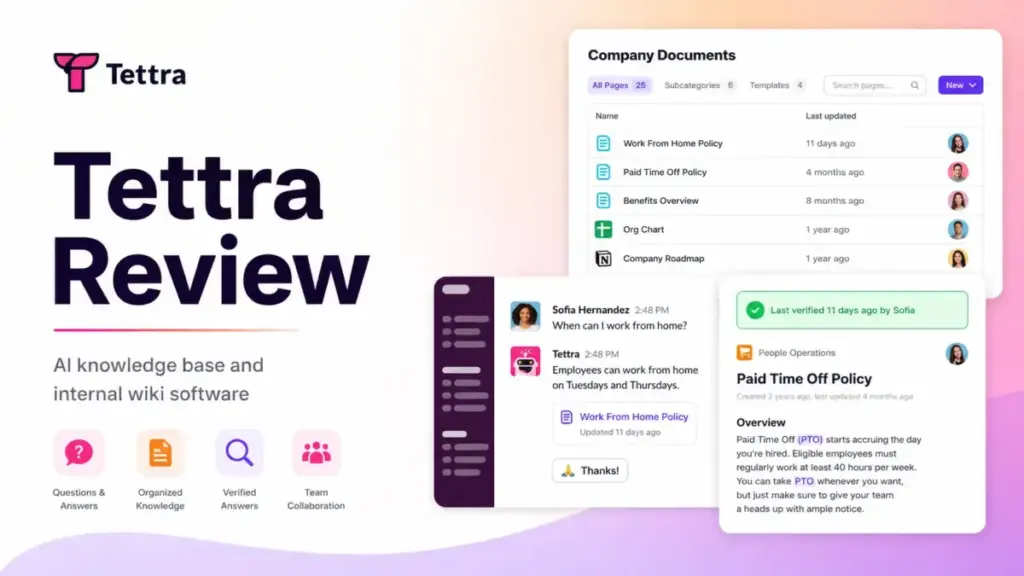
Most teams do not have a documentation problem. They have a “where did I see that answer” problem. The answer exists somewhere in a Slack thread, a Google Doc, a DM, or someone’s head. Nobody can find it when they need it. This Tettra review tests whether Tettra actually solves that problem or just moves scattered knowledge into another tool.
Tettra positions itself as an AI-powered knowledge base built around Slack. It is not a full documentation suite. It is not a customer-facing help center. It is a system for repeated internal questions, verified answers, and knowledge cleanup. That distinction matters, and most reviews skip it.
This review is based on hands-on workflow evaluation using official documentation, user feedback, pricing data, and competitive testing scenarios. I tested Tettra as a Slack-first knowledge base software option for teams between 10 and 250 employees, covering AI answer flows, expert routing, content verification, pricing gates, and alternatives.
TL;DR: Tettra Verdict and Score
Tettra scores 8.2 out of 10 as a Slack-first internal knowledge base for teams that need repeated questions answered quickly. It is not the best choice for every team or every knowledge problem.
| Category | Tettra Result | Buyer Impact |
|---|---|---|
| Best For | Slack-first teams with repeated internal questions | Strong fit for support, HR, onboarding, and SaaS ops teams |
| Not For | Customer-facing help centers or heavy doc design | Look at Document360 or Helpjuice instead |
| Score | 8.2/10 | Strong in its lane, limited outside it |
| Starting Price | $8/user/month billed yearly, 10-user minimum | $960/year minimum commitment |
| AI Feature | Kai answers in Slack and Tettra | Depends on content quality and structure |
| Free Trial | 30 days, no credit card | Low-risk entry |
| Top Alternatives | Guru, Notion, Confluence, Slite | Each fits a different team shape |
Tettra is strongest when your team already lives in Slack and the same questions keep coming up. It is weakest when you need rich formatting, public-facing docs, offline access, or enterprise governance on a lower-tier plan.
What Is Tettra?
Tettra is an AI-powered internal knowledge base and Q&A platform designed to stop repetitive questions in Slack. It is not a general-purpose wiki, a project management tool, or a customer support portal.
Tettra lets teams create new documentation or import existing content from Google Docs, Notion, and local files. The core workflow centers on its AI assistant, Kai, which answers questions directly in Slack channels and DMs. When Kai cannot find an answer, it routes the question to a subject matter expert. Once an expert answers, that answer becomes a verified knowledge base page.
This Slack-first design separates Tettra from broader tools like Notion or Confluence. It also limits Tettra. If your team does not use Slack heavily, or if you need a customer-facing help center, Tettra is the wrong tool. I will explain who should skip Tettra later in this review.
How I Tested Tettra
I evaluated Tettra through a workflow simulation covering the full question-to-verified-answer cycle. This was not a quick feature tour. I focused on the scenarios that matter to actual buyers.
My evaluation process:
- Built a small internal knowledge base from sample docs, covering onboarding, support policies, and IT procedures.
- Asked repeated questions in Slack to test Kai’s auto-answer behavior.
- Tested the flow when Kai could not find an answer, including question routing to subject matter experts.
- Reviewed the verification workflow for marking pages as current or stale.
- Checked stale-page reports and unowned content reports.
- Compared feature availability between Scaling and Enterprise plans.
- Reviewed pricing gates for SSO, SCIM, API, and group permissions.
- Cross-referenced user feedback from G2 (4.7/5, 161 reviews), Capterra (4.1/5, 9 reviews), and Gartner Peer Insights.
For full details on how SaaSZap reviews SaaS products, see our SaaS Zap review methodology.
Tettra Features That Matter
Tettra’s feature set is narrow on purpose. It focuses on AI answers, Slack Q&A, content verification, and knowledge maintenance rather than trying to be a general workspace.
Tettra Kai AI Answers
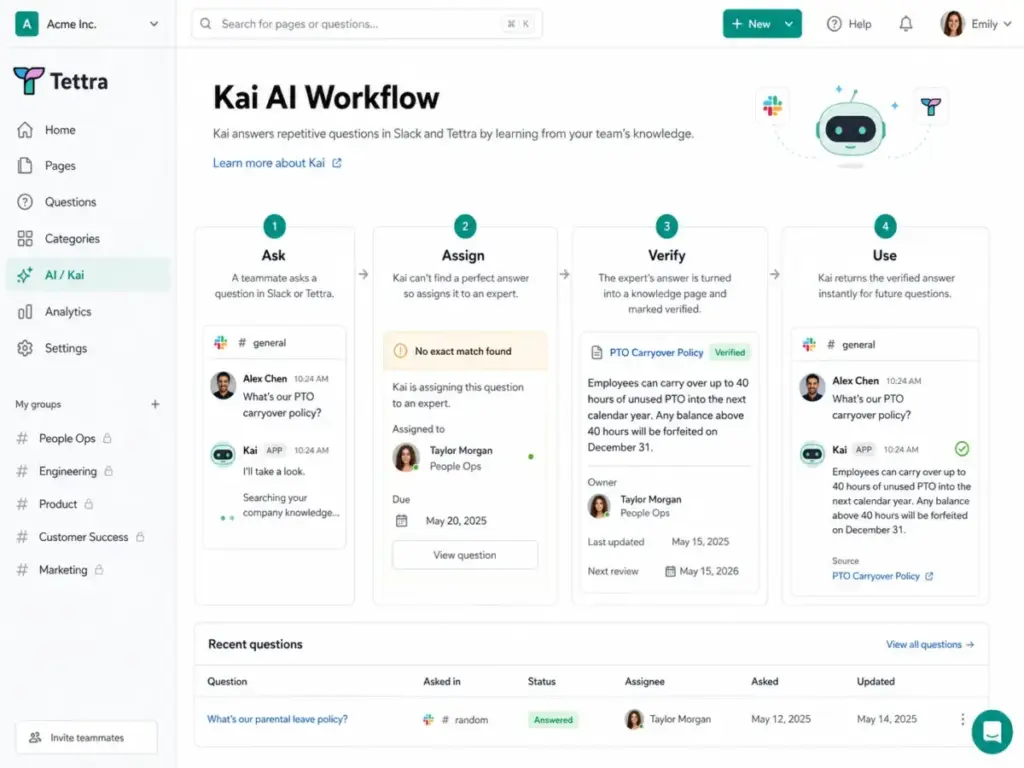
Kai is Tettra’s AI assistant. It works inside both Tettra and Slack. When someone asks a question, Kai searches the company’s knowledge base and returns an answer if one exists. If Kai cannot find a match, it assigns the question to a subject matter expert.
This is not a generic chatbot bolted onto a wiki. Kai’s value comes from the closed loop: question asked, answer found or routed, answer verified, answer reused. The quality of Kai’s answers depends entirely on the quality of the knowledge base content. If your pages are outdated or poorly structured, Kai will surface bad answers or no answers.
“The FAQ feature is particularly useful in my opinion.” – Hiten Shah, Crazy Egg, Product Hunt
Tettra Slack Q&A Workflow
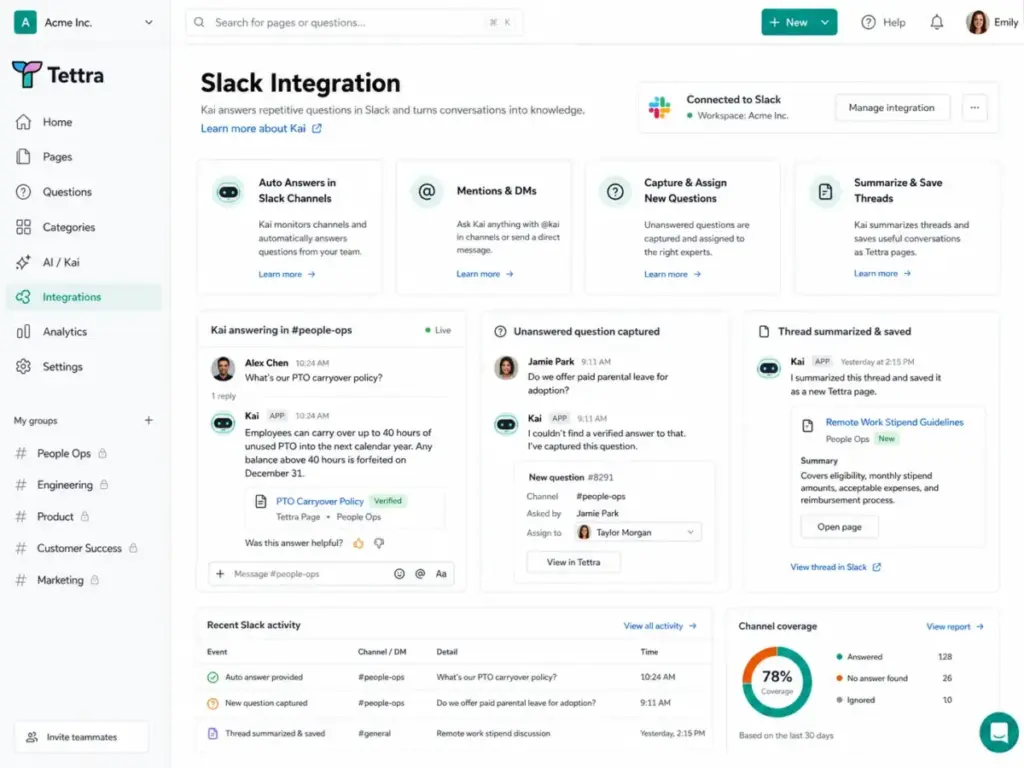
The Slack integration is Tettra’s strongest differentiator. Here is the actual workflow:
- A team member asks a question in a Slack channel.
- Kai checks the knowledge base and auto-answers if a match is found.
- If no match, Kai captures the question and routes it to the right expert.
- The expert answers in Slack or Tettra.
- The answer is saved as a Tettra page.
- The page enters the verification cycle.
- Next time the same question is asked, Kai answers instantly.
You can also mention Kai directly in DMs, summarize Slack threads into Tettra pages, and get Slack notifications with link previews. Slack SSO is available for account management.
“Integration with Slack makes looking up information easy.” – Helia T., Scientist, Higher Education, Capterra
Tettra Knowledge Verification
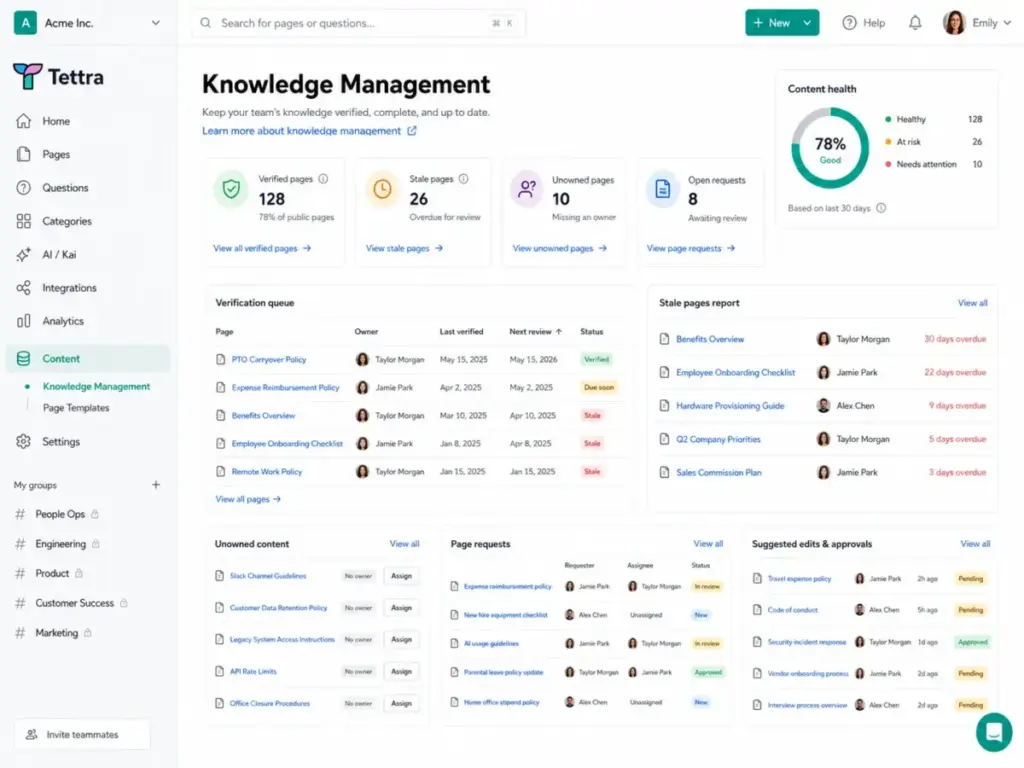
Tettra’s verification system is what keeps a knowledge base from rotting. Most wiki tools let you create pages. Few force you to maintain them.
Tettra includes:
- Page verification: Owners confirm content is still accurate on a set schedule.
- Stale pages report: Flags pages that have not been verified recently.
- Unowned content report: Identifies pages with no assigned owner.
- Public content report: Shows what is visible outside the team.
- Suggested edits and approvals: Contributors can suggest changes without directly editing.
- Page requests: Team members can request new pages for missing topics.
This matters because knowledge bases fail not from lack of content but from content decay. Tettra’s verification loop directly addresses that problem.
Tettra Content Organization
Tettra organizes content into categories and pages. You can create new documentation inside Tettra or import from Google Docs, Notion, and local files. The editor is functional but not rich. Multiple user reviews on G2 and Gartner mention limited formatting and customization options.
“I appreciate the organization of documents within the platform.” – Mitchell S., validated reviewer, G2, December 15, 2025
The search works, but its quality depends on how well content is structured and maintained. This is a recurring theme with Tettra: the tool gives you the system, but your team has to run it.
Tettra Integrations and API
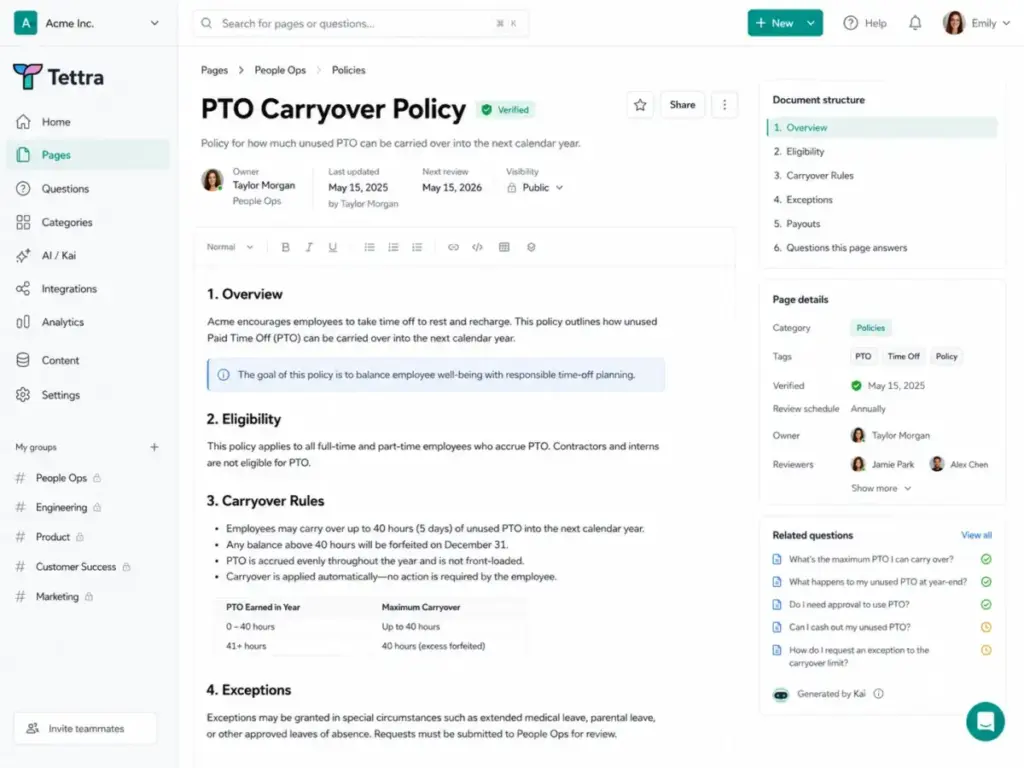
Tettra’s integration list includes Slack, Google Workspace, GitHub, Zapier, Notion, and an API.
The integration count is modest compared to tools like Guru (100+ integrations). For most small teams, Slack and Google Workspace cover the critical workflows. If you need deep integrations with CRM, ticketing, or HRIS systems, you will need Zapier or the API.
About the API: Tettra’s public API is limited and experimental. Tettra’s own documentation warns that breaking, non-backward-compatible changes are possible. API keys are available only on Scaling and Enterprise plans. Do not build critical automations on this API without accepting that risk.
Tettra Permissions and Governance
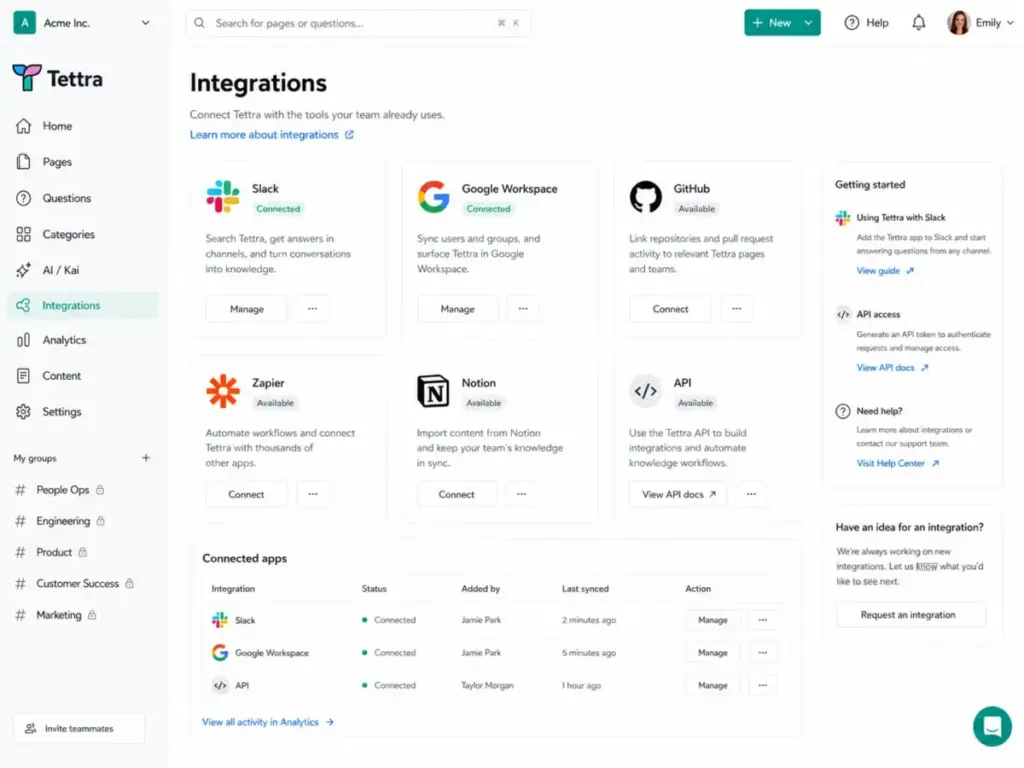
Tettra offers guest users, read-only users, invite-only categories, page locking, and group permissions. However, the governance features are gated.
Key governance gates:
- SAML SSO and SCIM: Paid add-ons on the Scaling plan. Included on Enterprise. This is confirmed on Tettra’s pricing page and SSO/SCIM support docs.
- Group permissions: Require a SCIM add-on on Scaling. Included on Enterprise.
- Custom reporting: Enterprise only.
- Hands-on training and custom onboarding: Enterprise only.
If your team requires SSO and SCIM on day one without paying for add-ons, Enterprise is your only option, and that requires contacting sales.
Tettra Security and Admin Controls
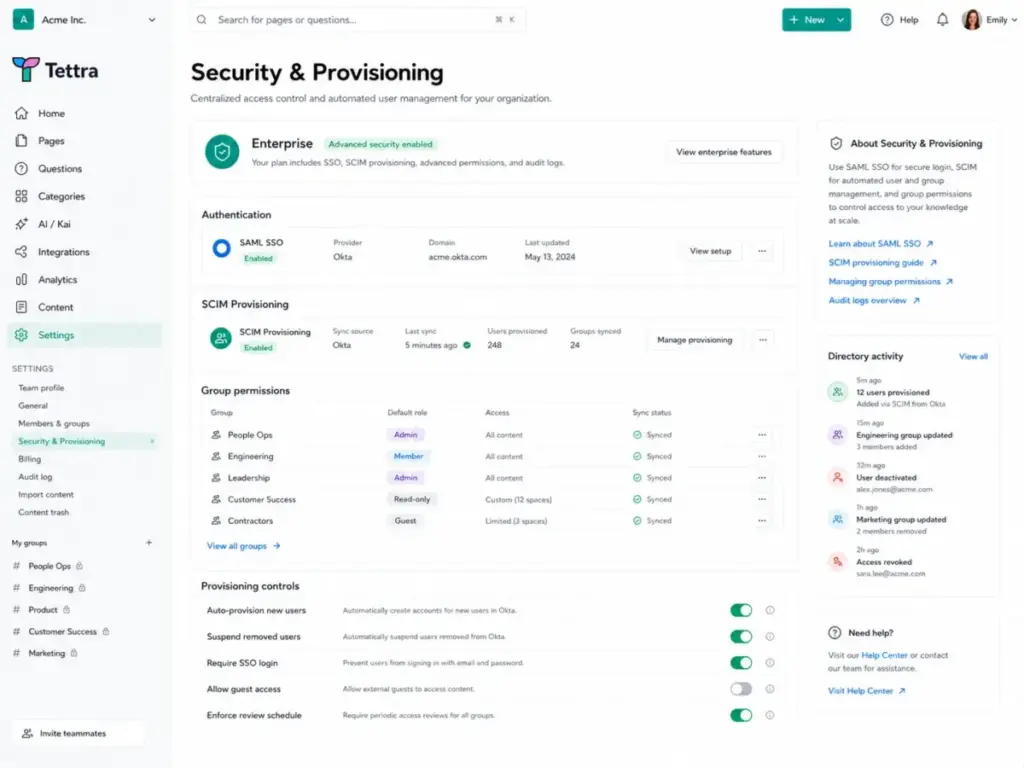
Tettra covers the basics of SaaS security, but enterprise-grade controls require higher plans or add-ons. Do not assume all security features are included on every plan.
What is included by default, based on Tettra’s security page:
- HTTPS encryption in transit.
- Primary database and backups encrypted.
- Daily backups.
- Content can be exported as HTML.
- Tettra states it can restore from backup within an hour in a data-loss event.
- Hosting on Heroku and AWS.
- Authentication via Slack.
GDPR: Tettra’s GDPR page says it supports self-serve data exports and data deletion requests.
I did not find official Tettra documentation confirming SOC 2 certification. I will not claim it exists. If your compliance team requires SOC 2, ask Tettra directly before committing.
Tettra User Experience
Setup is fast, but long-term adoption depends on your team’s discipline around content ownership. Tettra is not hard to learn. The harder part is maintaining a healthy knowledge base over time.
“I like Tettra for its ease of use.” – Ashwin J., validated reviewer, G2, April 10, 2026
What works well:
- Getting started is quick. The 30-day free trial requires no credit card.
- Importing from Google Docs is straightforward.
- The Slack flow feels natural for teams already living in Slack.
- Verification reminders push content owners to review their pages.
- Analytics show which pages are used and which are ignored.
Where users report friction:
- The editor has limited formatting and customization. Users on G2 and Gartner mention this repeatedly.
- Search results depend heavily on how well content is organized and titled.
- Gartner feedback mentions concerns about simultaneous editing limitations.
- Gartner feedback also notes no offline access.
- Large organizations may find the governance model too simple for complex permission structures.
Tettra Pricing and Plans
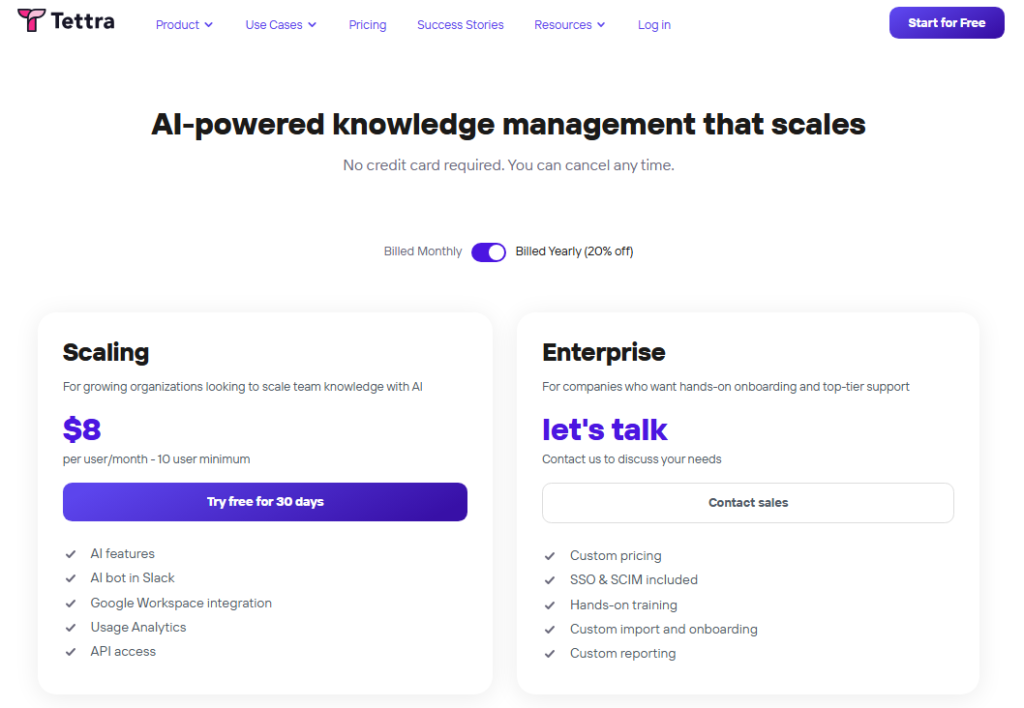
Tettra’s current pricing is simple at first glance, but confusing when you compare official sources. Here is what I verified directly from the Tettra pricing page on May 9, 2026.
Current Official Pricing
| Plan | Starting Price | Minimum Users | Best For | Key Gates | Verified |
|---|---|---|---|---|---|
| Scaling | $8/user/month (billed yearly) | 10 users | Growing teams needing AI, Slack bot, analytics, API | SSO/SCIM are paid add-ons; group permissions need SCIM add-on | May 9, 2026 |
| Enterprise | Custom pricing (contact sales) | Contact sales | Teams needing SSO, SCIM, custom onboarding, priority support | Everything included | May 9, 2026 |
Tettra’s pricing page states yearly billing saves 20%.
The Plan Name Confusion
The current pricing page emphasizes Scaling and Enterprise. However, Tettra’s own FAQ and G2 still reference older plan names. The FAQ mentions Basic at $5/user/month for teams of 10+, Scaling at $10/user/month for up to 250 users, and Enterprise at $7,200/year for the first 50 users. G2 lists Basic starting at $40/month for 10 users, Scaling at $80/month for 10 users, and Professional at $7,200/year for 50 users.
I recommend treating the current pricing page as the primary source and asking Tettra directly if the older plans are still available.
User Count Cost Table
| Team Size | Scaling Cost Estimate (Yearly Billing) | Enterprise Note | Buyer Takeaway |
|---|---|---|---|
| 10 users | $80/month or $960/year | Custom quote required | Minimum entry point for Scaling |
| 25 users | $200/month or $2,400/year | Custom quote required | Reasonable for mid-size teams |
| 50 users | $400/month or $4,800/year | Older FAQ reference: $7,200/year for 50 users | Compare Scaling + add-ons vs. Enterprise |
| 100 users | $800/month or $9,600/year | Custom quote required | Enterprise likely makes more sense at this scale |
At 50 users, the Scaling plan costs $4,800/year before SSO/SCIM add-ons. The older Enterprise floor of $7,200/year for 50 users (from FAQ/G2 references) suggests Enterprise may cost roughly $2,400 more but includes SSO, SCIM, custom onboarding, and priority support. At that scale, the Enterprise upgrade starts making financial sense.
Tettra Pros and Cons
Here is what holds up and what does not, based on workflow testing and verified user feedback.
| Pros | Cons |
|---|---|
| Slack-first Q&A workflow is genuinely useful for teams with repeated questions | Editor and formatting options are limited compared to Notion or Confluence |
| Kai AI answers work in both Slack and Tettra, reducing context switching | API is limited, experimental, and may have breaking changes |
| Content verification and stale-page reports actively fight knowledge decay | SSO and SCIM require paid add-ons on Scaling or an Enterprise contract |
| Question routing to subject matter experts closes the unanswered question gap | Not built for customer-facing help centers or public documentation |
| 30-day free trial with no credit card lowers evaluation risk | Simultaneous editing limitations reported by Gartner users |
| Google Docs import simplifies migration from scattered documents | Search quality depends on content structure and discipline |
| Slack thread summarization captures tribal knowledge before it disappears | Microsoft Teams workflows are secondary to Slack |
| Good adoption curve for non-technical teams already in Slack | No offline access, per Gartner user feedback |
What Most Tettra Reviews Get Wrong
Most reviews treat Tettra like a general wiki and compare it against full documentation platforms. That framing misses the point.
Tettra is not trying to be Notion. It is not trying to be Confluence. Its homepage says “stop answering repetitive questions in Slack.” That is the product’s center of gravity.
When reviewers compare Tettra’s editor to Notion’s editor, or Tettra’s integrations to Guru’s 100+ integrations, they are measuring the wrong thing. Tettra wins when your problem is specific: the same onboarding questions keep appearing in Slack, new hires keep DMing the same three people, and nobody knows which Google Doc has the current travel policy.
If that is your problem, Tettra’s Slack-first Q&A loop, Kai AI answers, and verification workflow are a tighter solution than most general-purpose tools. If your problem is broader, like building a full internal documentation library, managing complex projects, or running a public help center, Tettra is the wrong tool.
The other gap in most reviews: nobody explains that Tettra’s AI value depends on knowledge hygiene. Kai can only answer from what your team puts into the system. If your pages are outdated, duplicate, or poorly organized, Kai will reflect that. The AI is only as good as the content behind it.
Tettra Alternatives: Decision Table
No single knowledge base tool fits every team. Here is when to pick Tettra and when to pick something else.
For detailed reviews of each tool, see the individual reviews linked below the table.
| Alternative | Choose It If | Choose Tettra If |
|---|---|---|
| Guru | You need 100+ integrations, SOC 2, HIPAA, and enterprise governance | You want simpler Slack Q&A without an enterprise sales process |
| Notion | You need a flexible workspace with databases, projects, and docs in one place | You want a focused Slack Q&A system, not a multi-purpose workspace |
| Confluence | Your team runs on Jira and needs deep Atlassian integration | Your team runs on Slack, not Jira, and needs faster adoption |
| Slite | You want transparent pricing with AI search at $8/user/month and SSO at $20/user/month | You specifically need Kai’s Slack channel auto-answers and expert routing |
| Document360 | You need a customer-facing knowledge base or public help center | You need an internal knowledge base for team questions only |
| Helpjuice | You need branded public support content and external self-service | You need internal Slack Q&A, not external customer support docs |
| Nuclino | You want a fast, lightweight team wiki without Slack-heavy workflows | You need AI-powered Slack Q&A and knowledge verification workflows |
| Coda | You need interactive docs, tables, automations, and doc-app hybrids | You only need internal Q&A and do not want workflow complexity |
Tettra vs Guru
Guru is the stronger choice for enterprise teams needing compliance certifications (SOC 2 Type II, HIPAA, GxP), permission-aware AI answers with citations, and 100+ integrations. Tettra is simpler and more direct for Slack-first teams under 250 people. Guru’s current pricing is sales-led and tailored to organization scale. See our full Guru review for details.
Tettra vs Notion
Notion offers more flexibility with databases, project views, and a generous free plan. Notion Business at $20/member/month includes SAML SSO, verified pages, and private teamspaces. But Notion is not purpose-built for Slack Q&A and expert routing. Tettra is a sharper tool for a narrower problem. See our Notion review.
Tettra vs Confluence
Confluence fits teams already invested in the Atlassian ecosystem. The Standard plan at roughly $5.42/user/month offers 250 GB storage. Premium adds unlimited storage, 24/7 support, and a 99.9% uptime SLA. Confluence is heavier to administer and harder to adopt for non-technical teams. Tettra wins on adoption speed for Slack-first organizations. See our Confluence review.
Tettra vs Slite
Slite is the closest competitor in positioning. Slite Standard costs $8/user/month billed yearly with AI Search, verification, and analytics. Slite Knowledge Suite at $20/user/month adds Enterprise Search and OpenID SSO. Slite limits AI answers to 30/month/user on Standard and 100/month/user on Knowledge Suite. Tettra’s advantage is deeper Slack integration with Kai’s auto-answers and expert routing. See our Slite review.
Tettra vs Document360 and Helpjuice
Both Document360 and Helpjuice are built for customer-facing knowledge bases and public help centers. Tettra is built for internal team knowledge. If you need external docs, branded support portals, or public self-service content, look at our Document360 review or Helpjuice review instead.
Tettra vs Nuclino and Coda
Nuclino is a faster, lighter team wiki for general collaboration. Coda is a more powerful doc-app hybrid for structured workflows and tables. Neither is built around Slack Q&A the way Tettra is. If your primary need is not repeated Slack questions, see our Nuclino review or Coda review.
Who Should Use Tettra?
Tettra fits specific team profiles well. It is not for everyone, and that is fine.
- Slack-first support teams: If your internal support requests arrive in Slack channels and you want Kai to auto-answer the common ones, Tettra is built for you.
- SaaS startups (10 to 250 employees): Growing teams that outgrew “just search Slack” but do not need a full enterprise documentation platform.
- HR and operations teams: Teams documenting onboarding flows, company policies, travel rules, and SOPs that get asked about repeatedly.
- Agencies managing client processes: Small agencies with documented workflows that team members need to reference frequently.
- Any team where the same 50 questions keep showing up: If your bottleneck is repeated questions, not document creation, Tettra targets that problem directly.
Who Should Not Use Tettra?
Tettra is the wrong choice for these situations, and I would recommend looking elsewhere.
- You need a public help center or customer-facing knowledge base. Tettra is internal-only. Use Document360 or Helpjuice for external support content.
- You need rich document design and formatting. Tettra’s editor is functional, not powerful. Multiple user reviews cite limited formatting. Use Notion or Confluence if document design matters.
- Your team works primarily in Microsoft Teams, not Slack. Tettra’s core value is Slack-native. Teams workflows are secondary. This is a structural limitation, not a missing feature.
- You need enterprise governance on a lower budget. SSO and SCIM are add-ons on Scaling and only included on Enterprise. If your compliance requirements demand SSO on day one, budget for the add-on or go Enterprise.
- You need offline access. Gartner user feedback flags no offline access. If your team works in environments with unreliable internet, Tettra will not work well.
- You need real-time simultaneous editing. Gartner feedback mentions this limitation. If your workflow requires multiple people editing the same page at the same time, consider Notion or Confluence.
- You have 500+ employees and need deep customization. Large organizations may outgrow Tettra’s governance and customization model. Guru or Confluence better serve that scale.
Final Verdict: 8.2/10
Tettra earns an 8.2 out of 10 for doing one thing well: turning repeated Slack questions into verified, reusable knowledge. It does not try to do everything, and that focus is both its strength and its ceiling.
Buy Tettra if: Your team lives in Slack, the same internal questions keep appearing, and you want a system that auto-answers, routes unanswered questions to experts, and keeps pages verified and current. The 30-day free trial with no credit card makes evaluation low-risk. Scaling at $8/user/month with a 10-user minimum is a reasonable entry point.
Skip Tettra if: You need a customer-facing knowledge base, rich document design, Microsoft Teams-first workflows, enterprise SSO without add-on costs on Scaling, offline access, or simultaneous editing. In those cases, look at Guru, Notion, Confluence, Document360, or Helpjuice depending on your specific need.
Tettra is not the best knowledge base for every team. It is the best knowledge base for teams whose knowledge problem starts and ends in Slack. If that describes your team, it is worth the trial.
FAQ
What is Tettra used for?
Tettra is used as an internal knowledge base for teams that want to reduce repeated questions in Slack. It combines AI-powered answers through its Kai assistant, question routing to subject matter experts, content verification, and Slack integration into a single workflow.
How much does Tettra cost?
Tettra Scaling costs $8 per user per month billed yearly with a 10-user minimum, making the minimum annual cost $960. Enterprise pricing is custom and requires contacting sales. SSO and SCIM are paid add-ons on Scaling and included on Enterprise. Pricing verified May 9, 2026.
Is Tettra free?
Tettra is not free for ongoing use, but it offers a 30-day free trial with no credit card required. There is no permanent free plan listed on the current pricing page.
Does Tettra work with Slack?
Yes. Slack is Tettra’s primary integration. The Kai AI assistant auto-answers questions in Slack channels and DMs, captures unanswered questions, routes them to experts, and can summarize Slack threads into knowledge base pages.
What is Tettra Kai?
Kai is Tettra’s AI assistant that searches company knowledge base content and answers questions directly in Slack or inside Tettra. When Kai cannot find an answer, it assigns the question to a subject matter expert for resolution.
Is Tettra better than Confluence?
Tettra is better than Confluence for Slack-first teams that need fast adoption and AI Q&A. Confluence is better for Jira-integrated teams needing structured documentation at enterprise scale with more storage and admin controls.
Is Tettra better than Notion?
Tettra is better than Notion for the specific use case of Slack-based repeated questions and expert routing. Notion is better as a flexible all-in-one workspace with databases, projects, and a free plan.
What are the best Tettra alternatives?
The best Tettra alternatives depend on your needs. Guru fits enterprise governance and compliance. Notion fits flexible workspaces. Confluence fits Jira teams. Slite fits clean docs with AI. Document360 and Helpjuice fit customer-facing help centers. Nuclino fits lightweight wikis. Coda fits workflow-heavy doc apps.
Does Tettra support SSO?
Tettra supports SAML SSO, but it is a paid add-on on the Scaling plan. SSO is included on the Enterprise plan. Slack SSO is available for basic account management on all plans.
Does Tettra have an API?
Yes, but with caveats. Tettra offers a limited public API that is explicitly marked as experimental. Breaking, non-backward-compatible changes are possible. API keys are available on Scaling and Enterprise plans only.