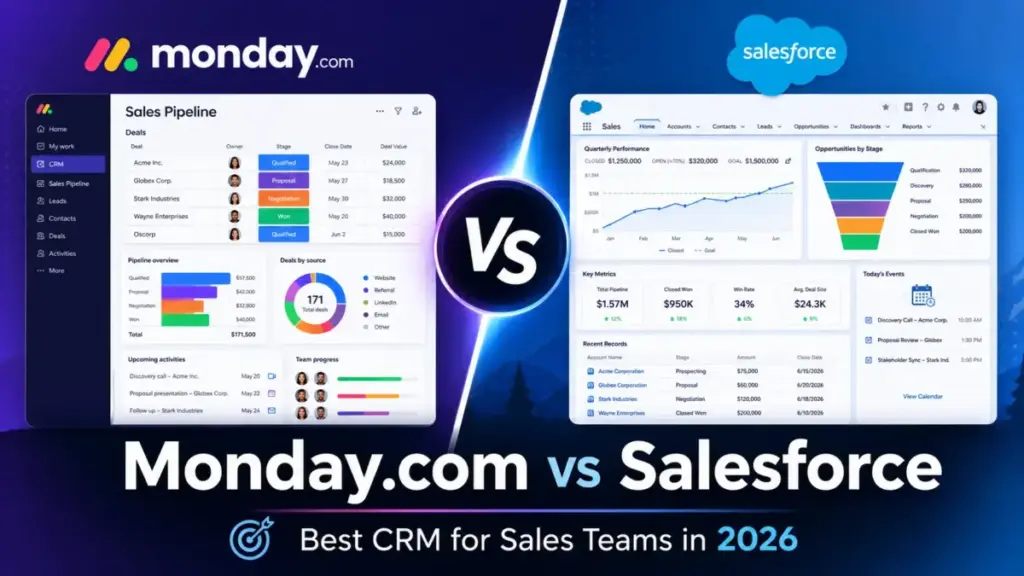
monday CRM starts at $12/seat/month, billed annually as of June 2026. Salesforce Sales Cloud starts at $25/user/month. Those two numbers may look close at first, but the real cost gap shows up at 10 users, 25 users, and beyond. A 25-person sales team on monday CRM Standard pays $425/month. The same team on Salesforce Starter Suite pays $625/month, before any support upgrade, AI add-on, or implementation partner cost.
Choose monday CRM if your team wants a visual pipeline, fast adoption, and lower software cost without a dedicated CRM admin. Choose Salesforce Sales Cloud if your sales process needs deep object relationships, enterprise governance, advanced forecasting, and RevOps ownership.
This comparison breaks down what CRM software actually does when you put both tools through the workflows that matter most: pipeline management, automation at scale, and reporting depth. After evaluating 40+ CRM platforms, I, Alex Morrison, can tell you the pricing page rarely reflects what a 10-person team actually pays. The cost-at-scale numbers below will tell you more than any feature checklist.
Quick Verdict: Monday.com vs Salesforce
| Category | Winner | Why |
|---|---|---|
| Lowest software cost | monday CRM | 17/seat/monthvs25/user/month at entry tier (annual) |
| Ease of use and adoption speed | monday CRM | Visual boards, low admin overhead, faster rep adoption |
| No-code workflow automation | monday CRM | Built-in automations accessible within plan limits |
| CRM depth and enterprise customization | Salesforce | Deeper object model, forecasting, territory management |
| AI and sales intelligence | Salesforce | Agentforce, predictive AI, conversation intelligence |
| Integrations and ecosystem | Salesforce | AppExchange, AgentExchange, Customer 360, Slack, Tableau |
| Support and governance | Depends | monday CRM for standard support; Salesforce for enterprise success plans |
| Cost at 25 users | monday CRM | 425/monthvs625/month at comparable entry tiers |
| Setup and onboarding speed | monday CRM | Low complexity; no mandatory onboarding calls |
| Reporting and analytics depth | Salesforce | Multi-object reporting, custom dashboards, pipeline insights |
What this means: monday CRM wins 5 of 10 categories, Salesforce wins 4, and 1 depends on your support needs. The split is not random. monday CRM wins on cost, speed, and usability. Salesforce wins on depth, ecosystem, and enterprise architecture. Your decision comes down to which side of that trade-off matters more for your team size and sales complexity.
How We Compared Monday.com vs Salesforce
This comparison evaluates monday CRM and Salesforce Sales Cloud across pricing, feature gates, automation limits, AI capabilities, setup complexity, migration risk, and buyer fit. All pricing was verified from official US pricing pages on June 4, 2026.
Pricing sources:
- monday CRM: monday.com/crm/pricing (verified June 4, 2026)
- Salesforce Sales Cloud: salesforce.com/editions-pricing/sales-cloud (verified June 4, 2026)
- Salesforce Success Plans: salesforce.com/success-plans (verified June 4, 2026)
Both products were evaluated at third_party_validated level, meaning the analysis relies on official product documentation, pricing pages, public feature specifications, and verified review patterns from Gartner Peer Insights. Neither product was hands-on tested for this specific comparison. Where claims depend on third-party review sentiment, those patterns are cited rather than stated as first-person testing observations.
Comparison dimensions include: pricing and total cost at scale, ease of use and adoption speed, CRM depth and enterprise customization, no-code workflow automation, AI and advanced sales intelligence, integrations and ecosystem, and support and governance. Each dimension declares a winner based on official evidence.
Limitation: monday CRM Ultimate pricing is not publicly disclosed, and Salesforce add-on costs (Premier Support, Agentforce, implementation services) vary by contract. Cost-at-scale calculations use publicly available plan pricing for both tools.
Pipeline Management: monday CRM vs Salesforce Sales Cloud
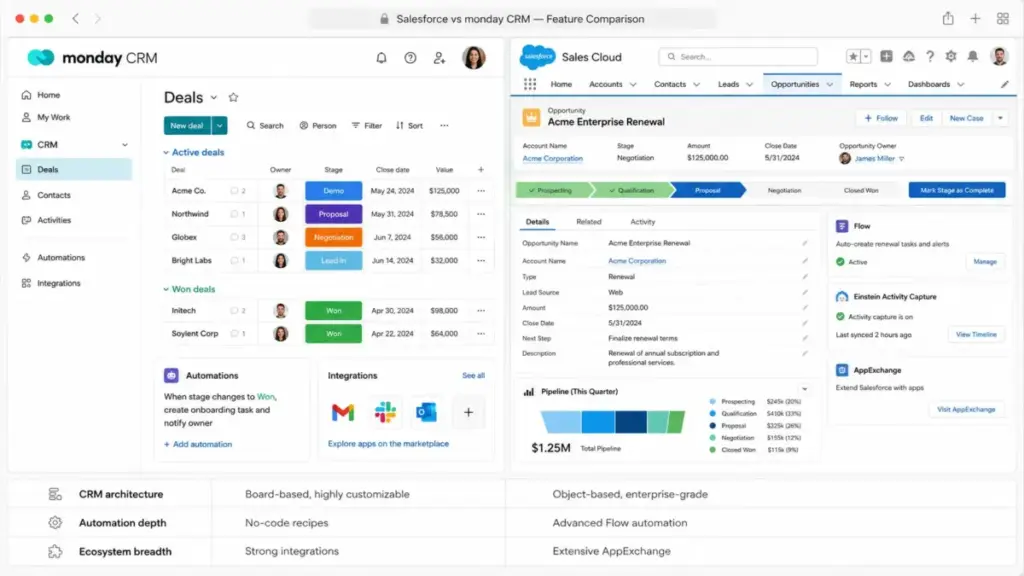
monday CRM treats the pipeline as a visual board. Contacts, deals, and activities live in customizable columns across a color-coded interface. For a 5-person startup replacing spreadsheets, this design reduces onboarding friction. Reps drag deals between stages without configuration training.
Salesforce Sales Cloud treats the pipeline as a structured data model. Leads, contacts, accounts, and opportunities are separate objects with defined relationships. A 100-person sales organization benefits from this architecture because it supports complex reporting hierarchies, cross-team visibility, and revenue attribution.
Where monday CRM Leads on Pipeline Management
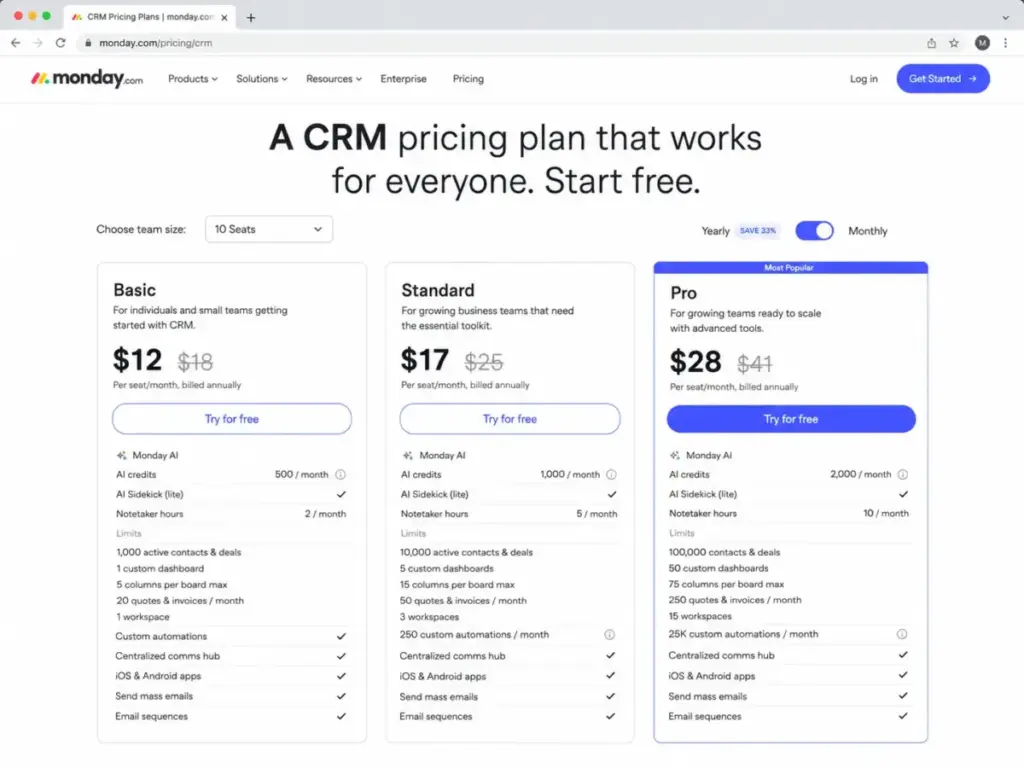
monday CRM Standard includes 10,000 active contacts and deals, 5 dashboards, and 250 custom automations per month at 17/seat/monthannual.Ateamof10canrunafunctionalpipelinefor170/month without needing a dedicated CRM admin.
The visual board model works well for teams that want pipeline, client onboarding, and project delivery in a single workspace. monday CRM connects these workflows natively through the best CRM software options available for smaller teams on the Work OS platform.
Where Salesforce Leads on Pipeline Management
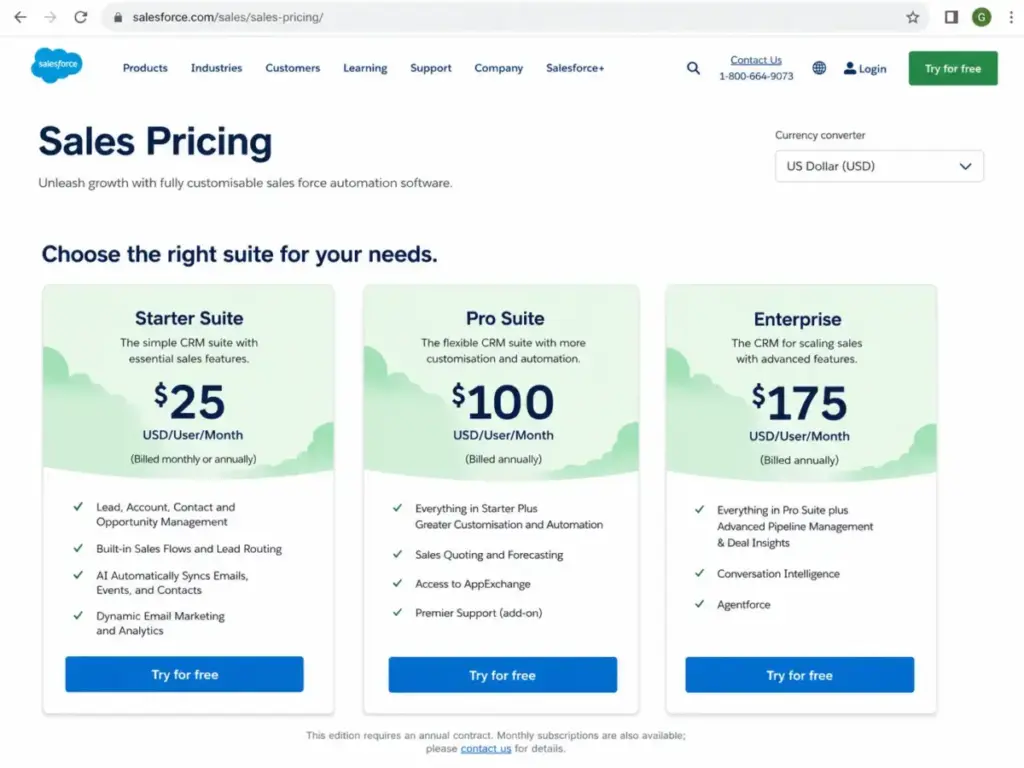
Salesforce Enterprise at $175/user/month annual (source) enables advanced pipeline management, deal insights, conversation intelligence, and Agentforce access. The object-level architecture supports territory management, multi-currency deals, custom objects, and reporting that monday CRM cannot replicate at any plan tier.
For a RevOps team managing complex forecasting across product lines and regions, Salesforce is the clearer fit.
Winner: Depends on team size. For teams under 25 that need visual pipeline speed, monday CRM. For teams over 50 with RevOps ownership and complex sales processes, Salesforce.
Automation at Scale: monday CRM vs Salesforce Sales Cloud
Automation determines whether a CRM saves your team time or creates admin work. Both platforms offer automation, but the cost to access it and the limits on usage differ sharply.
monday CRM Automation Limits by Plan
monday CRM publishes clear automation limits on its CRM pricing page:
| monday CRM Plan | Monthly Automations | Contacts and Deals | Dashboards | Annual Price |
|---|---|---|---|---|
| Basic | Not specified | 1,000 | 1 | $12/seat/month |
| Standard | 250 | 10,000 | 5 | $17/seat/month |
| Pro | 25,000 | 100,000 | 50 | $28/seat/month |
| Ultimate | Enterprise-scale | Unlimited | Unlimited | Custom |
What this means: A 10-person team on Standard gets 250 custom automations per month. If your sales workflow triggers 30+ automations per rep per month (follow-up emails, deal stage changes, notifications), you hit that ceiling fast. Upgrading to Pro jumps the price from 170/monthto280/month for 10 users, but you get 25,000 automations per month. That is a 100x increase in automation capacity for a 65% price increase.
Salesforce Automation Depth
Salesforce automation operates differently. Sales flows, lead routing, and process builder are available across tiers, but the sophistication scales with the plan. Enterprise and above open access to deeper workflow rules, advanced approval processes, and Agentforce AI agents.
The trade-off: Salesforce automation is more configurable than monday CRM, but it typically requires admin expertise to build and maintain. A 5-person team without a Salesforce admin will underuse the automation tools they are paying for.
Winner: monday CRM for no-code accessibility. Salesforce for enterprise-depth automation. If your team builds automations without a developer, monday CRM makes that possible at lower cost. If your team has admin resources and needs multi-object, conditional automation, Salesforce wins.
Reporting and Analytics: monday CRM vs Salesforce Sales Cloud
CRM reporting is where the architectural difference between monday CRM and Salesforce becomes impossible to ignore.
monday CRM Pro gives you 50 dashboards and 75 columns per board at $28/seat/month annual. Reports are visual, board-driven, and built for operational visibility. For a 10-person team tracking deal velocity, win rates, and rep activity, this works well.
Salesforce Enterprise and above offer multi-object reporting, custom report types, cross-department dashboards, pipeline inspection, and conversation intelligence. The reporting engine in Salesforce is designed for organizations that need to slice revenue data across territories, products, time periods, and team hierarchies.
Here is the gap: monday CRM dashboards report on what is in the boards. Salesforce reports on what is in the data model. If your sales reporting needs are limited to pipeline status and deal amounts, monday CRM delivers. If your VP of Sales needs forecast accuracy by region, product line, and rep performance quartile, Salesforce is the only option in this comparison.
Winner: Salesforce. The reporting depth is not comparable. monday CRM is sufficient for operational dashboards. Salesforce is built for analytical CRM reporting at enterprise scale.
Pricing: What 5, 10, 25, and 50 Users Actually Pay
Starting prices are misleading. The table below shows what real teams pay at four common sizes, using monday CRM Standard annual pricing (source) and Salesforce Starter Suite (source).
| Users | monday CRM Cost | Salesforce Cost | Winner | Pricing Basis |
|---|---|---|---|---|
| 5 | $85/month | $125/month | monday CRM | Standard annual vs Starter Suite |
| 10 | $170/month | $250/month | monday CRM | Standard annual vs Starter Suite |
| 25 | $425/month | $625/month | monday CRM | Standard annual vs Starter Suite |
| 50 | $850/month | $1,250/month | monday CRM | Standard annual vs Starter Suite |
What this means: monday CRM costs 32% less than Salesforce at every team size in this comparison. At 50 users, the gap is 400/month,whichis4,800/year in savings on software licensing alone.
But the pricing comparison changes if you need features beyond the entry tier.
When the Cost Gap Narrows (or Reverses)
monday CRM Pro at 28/seat/monthannualfor25userscosts700/month. Salesforce Pro Suite at 100/user/monthannualfor25userscosts2,500/month. The gap widens as both products move up-tier.
The hidden cost on the Salesforce side: Premier Success Plan can add 30% of net license fees (source) unless bundled with Unlimited or higher. For a 25-user Enterprise deployment at 175/user/month,thatisanadditional1,312.50/month for premium support alone.
The hidden cost on the monday CRM side: seat-bucket pricing with minimum purchase structure means you may pay for seats you are not using. Ultimate pricing for enterprise governance, HIPAA, and advanced security is not publicly disclosed and requires contacting sales.
Feature-to-Plan Gate Comparison
| Feature | monday CRM Plan Gate | Salesforce Plan Gate | Buyer Impact |
|---|---|---|---|
| Custom automations | Standard (250/month) | Starter Suite (basic) | monday CRM publishes limits; Salesforce scales with admin expertise |
| Advanced forecasting | Not available at CRM tier | Enterprise ($175/user/month) | Salesforce only for complex forecasting |
| HIPAA compliance | Ultimate (custom pricing) | Available with configuration | Both gate compliance features to higher tiers |
| AI-powered sales tools | AI-assisted (plan dependent) | Enterprise+ (Agentforce) | Salesforce has deeper AI packaging |
| Full sandbox | Not specified | Unlimited ($350/user/month) | Only Salesforce offers full sandbox at published pricing |
| Enterprise support | Ultimate (custom) | Premier (30% add-on or Unlimited) | Both charge extra for premium support |
| API automation limits | Plan-dependent | Edition-dependent | Both gate API access by tier |
What this means: monday CRM gives you more CRM capacity per dollar at lower tiers. Salesforce gives you more enterprise depth per dollar at higher tiers. The cross-over point depends on whether your team needs features that only exist on Salesforce Enterprise and above.
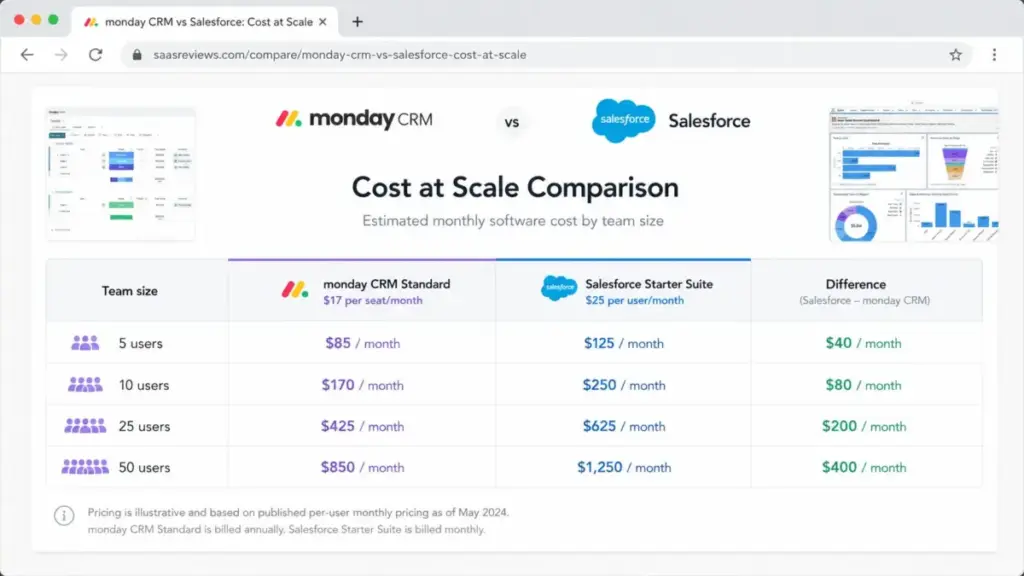
Winner: monday CRM on software cost. At comparable entry tiers and at every team size up to 50, monday CRM costs less. Salesforce total cost of ownership increases faster when you factor in support upgrades, implementation, admin time, and AI add-ons.
Setup and Migration Difficulty
| Factor | monday CRM | Salesforce Sales Cloud |
|---|---|---|
| Onboarding complexity | Low to medium | High |
| Admin required | No dedicated admin needed at Standard/Pro | Dedicated admin recommended at Pro Suite and above |
| Time to first pipeline | Hours to days | Days to weeks (with proper configuration) |
| Migration from other CRM | Medium effort | High effort |
| Data portability | Export and API support | Export, API, and MuleSoft for complex integrations |
| Workflow rebuild | Board-based, visual | Object-based, requires configuration strategy |
What this means: monday CRM is faster to deploy. Salesforce is harder to set up but more configurable once running. If your team cannot allocate 20+ hours to initial CRM configuration and training, monday CRM is the safer starting point. If your organization has a dedicated CRM admin or implementation partner, Salesforce setup complexity is manageable and the investment pays off in enterprise-scale control.
Migration Between the Two
Moving from monday CRM to Salesforce is high difficulty. You need to map boards, columns, contacts, deals, activities, automations, dashboards, and permissions into Salesforce objects and governance structures. This is not a weekend project for most teams.
Moving from Salesforce to monday CRM is medium to high difficulty. Complex objects, historical activities, automation logic, and multi-level reporting do not transfer one-to-one into a board-driven model. Teams moving from Salesforce to monday CRM are choosing simplification over depth.
Where monday CRM Wins
monday CRM is the better choice in these scenarios:
- 5-person startup choosing its first CRM. Lower cost, visual setup, and faster adoption matter more than enterprise architecture. A team of 5 on monday CRM Standard pays 85/monthversus125/month on Salesforce Starter Suite.
- 25-person sales team with simple pipeline and project handoff. monday CRM connects pipeline, client onboarding, and delivery workflows without requiring a Salesforce admin. The Work OS platform handles CRM plus project management in one interface.
- SMB replacing spreadsheets with a visual sales workflow. The board model, drag-and-drop deals, and no-code automations align with SMB adoption needs. Reps use it because it looks like the spreadsheet they already know, but with automation attached.
- Teams that want predictable, visible CRM costs. monday CRM publishes plan limits (contacts, automations, dashboards) clearly. You know what you get before you buy.
Where Salesforce Sales Cloud Wins
Salesforce Sales Cloud is the better choice in these scenarios:
- 100-person sales organization with RevOps and complex forecasting. Salesforce has deeper enterprise CRM architecture, multi-object reporting, territory management, forecasting models, and governance tools. These features do not exist in monday CRM at any tier.
- Enterprise buyer requiring HIPAA, auditability, and support governance. Both platforms support compliance at higher tiers, but Salesforce has broader enterprise compliance infrastructure and a more mature success-plan support model (Premier and Signature).
- Teams that need Agentforce, Data Cloud, and enterprise AI. Salesforce Agentforce 1 Sales at $550/user/month annual (source) includes the full AI suite, Slack Enterprise+, Tableau Next, and Data Cloud credits. monday CRM offers AI-assisted features but cannot match this enterprise AI depth.
- Organizations already invested in the Salesforce ecosystem. AppExchange, AgentExchange, Customer 360, MuleSoft, and Slack create a network effect that makes leaving expensive and expanding easy.
Who Should Choose monday CRM
Choose monday CRM if:
- Your sales team has fewer than 30 reps and does not need complex forecasting or territory management.
- You want a CRM that reps will adopt quickly without formal training programs.
- Your budget is under $500/month for CRM software and you need pipeline, contacts, and basic automations.
- You already use monday.com for project or operations workflows and want CRM in the same platform.
- You do not have a dedicated CRM admin on staff.
Who Should Choose Salesforce Sales Cloud
Choose Salesforce if:
- Your sales process involves multiple object relationships, multi-stage approvals, and cross-department reporting.
- You have a dedicated CRM admin or RevOps team to configure and maintain the system.
- Your organization needs enterprise governance, audit trails, advanced security, and compliance documentation.
- You plan to scale past 100 users and need a CRM that grows with complex organizational structures.
- You need AI-powered sales intelligence, conversation analytics, and predictive forecasting.
Who Should Avoid Both
Avoid both monday CRM and Salesforce if:
- You need an easier traditional CRM than Salesforce but more native CRM depth than monday CRM offers. Consider HubSpot vs Salesforce comparison for a middle-ground evaluation.
- Marketing automation is your main buying driver, not pipeline management. Neither monday CRM nor Salesforce Sales Cloud are marketing-first platforms at their core.
- Your team has 3 or fewer people and just needs contact tracking. A lighter CRM like Pipedrive may reveal a better fit for straightforward pipelines.
Alternatives to monday CRM and Salesforce
If neither tool fits, consider these options:
| Alternative | Best For | Starting Price | Free Plan |
|---|---|---|---|
| HubSpot CRM | Marketing-sales alignment, inbound teams | $20/seat/month (Starter) | Yes (limited) |
| Pipedrive | Pipeline simplicity, rep adoption | $14/seat/month (Essential) | No (14-day trial) |
| Zoho CRM | Budget-conscious teams, traditional CRM | $14/user/month (Standard) | Yes (3 users) |
What this means: HubSpot CRM splits the difference between monday CRM ease-of-use and Salesforce depth. Pipedrive is the simplest option for pure pipeline management. Zoho CRM offers traditional CRM structure at lower cost than Salesforce.
HubSpot CRM is the better choice for teams that want easier CRM adoption than Salesforce with stronger native marketing and sales alignment than monday CRM. Good middle ground for inbound marketing, sales pipeline, and RevOps without Salesforce-level complexity. Read the HubSpot CRM evaluation for details.
Pipedrive is the better pick for sales teams that want pipeline simplicity and rep adoption above platform breadth. Often easier than Salesforce and more sales-native than monday CRM for straightforward deal tracking. See the Pipedrive CRM analysis for a deeper look.
For a direct head-to-head, read the Pipedrive vs Salesforce comparison to see how the pricing and feature trade-offs stack up.
Zoho CRM works best for budget-conscious teams that want a broader CRM suite with more traditional CRM structure. A fit when monday CRM is too workflow-oriented and Salesforce is too expensive or complex. Check the Zoho CRM vs Salesforce comparison for pricing and feature details.
Final Verdict: monday CRM vs Salesforce in 2026
There is no single winner. The right choice depends on your team size, admin capacity, workflow complexity, and growth stage.
For teams under 25 with simple pipelines: monday CRM. The cost savings are real (425/monthvs625/month at 25 users), the adoption curve is shorter, and the visual workflow model fits teams that do not have (or want) a dedicated CRM admin.
For teams over 50 with enterprise sales processes: Salesforce. The CRM depth, reporting architecture, AI packaging, ecosystem scale, and governance options justify the higher cost when your organization has the admin resources to use them.
For the mid-market (25-50 users): This is the decision zone. If your sales process is predictable and your team values speed over depth, monday CRM Pro at 28/seat/monthannualgivesyou100,000contacts,50dashboards,and25,000automationspermonth.Ifyoursalesprocessiscomplexandgrowingmorecomplex,SalesforceProSuiteat100/user/month annual gives you a foundation that scales into Enterprise architecture.
The question is not which CRM is better. The question is whether your team needs a visual pipeline that reps use on day one, or an enterprise data model that supports complex revenue operations for years. That answer picks the tool.
After evaluating both platforms against official pricing, feature gates, and buyer-fit scenarios, I keep coming back to one observation: most teams overpay for Salesforce complexity they do not use, or outgrow monday CRM limits they did not check. Read the monday CRM pricing breakdown before committing.
For a closer look at the enterprise side, check the Salesforce pricing details to understand total cost of ownership at scale.
FAQ
Is monday.com a real CRM or a project management tool?
monday.com offers a dedicated CRM product called monday CRM, separate from its Work Management platform. monday CRM includes contact and deal management, sales pipelines, quotes and invoices, email sync, and custom automations. It is built on the monday.com Work OS, which means it shares the visual board interface with the project management product but has CRM-specific features and pricing. For teams that need both pipeline management and project delivery, this shared platform is an advantage.
Which is cheaper, monday CRM or Salesforce?
monday CRM costs less at every published tier. monday CRM Standard at 17/seat/monthannualis∗∗3225/user/month. At 25 users, monday CRM Standard costs 425/monthversus625/month for Salesforce Starter. The gap widens at higher tiers: monday CRM Pro at 28/seat/monthversusSalesforceProSuiteat100/user/month. Salesforce total cost of ownership also increases with support plan upgrades, implementation services, and AI add-ons.
Can monday CRM replace Salesforce?
Yes, for teams with simple to moderate sales processes. monday CRM handles contacts, deals, pipelines, automations, quotes, and dashboards. It cannot replace Salesforce for organizations that need complex object models, advanced forecasting, territory management, enterprise governance, or large ecosystem integrations through AppExchange. The best CRM options for sales teams depend on your process complexity, not your brand preference.
Do I need a Salesforce admin?
For Starter Suite, a small team can manage basic configuration without a dedicated admin. For Pro Suite and above, Salesforce strongly benefits from a dedicated admin or RevOps resource. Configuration strategy, user training, permission management, and ongoing governance require admin ownership. Most organizations running Salesforce Enterprise or Unlimited have at least one full-time admin. The admin cost (salary or contractor) should be factored into Salesforce total cost of ownership.
Is Salesforce worth it for a small business?
Salesforce Starter Suite at $25/user/month is viable for small businesses that expect rapid growth into complex sales operations. For a 5-person team that plans to stay small and needs a simple pipeline, monday CRM or Pipedrive provides similar functionality at lower cost and less complexity. Salesforce becomes worth the investment when the team needs cross-department CRM data, complex reporting, enterprise integrations, or compliance-level governance.
How hard is it to migrate from monday CRM to Salesforce?
Migrating from monday CRM to Salesforce is high difficulty. You need to map visual boards into Salesforce objects (leads, contacts, accounts, opportunities), rebuild automations as Salesforce flows, reconfigure dashboards as Salesforce reports, and establish governance structures. Data export from monday CRM is supported, but the structural differences mean most workflows need to be rebuilt, not transferred. Budget 4-8 weeks for a mid-sized team migration with admin support.
How hard is it to migrate from Salesforce to monday CRM?
Migrating from Salesforce to monday CRM is medium to high difficulty. Salesforce’s complex object relationships, custom fields, historical activity data, and multi-level reporting do not map directly to monday CRM’s board-based structure. Teams moving in this direction are choosing simplification. Export core data (contacts, deals, activities), rebuild pipelines as boards, and accept that some reporting granularity will be lost. The CRM migration guide covers general migration planning steps.
Which CRM has better reporting?
Salesforce has far deeper reporting capabilities. Multi-object reports, custom report types, cross-department dashboards, pipeline inspection, and conversation intelligence provide analytics depth that monday CRM cannot match. monday CRM reporting works well for operational visibility (deal status, rep activity, pipeline value) but is limited to board-level data. If reporting drives your CRM decision, Salesforce is the pick for sales teams evaluating CRM software.
Does monday CRM integrate with Salesforce?
monday.com offers integration capabilities through its marketplace and API, and third-party connectors can sync data between monday.com and Salesforce. This is relevant for teams using both platforms (monday.com for operations, Salesforce for sales). The integration depth depends on the connector and plan tier. For organizations committed to one CRM, running both simultaneously adds complexity and cost without clear benefit.
When does monday CRM become too limited?
monday CRM Basic has tight limits: 1,000 active contacts and deals, 1 dashboard, 5 columns per board, and 20 quotes and invoices per month. Standard raises limits to 10,000 contacts and 250 automations per month, which works for mid-sized teams. monday CRM becomes too limited when your organization needs complex object relationships, multi-level forecasting, strict enterprise governance, or when your contact database exceeds 100,000 records (requiring Ultimate at custom pricing). If you need a dedicated admin program and enterprise compliance, monday CRM’s CRM product is not built for that depth.