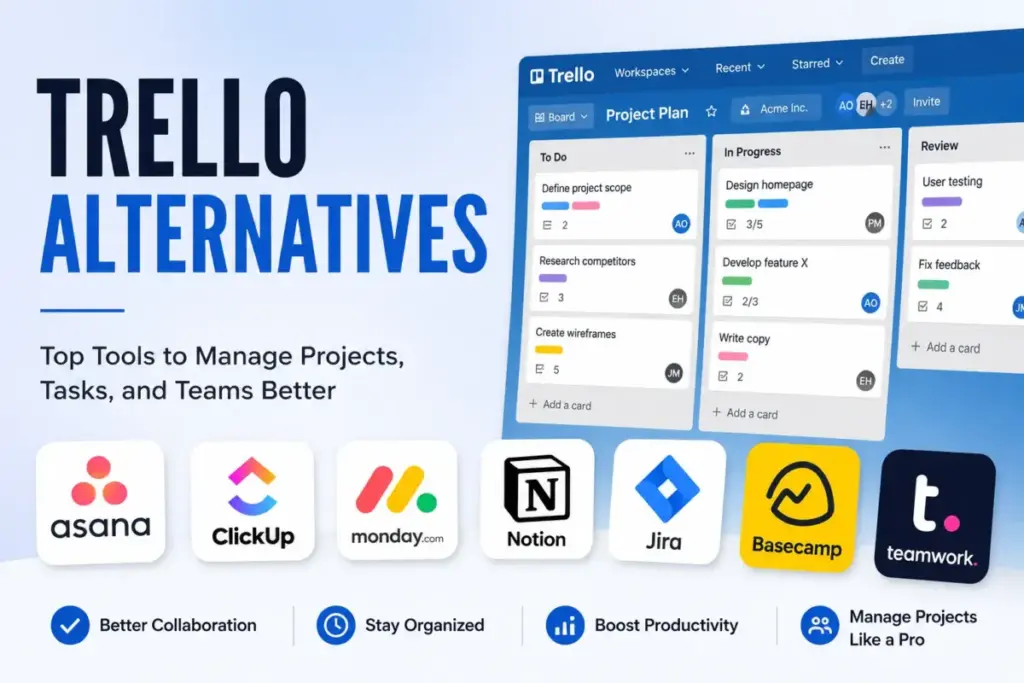
Your team’s project cards are piling up, columns are scrolling off the screen, and you’re getting tired of updating tasks that don’t show dependencies. When your team outgrows a simple visual board, Trello’s limitations start to create friction. The free plan has restricted features, and Standard pricing starts at $5 per user/month when billed annually in the US (as of May 2026). If you require advanced portfolios, native time tracking, or custom calculations, the per-seat billing scales faster than your project results.
Finding the right best project management software is not about chasing the longest feature checklist. It is about identifying the exact tool that resolves the friction that made you consider leaving. This guide compares 10 alternatives by US pricing, switching triggers, practical tiers, and migration difficulty.
We will examine how one flat-rate option can slash your software fees by over 70%, and how another tool clears the inbox noise that disrupts your daily focus.
Based on official product documentation, public US pricing sheets, and customer review patterns, this analysis is designed to help your team find the right fit. Under the byline of James Carter, who has reviewed 35+ project management tools, this guide outlines the practical trade-offs of each system. Before making a switch, understanding what project management is can help you map your team’s specific workflow requirements.
Quick Verdict: Best Trello Alternatives by Switching Trigger
The table below maps the best Trello replacement to the primary reason your team is leaving.
| If you are leaving Trello because… | Best alternative | Why |
|---|---|---|
| Complex projects outgrow board-only planning | Asana | Clean timeline and dependency model |
| Reporting and workload visibility are too thin | Asana | Built-in portfolios and workload dashboard |
| Automation limits or workflow caps become restrictive | ClickUp | High automation limits on mid-tier plans |
| Software teams need agile issue tracking | Jira | Backlogs, sprint boards, and dev integrations |
| Documentation and project context live outside Trello | Notion | Docs and databases sit directly beside tasks |
| Operational teams need database-style tracking | Airtable | Relational tracking and interfaces |
| Client-service teams need predictable client collaboration | Basecamp | Flat-rate unlimited guest access |
What this means:
If you are moving away from Trello, your choice should align with your primary operational bottleneck. Teams seeking pure cost relief often look to ClickUp or Trello, while agencies focus on Teamwork.com for client-facing features. If you struggle with coordination across departments, monday work management provides the most flexible visual workspace.
The Trello Problem Map
While Trello remains a strong choice for simple visual board planning, teams often look for alternatives when they hit these major friction points:
- The Card Chaos Factor: When lists grow to dozens of cards, the board view becomes hard to scan. Users report that it gets messy fast.
- Thin Portfolio Visibility: Reviewers on G2 commonly describe Trello as better for simple projects than complex work. It is weak for work that requires dependencies, workload management, and advanced reporting.
- Automation Quotas: Trello automation is plan-gated and quota-based. Operations-heavy teams often run out of rules on lower tiers.
- Ecosystem Add-on Tax: Deeper reporting, automation, and customization often require integrations or paid features. Buying multiple Power-Ups increases your total software bill.
- Agile Limits: Software developers often find Trello lacks the backlogs, sprint cycles, and release tracking they require.
For a deeper look at these limitations, you can check our Trello review which breaks down the platform’s core task structure.
Trello Pricing and Feature Gates
Understanding Trello’s pricing is critical to evaluating alternatives. Trello uses a per-user billing model that looks cheap but scales quickly.
The Free plan limits teams to 10 boards and restricts workspace collaborators. The Standard plan starts at $5 per user/month billed annually. It unlocks custom fields and unlimited boards. The Premium plan costs $10 per user/month billed annually. It adds timeline and dashboard views. For larger teams, Enterprise starts with custom quotes.
Our analysis of Trello pricing tiers shows how the cost escalates at scale. For a 10-user team, Trello Standard costs $50/month, while Premium costs $100/month.
Trello’s strengths include visual Kanban boards and simple template setups. Its main weakness is that advanced features are locked behind Premium, forcing teams to pay double just to view a timeline.
Alternatives That Fix Board Chaos
These tools provide structure for teams that find Trello’s simple card layout too limited for complex projects.
ClickUp: Best all-in-one Trello replacement

ClickUp positions itself as a complete work operating system, offering tasks, docs, whiteboards, goals, and chat. For teams leaving Trello, the primary draw is the visual flexibility combined with lower pricing.
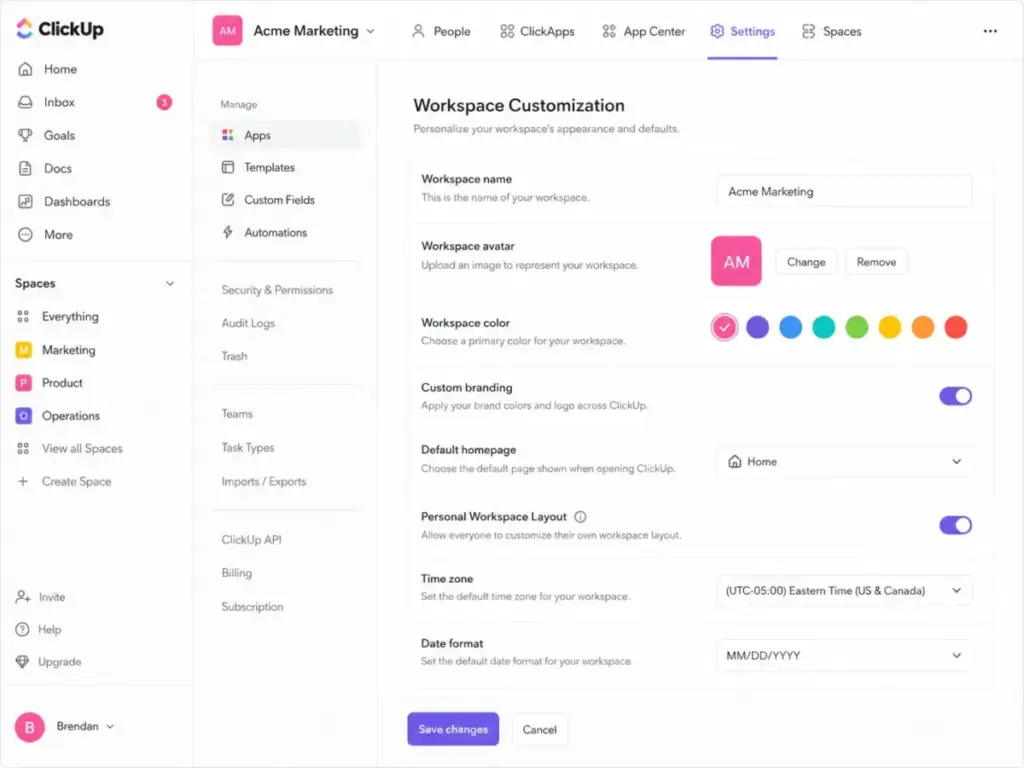
The Unlimited plan starts at $7 per user/month billed annually (as of May 2026). This is cheaper than Asana Starter. The Unlimited tier includes native time tracking, custom fields, and unlimited tasks. However, the sheer volume of options can make the initial setup feel cluttered.
- What it does better than Trello: Includes native time tracking, document management, and whiteboards on the Unlimited tier without requiring external integrations.
- What it does worse than Trello: The interface can feel slower, and the setup requires more administrative work due to the number of customizable parameters.
- Avoid if: Your team wants a simple task list and lacks the time to configure a complex workspace.
- Migration difficulty: Medium. The built-in Trello importer handles tasks and descriptions, but custom fields and permissions require manual reassignment.
Verdict: Choose ClickUp if you want to replace multiple tools (like Trello, Google Docs, and Toggl) under a single billing account. You can read our detailed ClickUp review to assess its usability under daily load.
Asana: Best for cross-functional project tracking

Asana is built around structured task hierarchies. It is the best alternative for teams that need to coordinate work across multiple departments.
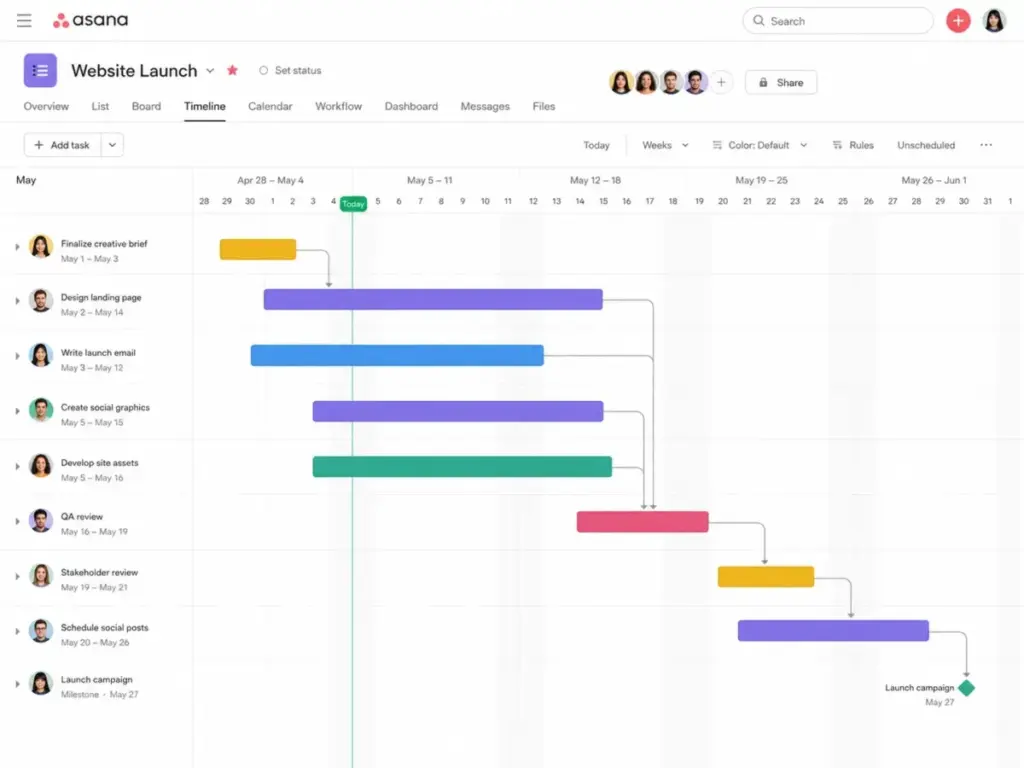
The Starter plan costs $10.99 per user/month billed annually (as of May 2026). This plan unlocks timeline views, calendar views, and custom fields. Asana makes it simple to map dependencies and track project milestones. The tradeoff is that Asana’s free plan is very restricted, forcing teams to upgrade to get basic views.
- What it does better than Trello: Better project hierarchy, portfolio visibility, and cross-functional coordination.
- What it does worse than Trello: Asana is more structured and may feel less casual than Trello for simple personal boards.
- Avoid if: You are a solo builder or small team with a budget under $50/month who just needs simple tasks.
- Migration difficulty: Medium. The Asana importer brings over Trello boards, but you must rebuild dependency connections manually.
Verdict: Choose Asana if you need clean timelines, task dependencies, and cross-project portfolios. Our in-depth Asana review explains its folder structure in detail.
monday work management: Best visual operations alternative

monday.com uses a flexible board builder with column types, status markers, and integrations. It is designed for operations teams that want a visual dashboard.
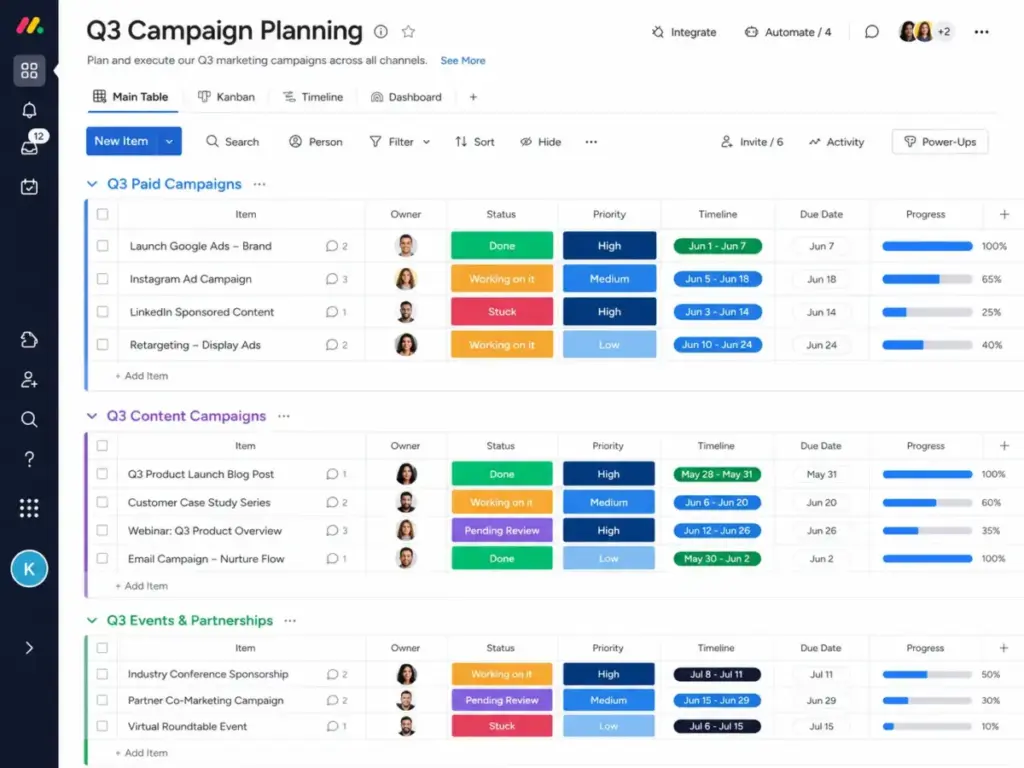
The Basic plan starts at $9 per seat/month billed annually (as of May 2026). This tier requires a minimum of 3 seats. monday.com sells seats in groups (like 3, 5, 10, or 15), which can make small-team pricing less exact. Standard starts at $12 per seat/month.
- What it does better than Trello: More configurable visual workflow boards and dashboarding.
- What it does worse than Trello: Seat-bucket billing can make small-team pricing less exact than simple per-user pricing.
- Avoid if: Your team size fluctuates frequently or you have exactly 4 users.
- Migration difficulty: Medium. The importer brings over Trello boards, but visual automation triggers must be remapped.
Verdict: Choose monday work management if your projects require custom columns, visual dashboards, and easy automation rules.
Wrike: Best for enterprise project control

Wrike is designed for large departments that require structured intake forms, Gantt charts, and resource management. It focuses on operational visibility across multiple teams.
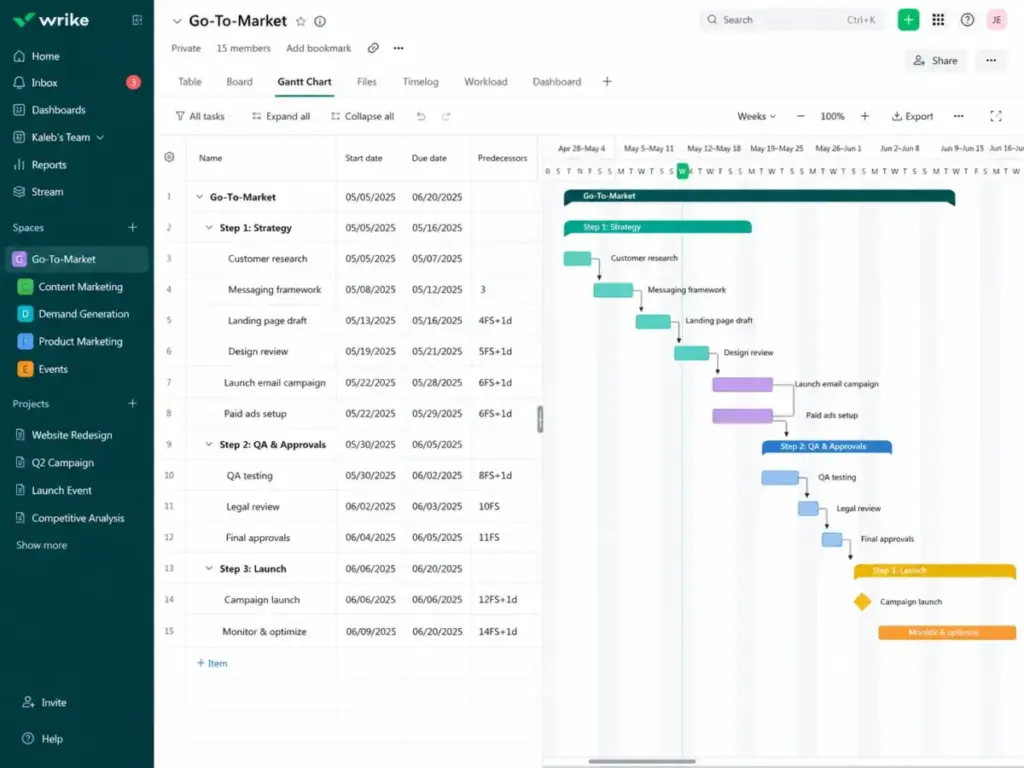
The Team plan starts at $10 per user/month (as of May 2026). Wrike locks its advanced resource management and custom fields behind the Business plan ($25 per user/month). The dashboards are highly detailed, but the interface takes longer to master.
- What it does better than Trello: Stronger structured project management and enterprise-grade work control.
- What it does worse than Trello: Wrike can feel more formal and complex than Trello for simple team boards.
- Avoid if: Your team consists of less than 5 people who want a visual, casual board layout.
- Migration difficulty: High. Due to Wrike’s folder structure, migration requires careful field mapping and staff retraining.
Verdict: Choose Wrike if you have a marketing or creative operations department of 20+ people who need to manage incoming requests.
Smartsheet: Best spreadsheet-style project platform

Smartsheet uses a grid interface that mimics Microsoft Excel but includes project views, card layouts, and automations. It is built for operations teams that manage projects via data rows.
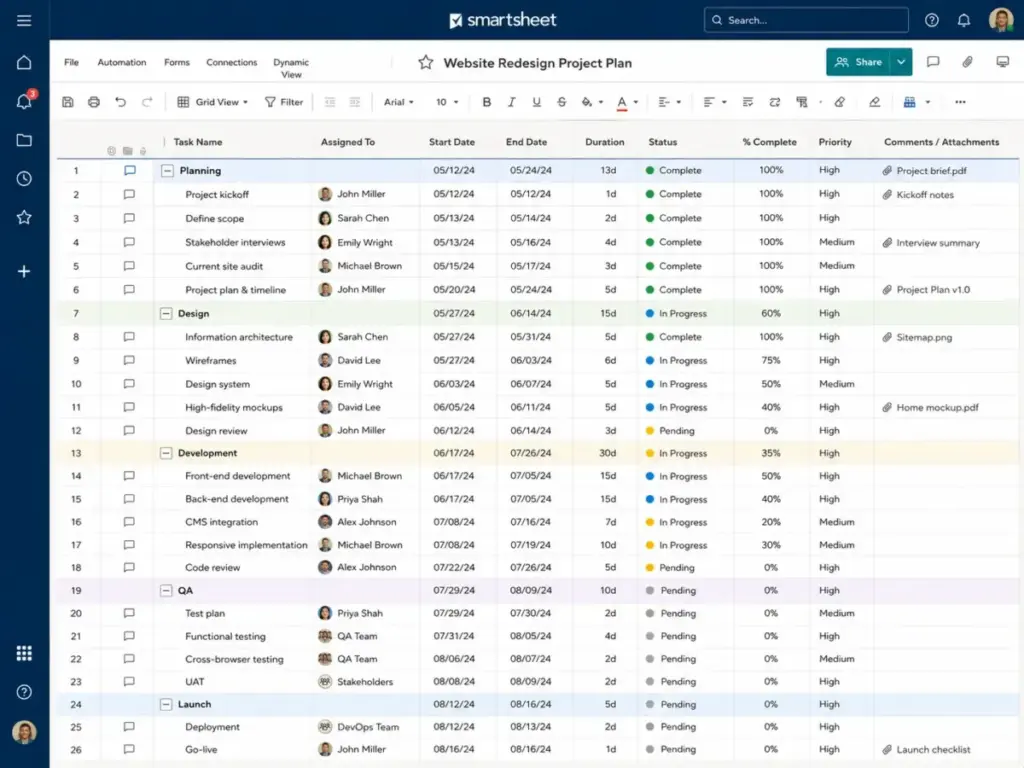
The Pro plan starts at $9 per member/month billed annually (as of May 2026). The Business plan costs $19 per member/month billed annually. Smartsheet allows unlimited free collaborators to view sheets, which helps control costs. The grid handles complex formulas, but it lacks the modern look of Trello’s task boards. If you need formulas but dislike the grid-first feel, compare Smartsheet alternatives before leaving Trello.
- What it does better than Trello: Advanced formulas, cell linking, and spreadsheet calculations that sync across multiple projects.
- What it does worse than Trello: Smartsheet is less visually casual than Trello and can be overkill for small Kanban-only teams.
- Avoid if: Your team hates working in grids and spreadsheet rows.
- Migration difficulty: High. Rebuilding Trello boards into a grid requires redesigning your sheets and manual field alignment.
Verdict: Choose Smartsheet if your project management is led by managers who rely on spreadsheet formulas and budget sheets.
Alternatives That Fix Complex Technical Workflows
These tools are built for engineering departments and data-heavy operations.
Jira: Best for software and agile teams

Jira is the standard tool for software engineering teams. It focuses on sprint cycles, backlog grooming, and code deployments.
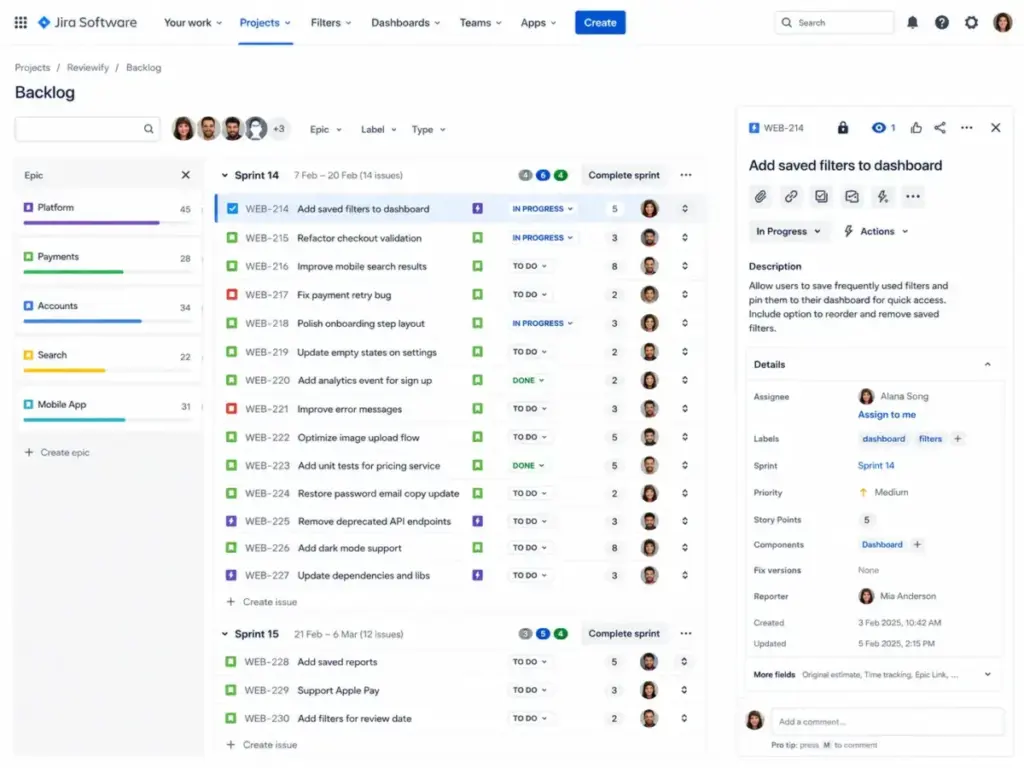
Jira’s Free plan supports up to 10 users. Paid plans are available via Atlassian’s pricing calculator, with Standard starting around $8.15 per user/month. Jira includes sprint reports and direct integrations with GitHub and GitLab. However, the interface is highly technical. Non-technical teams often find it hard to use.
- What it does better than Trello: Purpose-built agile software planning and issue tracking.
- What it does worse than Trello: Jira is heavier and less approachable than Trello for non-technical teams.
- Avoid if: Your team is a marketing or creative agency that has no software engineering workflows.
- Migration difficulty: High. Software teams must map development fields, sprint histories, and epic structures.
Verdict: Choose Jira if you are a software development team that needs to manage sprints, releases, and codebase issues. Our Jira review and analysis breaks down its features.
Airtable: Best database-style Trello alternative

Airtable is a relational database that lets teams build custom apps, content pipelines, and inventory trackers. It is designed for operations departments that need structured data.
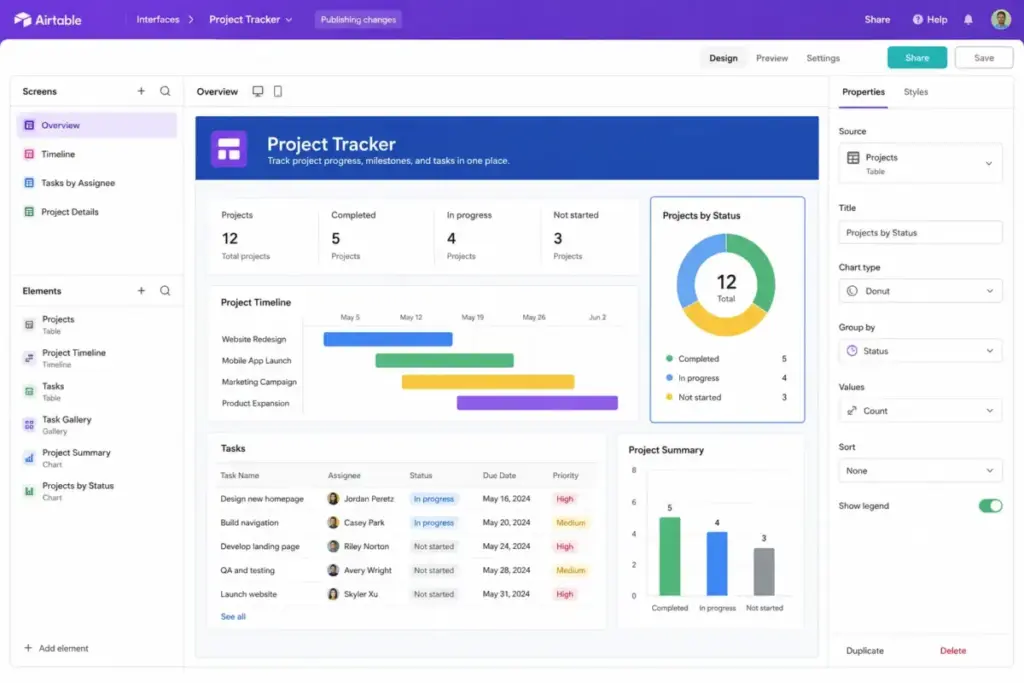
The Team plan costs $20 per seat/month billed annually (as of May 2026). Airtable’s power lies in its relational database structure. You can link client records directly to tasks, campaigns, and assets. The main tradeoff is that the pricing scale can escalate quickly as your database grows.
- What it does better than Trello: Relational database structure and custom views make Airtable stronger for structured tracking.
- What it does worse than Trello: Airtable is not as simple as Trello for a basic personal or team Kanban board.
- Avoid if: You want a simple task-only board and do not want to configure relational schemas.
- Migration difficulty: Medium. Rebuilding a task list into a relational database requires structuring tables and links.
Verdict: Choose Airtable if your team manages marketing campaigns, content calendars, or product inventory that requires structured relational databases.
Alternatives That Fix Documentation and Collaboration
These options combine project tracking with document hubs and client portals.
Notion: Best for docs and lightweight project hubs

Notion connects documents, wikis, meeting notes, and project databases. It is the best alternative for teams that want to store all company knowledge alongside tasks.
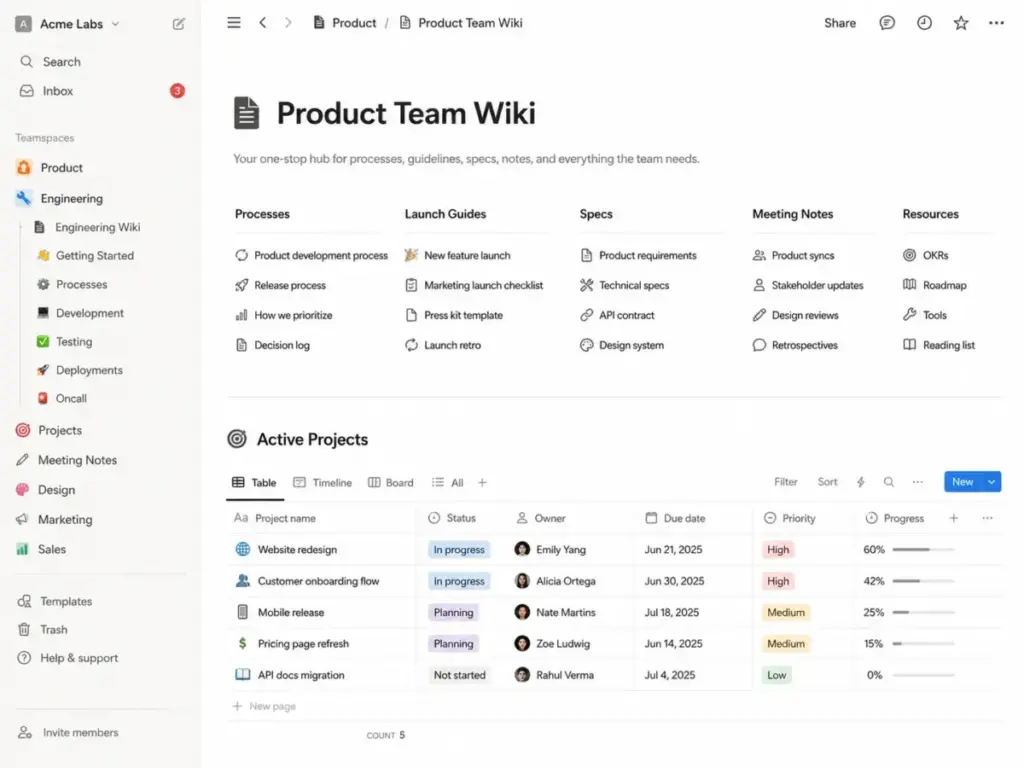
The Plus plan starts at $10 per member/month billed annually (as of May 2026). It unlocks unlimited database rows, custom templates, and page history. While Notion is highly flexible, it does not send structured task alerts like Trello. Teams must build their own notification views to keep work on track.
- What it does better than Trello: Combines docs, databases, and task/project views more naturally than Trello.
- What it does worse than Trello: Notion is less specialized for formal project controls and workload reporting.
- Avoid if: Your team requires automated reminders and strict task due-date controls.
- Migration difficulty: Medium. Notion can import Trello boards, but the resulting pages require formatting cleanup.
Verdict: Choose Notion if you want to build a central knowledge base where tasks are linked directly to project briefs. Our Notion review guidelines explain how its databases behave.
Basecamp: Best simple client collaboration alternative

Basecamp avoids per-user pricing entirely with its Pro Unlimited plan, which costs $299/month flat (billed annually) for unlimited users. This makes it a popular choice for teams with 20+ users.
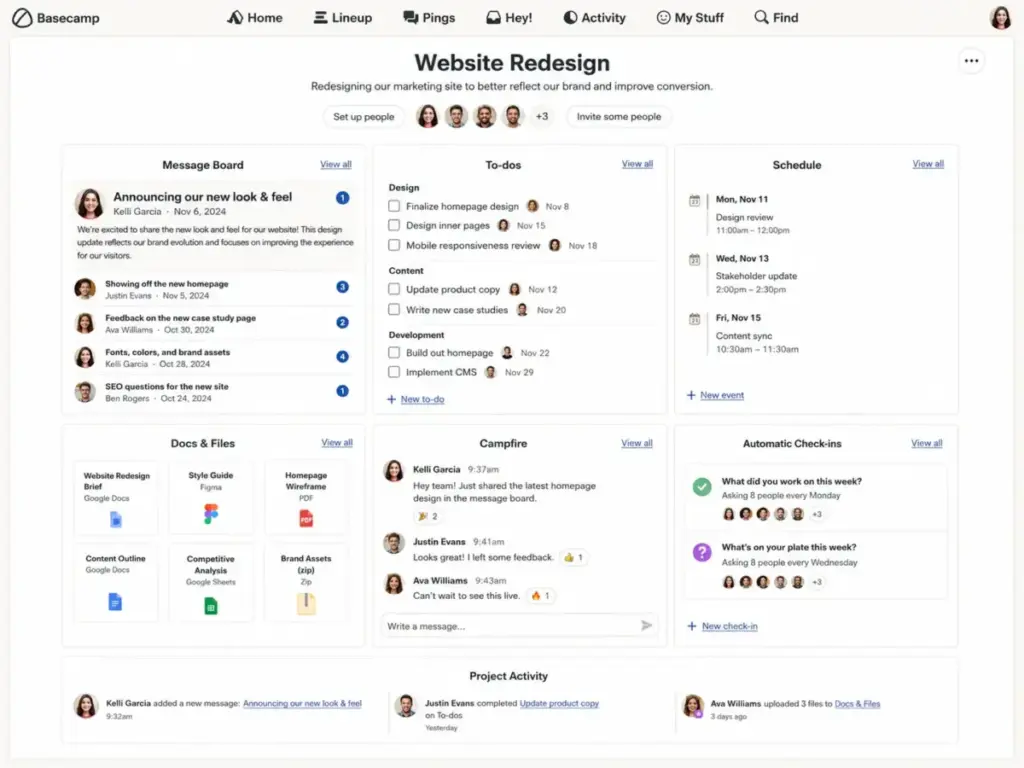
Basecamp consolidates messages, to-do lists, schedules, files, and chat. It is designed around project communication. You pay $15 per user/month on the entry tier if you do not choose flat-rate billing. The tradeoff is that you lose the custom fields and Gantt charts that Trello Standard provides. If that tradeoff matters, compare best Basecamp alternatives before leaving Trello.
- What it does better than Trello: Flat-rate Pro Unlimited pricing can be attractive for larger teams that do not want per-seat billing.
- What it does worse than Trello: Basecamp is not a deep PM system for dependencies, dashboards, or custom databases.
- Avoid if: Your managers depend on Gantt charts, resource allocation reports, or automated task rules.
- Migration difficulty: Low. Rebuilding task hierarchies is simple, but you will have to configure boards from scratch.
Verdict: Choose Basecamp if your team has more than 15 members and is tired of fluctuating per-user bills and constant email notifications.
Teamwork.com: Best for agencies and client-service teams

Teamwork.com is built specifically for client services, agencies, and professional services teams. It focuses on billable hours, project margins, and client access.
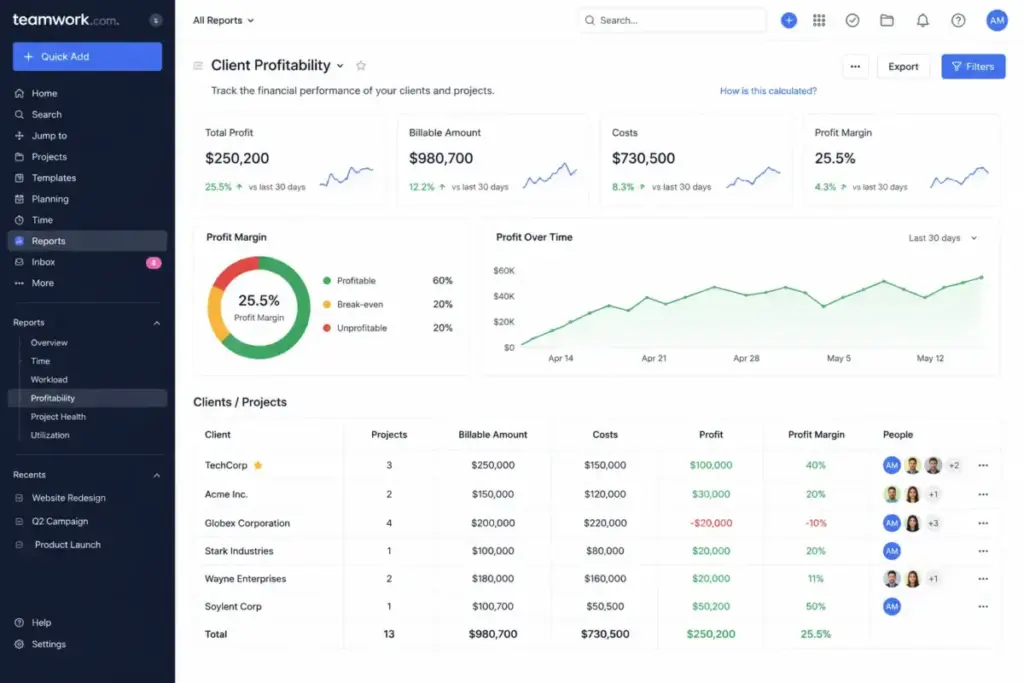
The Basics plan starts at $9.99 per user/month billed yearly (as of May 2026). Teamwork.com allows you to invite clients to view projects for free, saving you from purchasing extra user seats. The interface includes native time tracking, billing integrations, and project profitability metrics. For simpler work, Teamwork alternatives may be easier to run day to day.
- What it does better than Trello: Client-service project management depth is stronger than Trello’s general-purpose board workflow.
- What it does worse than Trello: Teamwork is more service-business-specific and less lightweight than Trello for simple boards.
- Avoid if: Your team only works on internal projects and does not need to track time or client budgets.
- Migration difficulty: Medium. Task lists and files import easily, but you must manually configure client permission profiles.
Verdict: Choose Teamwork.com if you run an agency or consulting firm and need to verify project profitability alongside task deadlines.
Pricing Comparison: Starting Price vs Practical Tier
The table below shows the starting prices, the practical tiers for teams, and the estimated cost for a 10-user team in the US market.
| Product | Starting Price | Practical Tier for Teams | Cost for 10 Users | Free Plan | Trial Details |
|---|---|---|---|---|---|
| Trello | Free | Standard ($5/user/month) | $50.00/month | Yes (10 boards) | Free Forever plan |
| ClickUp | Free | Unlimited ($7/user/month) | $70.00/month | Yes (60MB storage) | Free Forever plan |
| Asana | Free | Starter ($10.99/user/month) | $109.90/month | Yes (10 users) | 30-day trial |
| monday.com | Free | Standard ($12/seat/month) | $120.00/month | Yes (2 seats) | 14-day trial |
| Wrike | Free | Team ($10/user/month) | $100.00/month | Yes | 14-day trial |
| Smartsheet | Paid | Pro ($9/member/month) | $90.00/month | No | 30-day trial |
| Notion | Free | Plus ($10/member/month) | $100.00/month | Yes | Free Forever plan |
| Airtable | Free | Team ($20/seat/month) | $200.00/month | Yes (1,000 records) | 14-day trial |
| Jira | Free | Standard (approx. $8.15/user/month) | ~$81.50/month | Yes (10 users) | 14-day trial |
| Basecamp | Free | Pro ($15/user/month) | $150.00/month | Yes (1 project) | 30-day trial |
| Teamwork.com | Paid | Basics ($9.99/user/month) | $99.90/month | No | 30-day trial |
Note: Pricing is verified as of May 29, 2026, and is subject to change. Check official pricing pages for current US rates.
What this means:
While starting prices look close, the cost gap widens at 10 seats. ClickUp and Trello offer the lowest paid entry tiers, while Airtable sits at the top. For teams of 20 or more, Basecamp Pro Unlimited’s flat-fee billing becomes a highly cost-effective option, avoiding the seat-by-seat cost scale of Trello.
Trello Alternatives Feature Gate Comparison
This comparison maps where core project capabilities are unlocked across plans.
| Feature Gate | Trello | monday.com | ClickUp | Smartsheet | Basecamp | Asana |
|---|---|---|---|---|---|---|
| Timeline/Gantt | Locked at Premium | Locked at Standard | Included on Unlimited | Included on Pro | Not Included | Locked at Starter |
| Custom Fields | Included on Standard | Included on Basic | Included on Unlimited | Included on Pro | Not Included | Locked at Starter |
| Automations | Limit runs by tier | Action limits by tier | Action limits by tier | Included on Pro | Basic settings | Locked at Starter |
| Time Tracking | Locked at Premium | Locked at Pro | Included on Unlimited | Locked at Business | Not Included | Not Included |
| Client Portals | Guest access only | Locked at Standard | Guest access only | Included on Pro | Included on Pro | Guest access only |
What this means:
Trello gates timeline views and time tracking behind the Premium tier ($10/user/month), making Standard quite limited. ClickUp includes custom fields and time tracking on its lowest paid plan (Unlimited). Asana gates custom fields and timeline views behind the Starter tier, while Smartsheet includes timelines on the Pro level.
Migration Difficulty from Trello
Transitioning your project database requires rebuilding workflows and re-linking tools.
| Alternative | Migration Level | Typical Timeline | Primary Setup Risk |
|---|---|---|---|
| Basecamp | Low | 1–3 Days | Rebuilding folder hierarchies from scratch |
| ClickUp | Medium | 1–2 Weeks | Remapping custom fields and dashboard widgets |
| monday.com | Medium | 1–2 Weeks | Reconfiguring visual automation triggers |
| Teamwork.com | Medium | 1–2 Weeks | Mapping client access permission levels |
| Notion | Medium | 2–3 Weeks | Reformatting task tables to match wiki databases |
| Jira | High | 3–4 Weeks | Reconfiguring epic workflows and sprint tracking |
| Smartsheet | High | 3–4 Weeks | Rebuilding cell formulas and reports |
| Airtable | High | 3–4 Weeks | Redesigning relational databases from scratch |
| Wrike | High | 4–6 Weeks | Administrative training and request forms |
| Asana | Medium | 1–2 Weeks | Rebuilding dependency connections manually |
Disclaimer: Migration difficulty is an editorial estimate based on database models, custom configurations, and team training requirements.
What this means:
Simple tools like Basecamp can be set up in a few days. High-difficulty databases like Airtable or Smartsheet require several weeks to map fields, test links, and train team members. Plan for a transitional period where both services are running to prevent data loss.
Which Trello Alternative Should You Avoid?
Not every alternative is a safe fit for your specific business structure.
- Avoid Jira if you are a creative team: Jira’s interface is built for software developers, and marketing teams will find its terminology confusing.
- Avoid Airtable if you want a basic checklist: Setting up a relational database for simple to-do tasks is over-engineered and wastes time.
- Avoid ClickUp if you hate software setup: ClickUp has hundreds of parameters to configure, which can overwhelm teams seeking simplicity.
- Avoid Basecamp if you need strict dependencies: Basecamp’s simple to-do lists do not allow for automated Gantt calculations or task pathing.
- Avoid Smartsheet if your team hates spreadsheets: If your reps prefer cards and visual stages, forcing them into a spreadsheet grid will lower adoption.
What this means:
Avoid switching to a tool that duplicates the exact problems you are leaving behind. A team leaving Trello because they want visual simplicity should avoid Jira. An agency that needs time tracking should avoid Notion unless they plan to purchase third-party add-ons.
The Trello Alternative Nobody Mentions
While ClickUp and Asana dominate search results, Teamwork.com is often overlooked.
For agencies and client-facing teams, the true cost of project software includes the guest seats you must purchase for external clients. In Trello, client access is limited unless you assign them a paid seat or adjust complex permission menus.
Teamwork.com resolves this by offering free client users who can view progress, assign tasks, and log comments. It also includes native time tracking, billing integrations, and project profitability metrics. If your business depends on billable hours, Teamwork.com is the most direct way to track whether your projects are profitable.
How to Choose the Right Trello Alternative
When selecting a project management platform, use this decision framework to match your team’s needs:
- Define your primary exit trigger: Are you leaving Trello because of board clutter, pricing, or missing timelines?
- Calculate the 10-user cost: Compare the practical tiers, not the entry pricing. Check for seat buckets or user minimums.
- Evaluate feature gates: Ensure the features you need (like Gantt views or automation rules) are included in the tier you budget for.
- Assess migration effort: High-difficulty tools require weeks of setup. Choose a simpler tool if you lack administrative capacity.
- Review client access rules: If you work with external partners, prioritize tools that offer free guest collaborators.
When to Stay with Trello
Before migrating your database, consider whether staying with Trello makes the most business sense:
- Simple Kanban Workflows: If your projects are predictable and do not require Gantt views or workload reporting, Trello is still the fastest visual tool.
- Low Administrative Capacity: If your team lacks the time to configure a custom monday.com board, Trello’s out-of-the-box card structure is the safest path.
- Power-Up Dependency: If your workflows are tied to specific Trello Power-Ups, replacing these integrations can create unexpected downtime.
If your team is happy with the interface but concerned about costs, cleaning up inactive user seats is often cheaper than retraining your staff on a new system.
Final Verdict: The Best Trello Alternative for 2026
Your best path forward depends on your specific organizational size and workload structure:
- For budget-conscious teams under 10: ClickUp provides the most features at a lower entry cost on its Unlimited tier.
- For 5-person creative teams: monday work management is the best option due to its visual templates and flexible columns.
- For teams of 20+ seeking cost control: Basecamp Pro Unlimited’s flat-fee billing provides the most predictable software costs.
- For client services and agencies: Teamwork.com is the clearest fit for tracking billable hours and managing client access.
- For software engineering teams: Jira is the standard for Scrum sprints and issue tracking.
FAQs
What is the cheapest Trello alternative for 10 users?
ClickUp Unlimited is the cheapest option for 10 users, costing $70 per month when billed annually in the US. monday.com Basic costs $90 per month, while Jira is free for up to 10 users if the free plan limits fit.
Which Trello alternative has native Gantt charts?
ClickUp, Asana, and Smartsheet include native Gantt charts on their entry paid tiers. monday.com requires the Standard tier ($12/seat/month) to access timelines, while Trello requires the Premium tier ($10/user/month). If Smartsheet is on your list for Gantt charts, compare Smartsheet replacement options before moving past Trello.
Can Notion replace Trello?
Notion can replace Trello if your team wants a wiki-first database workspace. It connects documents and tasks in one tool. However, it lacks out-of-the-box task alerts, so you must configure database notifications.
Which alternative is best for client collaboration?
Teamwork.com is the best alternative for client work. It allows you to invite external clients to view and edit projects for free. It also includes native time tracking, budgets, and billing features to manage client campaigns.
Is monday.com better than Trello?
monday.com is better if you need highly visual boards, custom database columns, and visual dashboards. Trello is better if you prefer a simple visual card board with zero setup time. Standard monday.com costs $120/month for 10 users, compared to $50/month for Trello Standard.
What is the best Trello alternative for software teams?
Jira is the best alternative for software development. It includes dedicated sprint planning tools, release management, and issue tracking. If you are also managing team conversations, you can review Slack review details to coordinate team discussions.
How do I choose the best project tool?
How do I choose the best project tool? + Choose a tool by matching your switching trigger. If board clutter is the problem, Asana or Wrike provides better structure. If you need a complete wiki, Notion fits. For general options, you can check the best team collaboration tools list. If Wrike is on your shortlist because Trello feels too limited, review the best Wrike alternatives before trading a simple board for a heavier PM system.