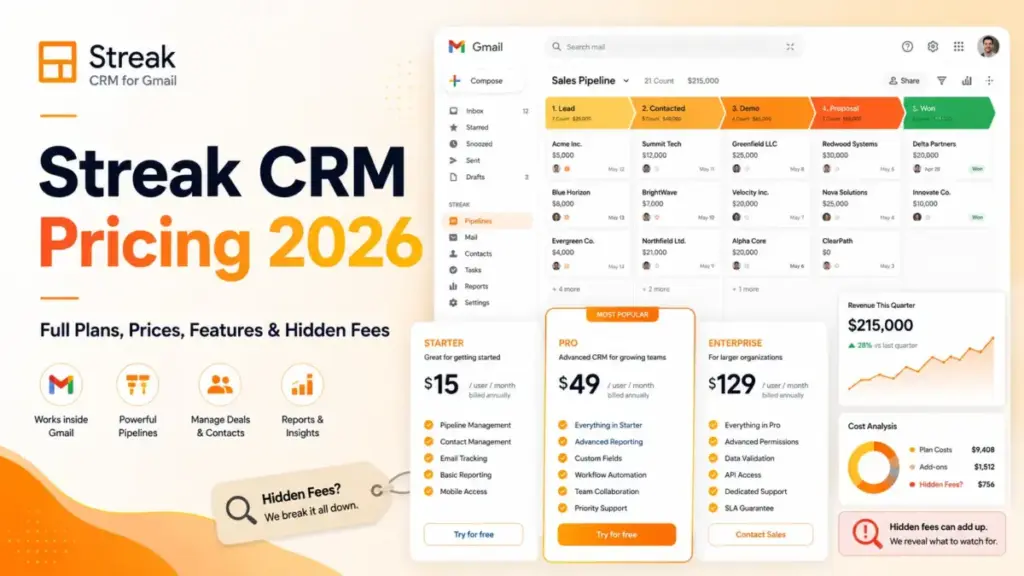
Streak CRM pricing starts at $49 per user per month on annual billing, and that number is the least interesting part of the bill. The figure that decides your budget is the one Streak does not print on the plan card: every teammate has to sit on the same plan, view-only stakeholders pay full price, and Enterprise cannot be bought below ten seats.
I have priced this the way a sales operations lead has to price it, treating Streak CRM pricing as a total cost of ownership problem rather than a per-seat sticker. Below you get verified plan prices, line-item billable costs, AI credit economics, and the exact annual spend for teams of 5, 10, and 20. If you are still building a shortlist, our best CRM software roundup is the better starting point.
All prices are US dollars, taken from Streak’s official pricing and support pages and checked on July 23, 2026.
Quick Pricing Verdict
| Question | Answer |
|---|---|
| Starting price | $49/user/month billed annually, or $59/user/month on monthly billing (Pro) |
| Free plan | Free email power tools only. No full CRM pipelines |
| Free trial | 14-day Pro+ trial |
| Best plan for most teams | Pro+ at $69/user/month annually once anyone needs automations or advanced reports |
| Plan to avoid | Pro, for any team where even one person needs automation or webhooks |
| Biggest hidden cost | The same-plan rule: one Pro+ requirement moves the whole team up, $20/user/month at annual rates |
| Enterprise entry cost | $15,480/year minimum (10 seats at $129/user/month, annual only) |
| Best alternative if too expensive | Less Annoying CRM at $15/user/month for solo and very small teams |
| Pricing verified | July 23, 2026, against Streak’s official pricing page |
Two entries in that table cost more money than most buyers expect. The same-plan rule turns one person’s feature request into a company-wide invoice, and the Enterprise seat floor turns a $129 per-seat headline into a five-figure annual commitment.
Free Streak Tools Are Not a Free Streak CRM
Streak’s free tier gives you email power tools inside Gmail, not a CRM. Several pages still ranking for this keyword describe a free Streak CRM plan or a Solo tier, and neither exists on the July 2026 pricing page.
What the free account includes, per Streak’s official pricing page: email tracking, link tracking, snippets, Streak Share, the thread splitter, and mail merge capped at 50 sends per day.
What it does not include: pipelines, boxes, shared CRM collaboration, and the team features that separate what CRM software does from a Gmail add-on. Streak’s own product documentation draws the same line between free email tools and paid CRM functionality.
If you are evaluating Streak as a free CRM, stop there. The free tier is a tracking and outreach utility, and every pipeline workflow sits behind a paid seat.
Executive Summary: Streak Cost at 5, 10, and 20 Users
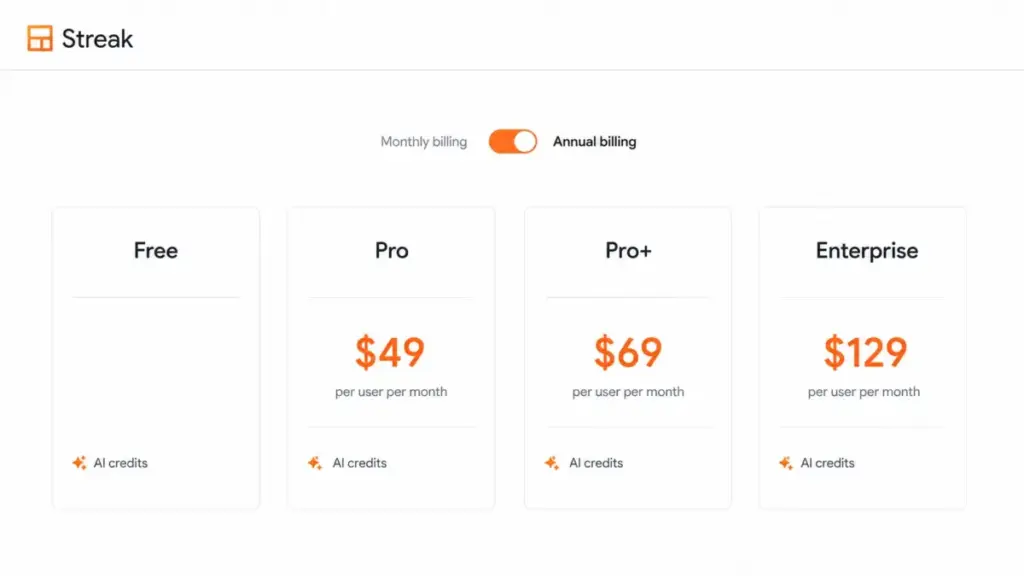
Here is the annual spend before add-ons, using the per-user rates published on Streak’s own pricing page. Annual figures assume the year is paid up front, which Streak’s billing FAQ states is how the discount works.
| Team size | Pro (annual) | Pro (12 months at monthly rate) | Pro+ (annual) | Pro+ (12 months at monthly rate) | Enterprise (annual only) |
|---|---|---|---|---|---|
| 5 users | $2,940 | $3,540 | $4,140 | $5,340 | Not available under 10 seats |
| 10 users | $5,880 | $7,080 | $8,280 | $10,680 | $15,480 |
| 20 users | $11,760 | $14,160 | $16,560 | $21,360 | $30,960 |
A ten-person team that needs automations is looking at $8,280 a year, not the $5,880 the Pro card implies. The gap between the plan you see first and the plan you end up on is roughly 41 percent at every team size, because the Pro to Pro+ step is a fixed $20 per user per month on annual billing.
Enterprise is a different category of decision. At ten seats it costs more than Pro+ does at twenty seats, which is why I treat it as a governance purchase rather than a scaling purchase.
Streak CRM Pricing Plans Compared
Every price below comes from Streak’s official pricing page, checked July 23, 2026.
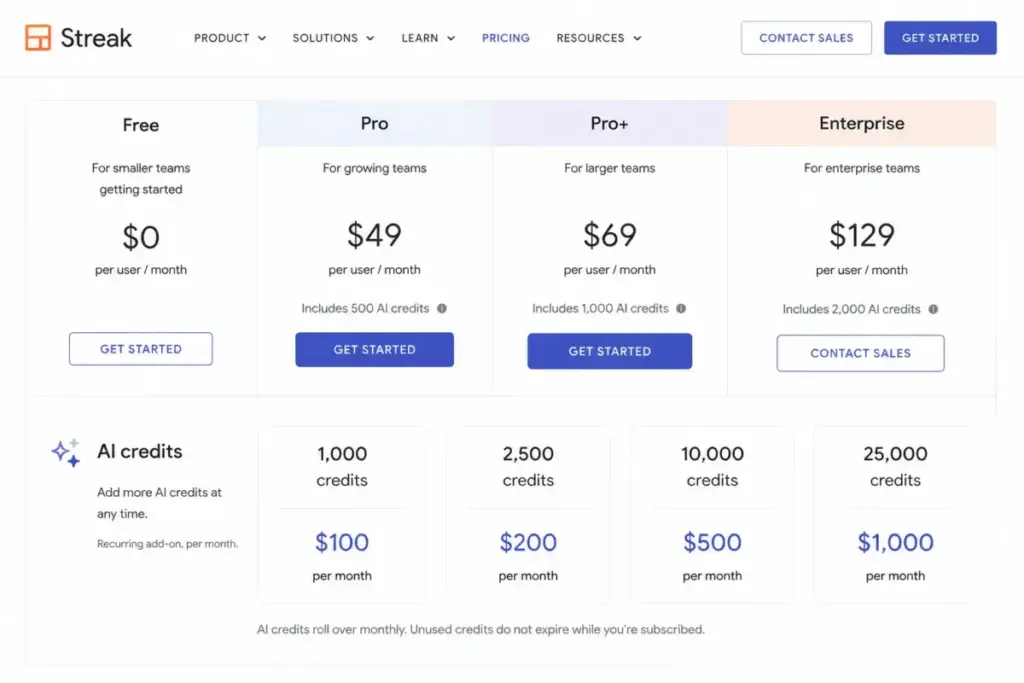
| Plan | Monthly | Annual (per user/month) | Billing basis | Best for | Key limits |
|---|---|---|---|---|---|
| Free | $0 | $0 | Per Gmail account | Solo users who need email tracking and light outreach | 50 mail merges/day, no pipelines, no team CRM |
| Pro | $59 | $49 | Per user/month | 2-8 person teams running shared pipelines without automation | Standard reports only, no automations, no webhooks, 20 AI credits/user/month |
| Pro+ | $89 | $69 | Per user/month | Teams that need automations, advanced reports, and webhooks | No custom permission sets, no data validation, 150 AI credits/user/month |
| Enterprise | Not purchasable monthly ($159 shown for comparison) | $129 | Per user/month, 10-seat minimum | 10+ seat teams needing custom roles and data validation | Annual contract only, $15,480/year floor, 500 AI credits/user/month |
The $159 Enterprise figure is a comparison display, not a checkout option. Streak’s pricing FAQ states that Enterprise is available with annual billing only, for teams of ten or more, so I use $129 per user per month for every Enterprise calculation in this guide.
Note also that all four tiers include unlimited CRM records and unlimited shared contacts on paid plans. Record volume is not the upgrade trigger at Streak, which is unusual for CRM pricing and worth remembering when you compare it against contact-tiered products.
What Each Streak Plan Includes
Pro: $49/user/month annually
Includes: the full Gmail-embedded CRM, private and shared pipelines, automatic email sharing, shared contacts, standard report dashboards, basic permission sets, standard API access, and live chat support. Mail merge rises to 1,500 per day on Google Workspace accounts.
Missing: automations, advanced report dashboards, webhooks, archived users, and priority support. AI capacity is thin at 20 credits per user per month.
Avoid if: anyone on the team has already asked for a rules-based automation or a custom report dashboard. You will pay the upgrade within a quarter and lose the annual prepayment logic in the process.
My verdict: Pro is a legitimate plan for a small relationship-tracking team, not for an outbound sales team with reporting expectations. Our Streak CRM review covers how that workflow holds up day to day.
Pro+: $69/user/month annually
Includes: everything in Pro plus advanced report dashboards, native integrations and automations, archived users, webhooks, priority support, 150 AI credits per user per month, and the 14-day trial.
Missing: custom roles and permission sets, data validation, dedicated support, and the included Advanced Implementation service.
Avoid if: you are a two-person team using Streak purely as a shared inbox with deal labels. The automation and reporting layer is the entire reason for the $20 per user premium.
Pro+ is the plan I would budget for by default at five or more seats, because the features that trigger the upgrade tend to arrive within the first two months of real pipeline use.
Enterprise: $129/user/month annually, 10 seats minimum
Includes: custom roles and permission sets, unlimited custom permission sets per pipeline, data validation, dedicated support with a CEO line, 500 AI credits per user per month, and Advanced Implementation at no extra fee.
Missing: monthly billing, and any option to buy fewer than ten seats.
Avoid if: your only reason for looking at Enterprise is the larger AI credit allowance. Buying credit packs on Pro+ is cheaper at almost every realistic volume, and I show that math further down.
Enterprise earns its price when pipeline-level permission control and data validation are compliance requirements, not conveniences.
Feature Gates by Plan
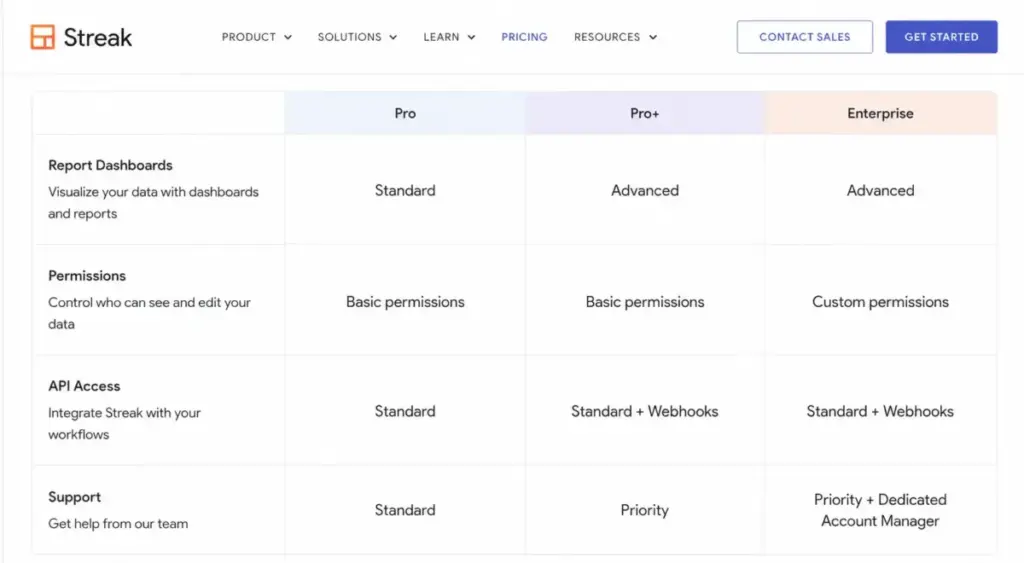
| Capability | Pro | Pro+ | Enterprise |
|---|---|---|---|
| Pipelines, boxes, shared contacts | Unlimited | Unlimited | Unlimited |
| Report dashboards | Standard | Advanced | Advanced |
| Integrations and automations | Not included | Included | Included |
| Webhooks | Not included | Included | Included |
| API access | Standard | Standard plus webhooks | Standard plus webhooks |
| Permissions | Basic sets | Basic sets | Custom roles and permission sets |
| Data validation | Not included | Not included | Included |
| Archived users | Not included | Included | Included |
| AI credits per user/month | 20 | 150 | 500 |
| Support | Live chat | Priority | Dedicated plus CEO line |
| Advanced Implementation | Custom fee | Custom fee | Included |
Three rows in that table cause almost every upgrade I would expect to see. Automations and webhooks push teams from Pro to Pro+, while custom permission sets and data validation push governed teams from Pro+ to Enterprise.
The reporting row is the quiet one. Streak splits standard and advanced report dashboards, so a sales manager asking for a forecast view is making a $20 per user per month request, multiplied by every seat on the account.
Line-Item Cost Breakdown: Every Billable Item
Seat fees are the only guaranteed line in Streak CRM pricing. Everything else in this table depends on how your team works, which is exactly why the plan card understates the real number.
| Line item | Cost | What triggers it |
|---|---|---|
| CRM seats | $49 to $129 per user/month annually | Every active user, including view-only stakeholders |
| Whole-team tier upgrade | $20/user/month annually ($30 monthly) | One person needs automations, advanced reports, or webhooks |
| Extra AI credits | $100 to $1,000 per month per pack | Team exceeds pooled included credits |
| Advanced Implementation | Custom one-time fee on Pro and Pro+ | Complex import, cleanup, automation, or integration setup |
| Enterprise seat floor | $15,480/year minimum | Any Enterprise purchase |
| Google Workspace licences | Priced by Google, not Streak | Needed for the 1,500/day mail merge quota and business-domain Gmail |
| Zapier subscription | Priced by Zapier, not Streak | Any workflow routed through Zapier rather than a native integration |
Two of those lines are external to Streak entirely. Your mail-merge capacity depends on a Google licence, so budget Google Workspace pricing alongside the CRM seats.
Connector breadth has the same problem. Anything routed through Zapier rather than a native integration adds Zapier pricing tiers to the same workflow budget, which means a Streak quote is never the full cost.
Streak does not publish a monthly automation run allowance on the pages I checked, so I do not assume one exists in either direction. Treat automation volume as an open question to raise with sales before a large rollout.
Add-Ons, Overages, and AI Credit Economics
AI credits are the add-on most likely to surprise a finance team, because the packs recur monthly and unused credits expire. Streak’s AI credits documentation states that included credits are seat-based, pooled across the team, and do not roll over.
| Credit pack | Monthly price | Cost per credit | Annualized |
|---|---|---|---|
| 1,000 credits | $100 | $0.10 | $1,200 |
| 2,500 credits | $200 | $0.08 | $2,400 |
| 10,000 credits | $500 | $0.05 | $6,000 |
| 25,000 credits | $1,000 | $0.04 | $12,000 |
The unit cost drops by 60 percent between the smallest and largest pack, so credit buying rewards accurate forecasting. Buying the 1,000-credit pack twelve times costs $1,200 a year for capacity that expires monthly whether or not you use it.
Included capacity scales with seats, and pooling helps teams with uneven AI usage.
| Team size | Pro pooled credits/month | Pro+ pooled credits/month | Enterprise pooled credits/month |
|---|---|---|---|
| 5 users | 100 | 750 | 2,500 |
| 10 users | 200 | 1,500 | 5,000 |
| 20 users | 400 | 3,000 | 10,000 |
Compare that against the Enterprise upgrade cost and the AI-only argument collapses. Moving ten users from Pro+ to Enterprise costs $7,200 more per year and adds 3,500 pooled credits per month, while a $500 pack adds 10,000 credits per month for $6,000 a year.
One caveat on precision. Streak’s pricing page and support documentation do not fully agree on the credit cost of certain individual AI actions, and one support example uses arithmetic inconsistent with the published per-user allowance.
I would use plan allowances and pack prices for budgeting, then verify per-action consumption inside Streak’s billing settings before committing to a high-volume AI rollout.
Seat Rules That Change Your Streak Bill
The same-plan rule and upgrade spillover
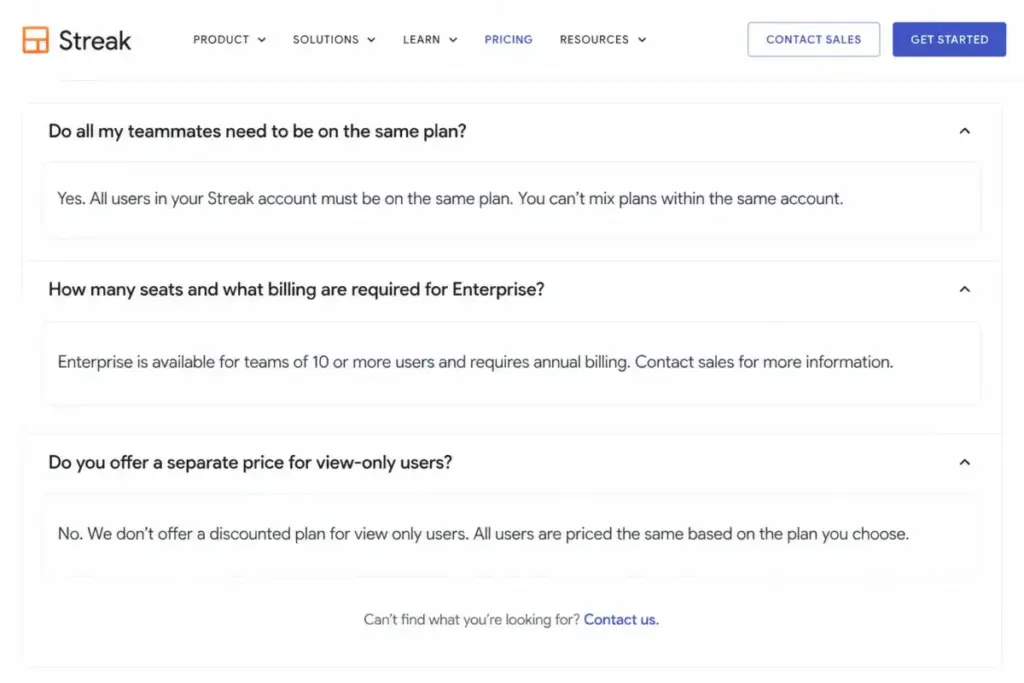
Streak’s pricing FAQ states that every teammate must be on the same plan. Mixed tiers are not available, so a single automation requirement re-prices the entire account.
| Team size | Annual uplift, Pro to Pro+ | Uplift if billed monthly |
|---|---|---|
| 1 user | $240/year | $360/year |
| 5 users | $1,200/year | $1,800/year |
| 10 users | $2,400/year | $3,600/year |
| 20 users | $4,800/year | $7,200/year |
| 25 users | $6,000/year | $9,000/year |
A twenty-person team where one operations hire wants webhooks is a $4,800 annual decision, not a $240 one. That is the single most useful number in this guide, and no ranking page I reviewed calculates it.
The buying consequence is simple. Decide your automation and reporting requirements before you sign an annual Pro contract, because the mid-year fix is an account-wide re-price rather than a seat-level one.
View-only users cost full price
Streak’s pricing FAQ explicitly states there is no discounted rate for users who only need to view data. A read-only sales director on a Pro+ account costs $828 a year, the same as an active rep.
At Enterprise rates the same observer costs $1,548 a year. For finance teams used to viewer seats in Salesforce or HubSpot, this is a real budgeting difference and it scales badly with stakeholder count.
Archived users solve a different problem
Archived users are available on Pro+ and Enterprise, and Streak’s plan comparison describes them as a way to preserve a former employee’s email history without holding Streak or Google licences.
| Seat state | What it does | Cost |
|---|---|---|
| Archived user | Preserves a departed employee’s email history in the CRM | No active seat required |
| Active view-only user | Gives a current stakeholder read access | Full seat price, no discount |
Do not confuse the two when you model headcount. Archiving reduces cost when people leave; it does nothing for the managers, finance partners, or founders who need read access while they are still employed.
Annual vs Monthly: The Real Savings Math
The annual discount in Streak CRM pricing is 20 percent, and the pricing FAQ states that the year is paid up front. That trade is straightforward at small headcounts and material at larger ones.
| Team size and plan | Annual prepayment | Cost of 12 months at monthly rates | Cash saved by paying annually |
|---|---|---|---|
| 5 users, Pro | $2,940 | $3,540 | $600 |
| 5 users, Pro+ | $4,140 | $5,340 | $1,200 |
| 10 users, Pro | $5,880 | $7,080 | $1,200 |
| 10 users, Pro+ | $8,280 | $10,680 | $2,400 |
| 20 users, Pro+ | $16,560 | $21,360 | $4,800 |
A twenty-seat Pro+ team saves $4,800 by prepaying $16,560 in a single transaction. Whether that is a good trade depends on your runway, not on the percentage.
I would pay monthly through the first sixty days of a CRM rollout, then switch to annual once the pipeline structure and seat count have stopped changing. Prepaying before adoption settles locks you into seats you may not keep.
Enterprise Pricing and the $15,480 Floor
Enterprise is annual-only for teams of ten or more, which converts a per-seat price into a minimum contract. At $129 per user per month, ten seats is $1,290 per month equivalent and $15,480 paid up front.
That floor changes who Enterprise is for. A seven-person legal or investment team with strict permission requirements cannot buy it at all, and an eleven-person team pays $17,028 a year for controls that a Pro+ account at $9,108 does not provide.
The features you are buying are custom roles and permission sets, unlimited custom permission sets per pipeline, and data validation. Streak’s pipeline permissions documentation confirms that Pro and Pro+ use predefined permission sets while custom permissions sit on Enterprise.
If pipeline-level access control is a compliance requirement, the floor is the price of entry. If it is a preference, Pro+ plus disciplined pipeline design is the cheaper answer.
Email, API, and Automation Limits That Affect Cost
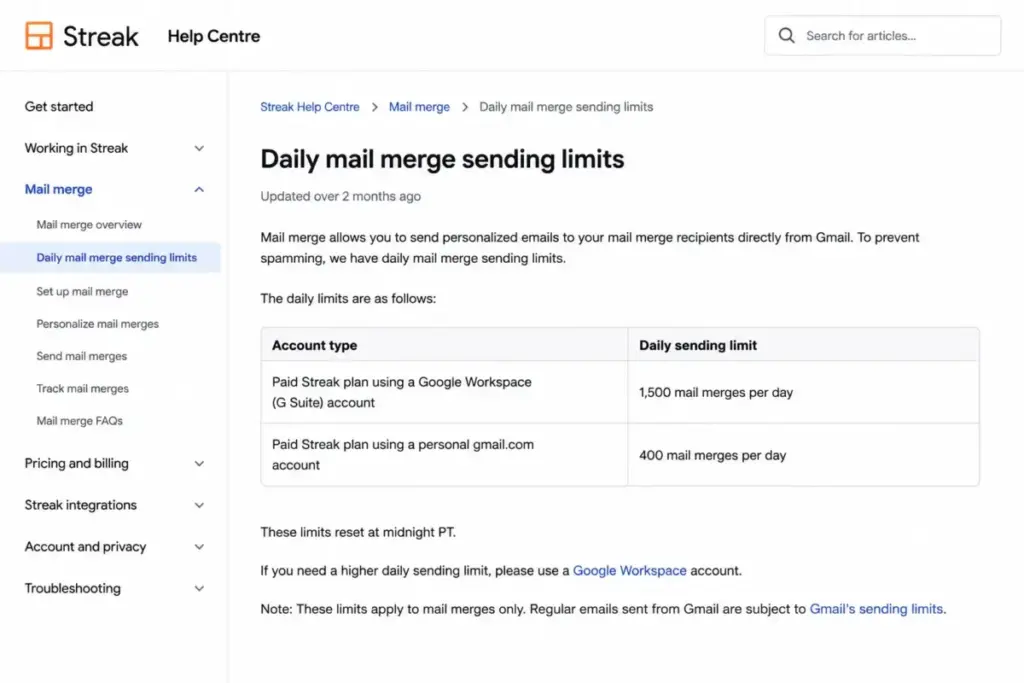
Paid mail merge is capped at 1,500 sends per day, but only for Google Workspace accounts. Streak’s mail merge limits documentation puts personal gmail.com accounts at 400 per day even on a paid Streak plan.
| Account type | Streak plan | Daily mail merge limit |
|---|---|---|
| Google Workspace | Paid | 1,500 |
| Personal gmail.com | Paid | 400 |
| Any Google account | Free | 50 |
The two quotas operate independently, so your Gmail sending limit and your Streak sending limit both have to accommodate a campaign. A five-person outbound team on personal Gmail addresses has a ceiling of 2,000 sends per day, not 7,500.
That single row disqualifies Streak for some outreach workflows, or forces a Google Workspace purchase that belongs in the same budget line as the CRM.
On the technical side, Pro includes standard API access while webhooks require Pro+ or Enterprise. Streak’s API documentation states there is no hard rate limit, asks teams to give notice above 10 requests per second, and notes that Google projects are limited to 20 requests per second.
For an integration engineer, that is an advisory threshold rather than a contractual ceiling, and it should be raised with Streak before you build a high-frequency sync.
Trial Billing, Cancellation, and Exit Costs
The Pro+ trial runs 14 days. Streak’s trial documentation explains that a team with a payment method on file is charged when the trial ends unless it cancels, while a team without one downgrades to the free tier.
That distinction is the whole trial risk. Add a card only if you have already decided to buy.
Cancellation behaves better than most CRMs on data retention and worse than most on usability. Streak’s cancellation guide states that the account downgrades to free, CRM data is retained, and paid pipelines and boxes become view-only.
Your records survive; your workflow does not. Plan the export before you cancel, not after.
A short exit checklist I would run at least a week before downgrade: export pipelines and boxes to Google Sheets, save any report dashboards you rely on, document automations before they stop, and confirm which teammates still hold the email history you need. Our CRM migration guide covers the sequencing in more detail.
One operational detail worth knowing in advance: subscription changes are handled through Streak in Gmail on desktop Chrome, not through the iOS or Android apps. Do not plan a cancellation around mobile access.
Real Cost Scenarios: 5, 10, and 20 Users
These are the totals I would put in a budget request, with the plan I would recommend for each scenario.
| Scenario | Recommended plan | Annual cost | Notes |
|---|---|---|---|
| Solo founder tracking investor and partner conversations | Pro | $588 | 20 AI credits/month; no automation or advanced reporting |
| 5-person relationship team, no automation | Pro | $2,940 | 100 pooled AI credits/month; upgrade risk within a quarter |
| 5-person sales team needing automations and forecasts | Pro+ | $4,140 | 750 pooled AI credits/month; the realistic plan for most 5-seat teams |
| 5-person team with heavy AI usage | Pro+ plus 1,000-credit pack | $5,340 | Assumes twelve monthly $100 pack charges; confirm cadence in billing settings |
| 10-person sales team with automation and reporting | Pro+ | $8,280 | 1,500 pooled AI credits/month; $2,400 above the Pro equivalent |
| 10-person team needing custom roles and data validation | Enterprise | $15,480 | The seat floor and the feature set arrive together |
| 20-person sales organization | Pro+ | $16,560 | 3,000 pooled AI credits/month; $4,800 saved versus monthly billing |
| 20-person governed organization | Enterprise | $30,960 | Custom permission sets per pipeline plus included implementation |
Read the two ten-person rows together. The jump from $8,280 to $15,480 buys governance features, not capacity, so it is a compliance decision rather than a growth decision.
The AI-heavy row carries one assumption I want visible: Streak’s pricing page describes add-ons as matching your billing cycle while its support wording centres on monthly credit amounts, so I annualized twelve monthly pack charges and flagged it rather than guessing at an annual pack price.
Onboarding, Implementation, and Support Costs
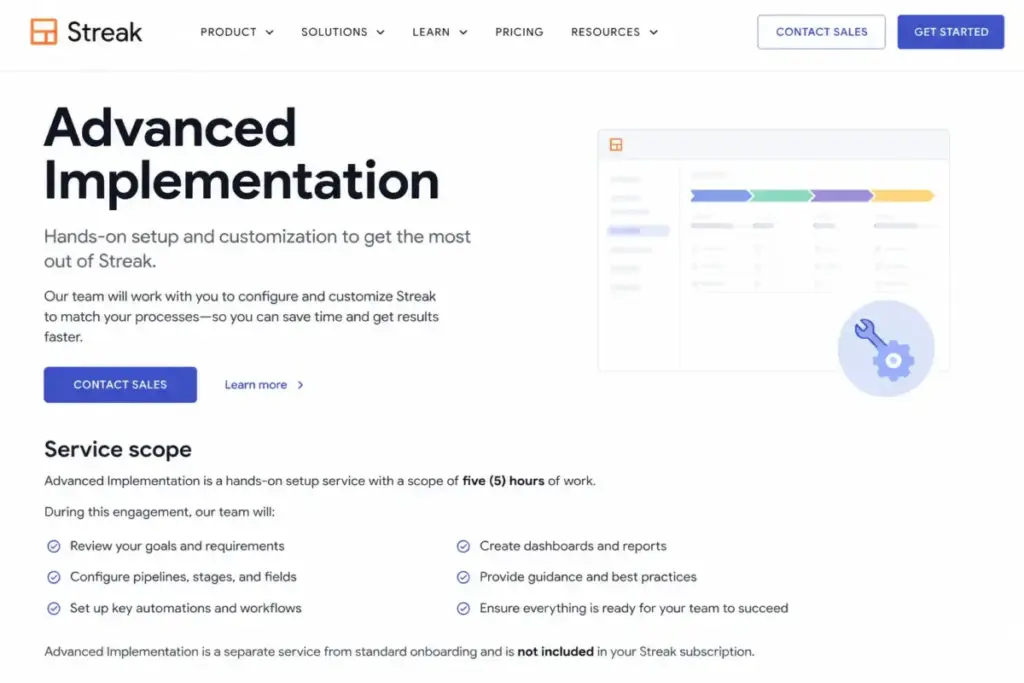
Streak’s Advanced Implementation service provides five hours of hands-on setup work. It carries a custom one-time fee on Pro and Pro+, and it is included on Enterprise.
Streak does not publish the dollar amount. I will not estimate it, so treat it as a quote you request during evaluation rather than a number you can budget from a webpage.
Where that fee is likely to matter: importing messy contact data, cleaning duplicate records before go-live, building the first set of automations, and wiring up integrations that go beyond the native Google Workspace connections.
| Plan | Support channel | Implementation service |
|---|---|---|
| Pro | Live chat | Custom fee |
| Pro+ | Priority support | Custom fee |
| Enterprise | Dedicated support plus CEO line | Included |
Support tier names are not response-time commitments. I found no public service level agreement on the Streak pages checked on July 23, 2026, so if guaranteed response times matter to your team, get them written into the Enterprise contract.
Security and Compliance: What Is Publicly Verifiable
Procurement teams ask for certifications, and I can only report what Streak publishes. Its security page states that Streak undergoes annual Google OAuth review and Chrome extension review, and that it supports security questionnaires.
Streak’s data storage documentation states that customer data is held on Google Cloud Platform in the United States. Those are the verifiable facts.
What I did not find on the pages checked: public SOC 2 or HIPAA documentation, or a regional hosting option outside the United States. Absence of public evidence is not evidence of absence, so request the current documentation directly if your security review requires it.
Which Streak Plan Should You Choose?
Team size is the wrong first question to ask about Streak CRM pricing. Start with the workflow, because Streak’s gates are drawn around capability rather than headcount.
Choose the free tier if: you are one person who needs email tracking, snippets, and fewer than 50 mail merges a day. You are not buying a CRM at this level.
Choose Pro at $49/user/month annually if: you have two to eight people sharing pipelines and email history, your reporting needs stop at standard dashboards, and nobody has asked for automation. A five-person recruiting team applying basic pipeline management basics to candidate stages fits here at $2,940 a year.
Choose Pro+ at $69/user/month annually if: anyone needs rules-based automations, advanced report dashboards, webhooks, or archived users. A ten-person outbound sales team with a forecast requirement belongs here at $8,280 a year, and I would plan for this tier from the start rather than upgrading mid-contract.
Choose Enterprise at $129/user/month annually if: you have at least ten seats and pipeline-level permission control or data validation is a documented requirement. A fifteen-person financial services team with client confidentiality rules is the profile, at $23,220 a year.
Choose something else if: you are a solo user who wants a full CRM under $20 a month, or your outreach runs from personal Gmail addresses at more than 400 sends a day. Our best CRM for small business list covers the cheaper end of that decision.
Which Streak Plan Should You Avoid?
Pro is the plan most teams should be careful with, and the reason is structural rather than functional. It is a fine product at $49 per user per month, but its gates sit exactly where growing sales teams tend to arrive within a quarter.
The failure mode looks like this: a team buys twelve months of Pro at 10 seats for $5,880, then needs webhooks in month four. The correction is an account-wide move to Pro+, not a single-seat change.
The exception: if your team uses Streak as a shared, searchable email and relationship record and has explicitly decided against automation, Pro is the right purchase and you should stay on it.
Enterprise is the second plan to scrutinize, specifically when it is being considered for AI capacity. Buying credit packs on Pro+ delivers more credits per dollar at ten seats than the Enterprise upgrade does.
Streak CRM Pricing vs Competitors
These are entry-price anchors from each vendor’s official pricing page, checked July 23, 2026. They are cost context, not feature equivalence, because plan scope differs across all four products.
| Product | Entry price | Practical tier | 10-user annual cost at practical tier |
|---|---|---|---|
| Streak | $49/user/month annually | Pro+ at $69/user/month | $8,280 |
| Copper | $23/user/month annually (Basic) | Professional at $59/user/month | $7,080 |
| Less Annoying CRM | $15/user/month | Single plan | $1,800 |
| HubSpot Sales Hub | $7/seat/month (Starter, as displayed) | Professional at $90/seat/month | $10,800 |
Copper’s figures come from its official pricing page. Less Annoying CRM publishes a single plan at $15 per user per month with a 30-day trial on its own pricing page.
Copper is the closest structural comparison, since it is also a Google Workspace CRM, and its Professional tier lands roughly $1,200 a year below Streak’s Pro+ at ten seats. If your requirement is a Google-native CRM with a lower practical-tier price, the Copper CRM review explains why it is the better pick on cost alone.
Less Annoying CRM is the answer to the solo affordability objection that shows up repeatedly in community discussions about Streak. At $15 per user per month it costs less than a third of Streak Pro, though it does not live inside the Gmail interface the way Streak does.
The pattern to watch is the distance between entry price and practical tier. Streak’s gap is $20 per user per month, Copper’s is $36, and HubSpot’s is $83.
That last figure comes from the Sales Hub pricing page, where Starter is displayed at $7 per seat and Professional at $90. Compare practical tiers rather than entry prices, or you will misjudge every product in this table.
The HubSpot CRM review covers what that Professional tier buys, and it is a different class of product from a Gmail-embedded CRM.
Is Streak CRM Worth the Price?
Worth it if: your team already runs its relationships through Gmail, you value having deal context attached to email threads, and you need shared pipelines more than deep forecasting. At five to ten seats on Pro+, $4,140 to $8,280 a year buys a CRM your reps do not have to remember to open.
Not worth it if: you are one person paying $588 a year for a CRM you use lightly, your outreach volume exceeds what personal Gmail supports, or you need mixed permission levels across a small team. At that profile the Less Annoying CRM review points to a cheaper fit.
The premium inside Streak CRM pricing is the Gmail architecture. Everything Streak does well comes from living inside the inbox, and everything it charges extra for comes from the fact that pipelines, automations, and reporting are bolted onto an email client rather than built as a standalone platform.
Recurring reviewer patterns on G2, Capterra, and TrustRadius qualify that convenience. Reviewers frequently praise managing CRM work without leaving Gmail, while recurring criticism mentions Gmail lag, limited reporting or customization for complex needs, and a learning curve once workflows grow.
Those are reviewer patterns rather than verified performance measurements, and I treat them as a signal to test reporting depth during the trial rather than as a product verdict. If reporting depth is the sticking point, the Streak CRM alternatives shortlist is the next step.
Outdated Streak Pricing Claims, Corrected
Several pages ranking for Streak CRM pricing carry plan names and allowances that no longer match Streak’s official pages. Here is what to ignore.
| Stale claim still circulating | Verified position on July 23, 2026 |
|---|---|
| Streak offers a free CRM plan | Free tier includes email power tools and 50 mail merges/day; CRM pipelines require a paid seat |
| Streak sells a Solo plan | Current tiers are Free, Pro, Pro+, and Enterprise |
| AI allowances of 10, 50, and 500 credits | Pro 20, Pro+ 150, Enterprise 500 per user per month |
| Enterprise costs $159/user/month monthly | $159 is a comparison display; purchase is annual at $129/user/month for 10 or more users |
| Streak pricing is $59/user/month | $59 is the Pro monthly rate; $49 applies on annual billing |
Anything published before mid-2026 that lists a Solo tier is describing a plan structure that no longer exists. Check the date on any Streak pricing page you read, including this one.
How to Avoid Overpaying for Streak
- Decide on automation before you sign. The Pro to Pro+ gap costs $2,400 a year at ten seats, and the same-plan rule means you cannot upgrade one person.
- Count your view-only stakeholders as full seats. Every observer costs $828 a year on Pro+, so decide whether a shared report export would serve them instead.
- Run the first sixty days on monthly billing. Seat counts move during rollout, and annual prepayment locks in a headcount you have not validated.
- Forecast AI credits before buying a pack. The 10,000-credit pack costs half as much per credit as the 1,000-credit pack, and unused credits expire monthly.
- Do not buy Enterprise for AI capacity. At ten seats, a $500 monthly pack adds more credits than the Enterprise upgrade for less money.
- Check your Google account type before promising outreach volume. Personal Gmail caps paid mail merge at 400 a day against 1,500 on Google Workspace.
- Get the Advanced Implementation quote during evaluation. It is a custom one-time fee on Pro and Pro+, and it belongs in year-one cost rather than as a surprise after signature.
- Export before you cancel. Downgrading leaves your data readable but your pipelines view-only, and rebuilding them elsewhere is easier from a clean export.
How I Evaluated Streak CRM Pricing
This guide is based on official research, not a hands-on trial. Alex Morrison compiled it for SaaSZap from Streak’s official pricing page, plan comparison, billing FAQ, AI credit documentation, mail merge limits, API documentation, implementation service page, cancellation guide, security page, and data storage documentation, all checked on July 23, 2026.
Every total cost figure in this guide is arithmetic derived from Streak’s published per-user prices and its stated seat rules. Competitor prices come from each vendor’s own pricing page on the same date.
Third-party review platforms were used only for recurring sentiment patterns, never for pricing or feature facts. Where Streak’s own pages disagree with each other, I have said so rather than picking the more convenient number.
Known limits of this research: the Advanced Implementation fee, contractual support response times, any monthly automation run allowance, full mobile feature parity, and public certification documentation were not available on the pages checked. Commission never affects how a plan is ranked or recommended here.
FAQ
How much is Streak CRM per month?
Streak Pro costs $59 per user per month on monthly billing or $49 per user per month billed annually. Pro+ costs $89 monthly or $69 annually. Enterprise is sold at $129 per user per month with annual billing for teams of ten or more. Prices were verified on Streak’s official pricing page on July 23, 2026.
Is Streak CRM free?
Streak has a free tier, but it is not a free CRM. The free account includes email tracking, link tracking, snippets, Streak Share, the thread splitter, and up to 50 mail merges per day. Pipelines, boxes, and shared team CRM collaboration all require a paid seat starting at $49 per user per month on annual billing.
Is Streak Pro+ worth the extra cost?
Pro+ costs $20 more per user per month than Pro on annual billing. It adds automations, advanced report dashboards, webhooks, archived users, priority support, and 150 AI credits per user monthly instead of 20. For a ten-person team that is $2,400 a year, and it is worth it the moment anyone needs automation or forecast-level reporting.
How many users are required for Streak Enterprise?
Enterprise requires at least ten users and is sold with annual billing only. At $129 per user per month, that creates a minimum commitment of $15,480 per year. The $159 per user monthly figure shown on the pricing page is a comparison display rather than a purchasable monthly option.
Can Streak team members be on different plans?
No. Streak’s pricing FAQ states that every teammate must be on the same plan, so mixed tiers are not available. If one person needs a Pro+ feature such as webhooks or advanced reports, the entire team moves to Pro+ at $69 per user per month annually. Factor that rule into your plan choice before signing an annual contract.
Does Streak charge for view-only users?
Yes. Streak’s pricing FAQ states there is no separate or discounted price for users who only need to view data. A read-only stakeholder costs the same as an active user, which is $828 a year on Pro+ or $1,548 a year on Enterprise. Budget observers as full seats.
How many mail merges can Streak send?
Paid plans allow up to 1,500 mail merge emails per day on Google Workspace accounts. Personal gmail.com accounts are limited to 400 per day even on a paid plan, and free accounts are capped at 50. Streak and Gmail sending quotas operate independently, so both have to accommodate your campaign volume.
How do Streak AI credits work?
Included credits are seat-based and pooled across the team: 20 per user monthly on Pro, 150 on Pro+, and 500 on Enterprise. Credits expire each month and do not roll over. Extra capacity is sold in recurring packs of 1,000 credits for $100, 2,500 for $200, 10,000 for $500, and 25,000 for $1,000 per month.
Does Streak have a free trial?
Streak offers a 14-day Pro+ trial. If a payment method is on file, the team is charged when the trial ends unless it cancels first. If no payment method has been added, the account downgrades to the free tier instead. Add a card only once you have decided to buy.
What happens when I cancel Streak?
The account downgrades to the free tier and your CRM data is retained, but paid pipelines and boxes become view-only. Export pipelines, boxes, and any reports you depend on before you cancel. Subscription changes are handled through Streak in Gmail on desktop Chrome rather than in the mobile apps.